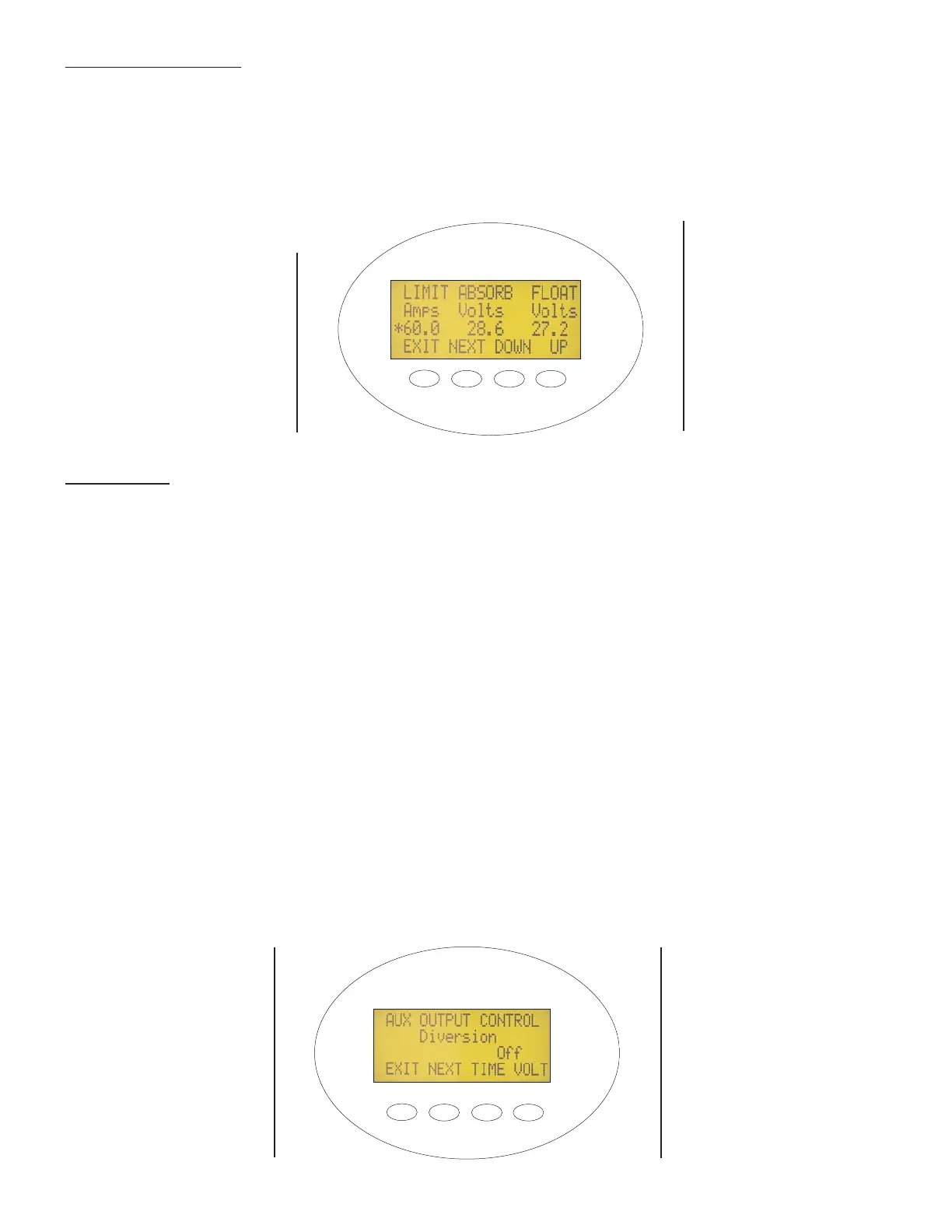
Figure 8 - Charger Set-up Screen
Charger Parameters The charger parameters are automatically set to defaults when the nominal battery system
voltage is set, and can be user modified. The default ABSORB and FLOAT Volts setpoints are based on typical lead
acid battery systems. The default charger current limit is 60 Amps. If the manufacturer of the batteries you are using
recommends different ABSORB and FLOAT Volts setpoints, you can change the setpoints using the Charger Set-Up
Screen shown in Figure 8. If your system requires current limiting other than 60 Amps due to breaker or wire rating, you
can change the current limit setpoint using this screen. The actual target voltages will be modified if a battery tempera-
ture sensor is installed and can be viewed in the miscellaneous screen next to the Tmp Comp heading.
Pressing "NEXT" selects which parameter you are going to increase or decrease. The one that is presently selected will
have an asterisk * in front of it. You may need to re-
enter your access code to change settings.
AUX Output The user can set the function for this secondary control circuit. The choices are: Manual, Disabled,
Diversion, Low Battery Disconnect, Remote, and Vent Fan. The terminals marked "AUX" supplies a 12 VDC at 200 mil-
liamp max output. This output can be used to power the coil of a relay, a small piezo buzzer, or a 12V LED indicator.
The Optimization menu allows you to change the Aux Output from Active High (default) to Active Low, which inverts the
Aux Output terminals and supplies 12V when the function is inactive, instead of 0 volts. For example, the Active Low
option could turn Low Battery Disconnect into a Diversion function. In either case, Active High or Active Low, “On” means
that 12 volts is present on the Aux terminals and “Off” means 0 Volts is present on the Aux terminals.
Manual You can turn on and off the AUX output manually from the MX60 keypad.
Disabled The AUX output terminals have no output if in Active High mode, or 12V if Active Low.
Diversion Used when a wind or hydro generator is connected directly to the batteries and excess power needs to
be diverted when the battery is full. The AUX output terminal will become Active when the battery volt
age reaches the ABSORB or FLOAT voltage relative to an adjustable value. The value is adjustable in
tenths of a volt from -5.0 volts to 5.0 volts. Minimum on-time can be adjusted from 0.1 to 25 seconds.
Low Battery The Aux output terminals are Active when the battery voltage drops below a low battery set
Disconnect point for an adjustable time delay period. When the battery voltage exceeds the reconnect voltage set
point the aux output will deactivate. The time delay is adjustable from 0 - 250 seconds.
Remote An OutBack MATE can control the operation of the Aux output of the MX controller. Only one MX or FX
device's Aux control output can be automatically controlled by the MATE.
Vent Fan The Aux Output becomes active for at least 30 seconds when the battery voltage exceeds the Vent Fan
voltage setting
Figure 9 - Auxiliary Output Set-up Screen
PRESS “EXIT” TO
SAVE THE NEW SET-
TINGS AND RETURN
TO THE STATUS
SCREEN
10
PRESSING "NEXT"
SELECTS WHICH
PARAMETER YOU ARE
GOING TO INCREASE
OR DECREASE.


 To Next Page
 Loading...