OPERATIONAL STATUS
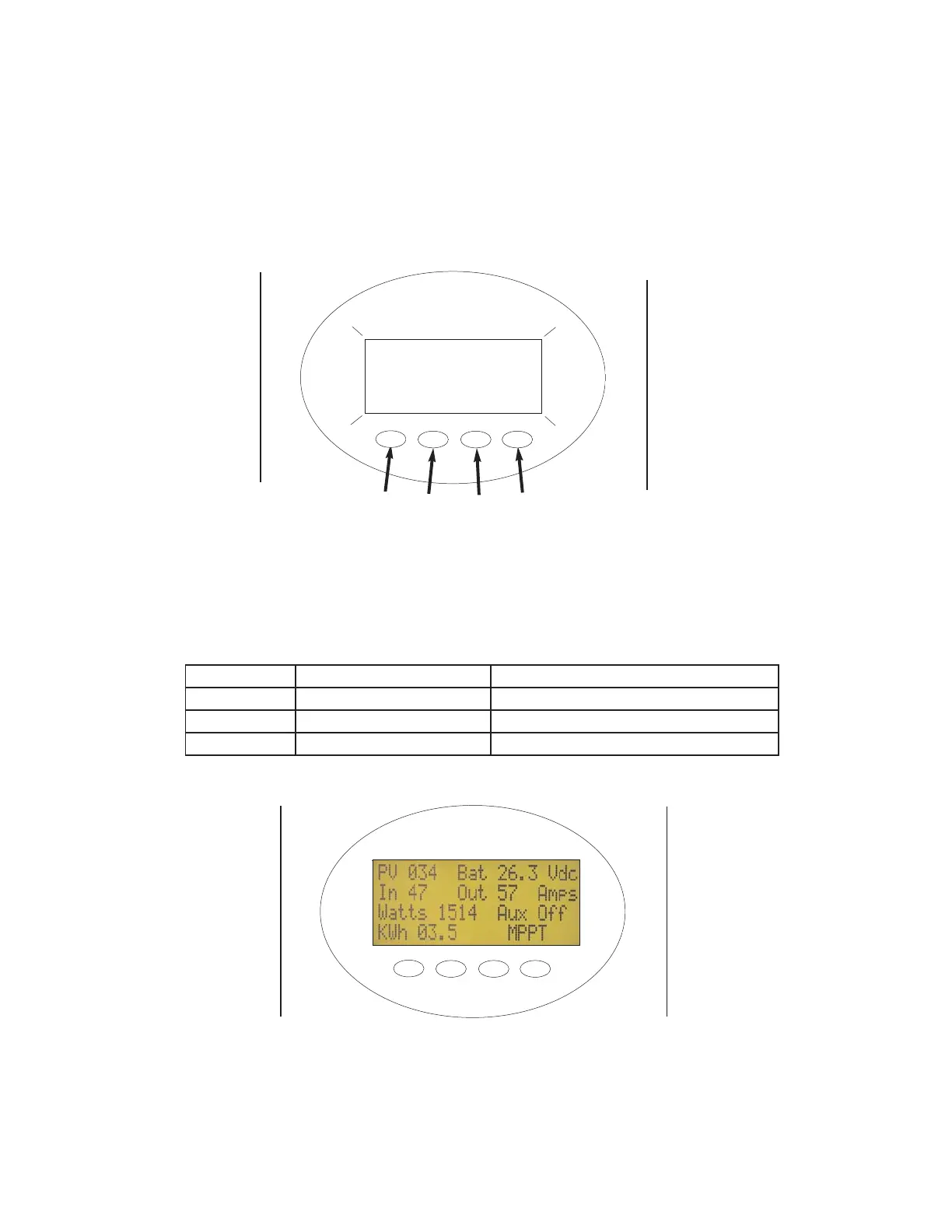
The MX60 Charge Controller has a 4 line, 80 character LCD display and four “soft key” buttons to allow the user to
adjust battery charging parameters and access other information. The MX60 has a setpoint adjustment lockout that
requires an access code to make any changes to the controller’s operation.
The MX60 is factory preconfigured for a 12V battery system. All of the default settings are multiples of 12V nominal
settings. The default bulk termination, or Absorb voltage setting is for 14.3 VDC and the default float setting is 13.6 VDC.
The controller will process up to 60 amps of output DC current.
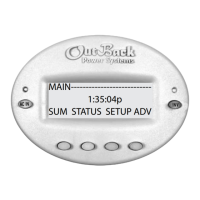
Figure 6 shows the main Status (Home) Screen. This default screen shows the following information:
OPERATIONAL MODES
Figure 5 - MX60 Power Up / Start-up Screen
Note that the user selected nominal battery system voltage is shown in the upper right corner.
Top Line PV array voltage Battery voltage
Second Line Current in from PV array Current out to battery system
Third Line Instantaneous output watts Aux Output terminal status
Fourth Line Daily KWH produced Mode of operation
Figure 6 - MX60 Home Status Screen
7
1
2
3
4
Soft Keys
OutBack 24V
Power
Systems
MX60


 To Next Page