12 13THE INTERFACE XS1 USER MANUAL
Optimize your XS1 experience with the advanced train-
ing features, such as the Balance Meter, Virtual Spotter,
and the Advanced Training Modes.
BALANCE METER
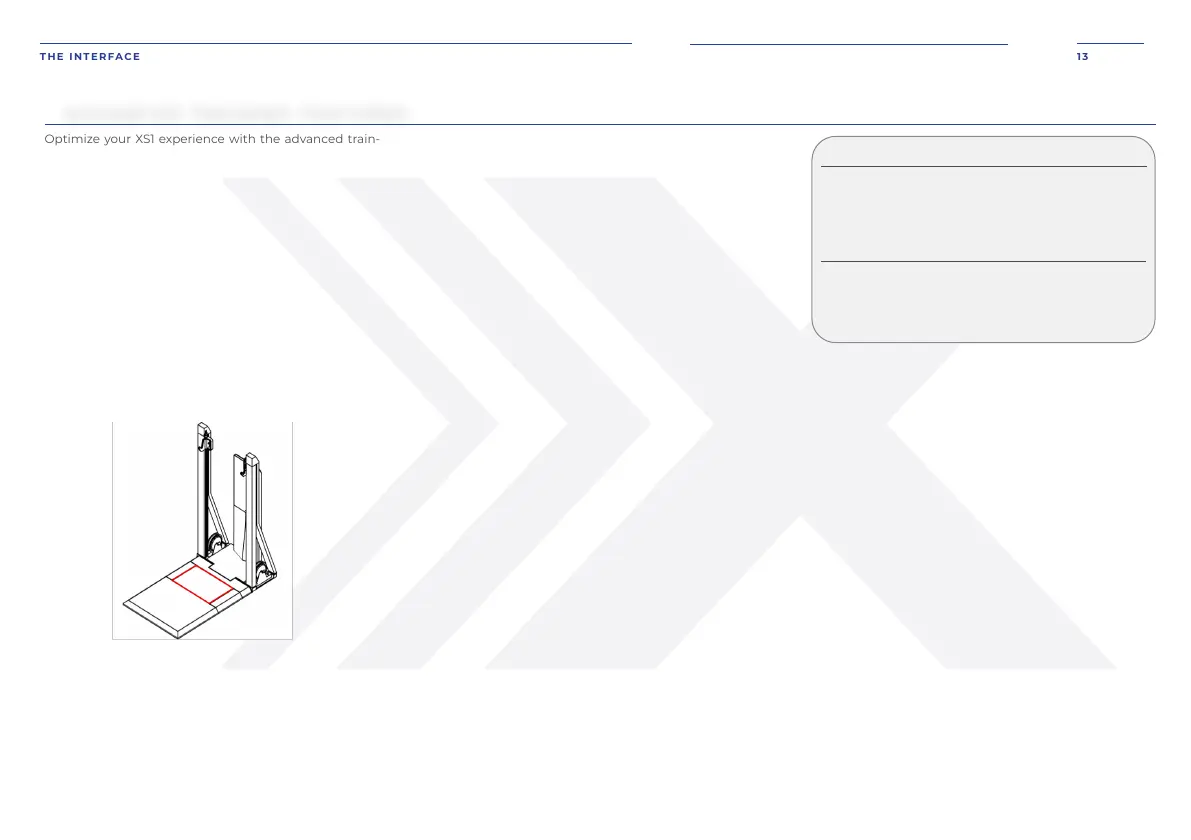
The force plate is the rectangular inset embedded at the
front of the deck. It is approximately 30” wide and 18”
deep.
The balance meter measures balance and weight distri-
bution. When conducting lifts, such as squats or dead-
lifts, stand on the force plate with both feet centered and
equally spaced. When the balance meter is turned on,
you will see real-time feedback of your center of balance.
For the balance meter to function properly, ensure that
it is clear of any objects or persons during power-up.
See INITIALIZATION PROCESS on page 11.
VIRTUAL SPOTTER
The XS1 has an advanced feature known as virtual spot-
ter. This feature must be turned on in order to use it
during an exercise. Like a real spotter, the virtual spotter
will assist you when you are unable to continue to move
the cables at the bottom range of motion.
ADVANCED TRAINING FEATURES
FIGURE 5
There are two different virtual spotter modes that you
can choose:
Gradual and Instant.
GRADUAL
When a struggle is detected during an exercise, grad-
ual mode will progressively reduce the tension by up
to 20 pounds until your lift is moving again. The origi-
nal load will resume during next rep.
INSTANT
When a struggle is detected during an exercise, in-
stant mode will unload all tension and end your set.
STRENGTH TRAINING MODES
Training modes maximize your strength training.
There are six modes for strength training on the XS1:
Overload, Chains, Burnout, Perturbation, Adaptive,
and Reactive.
modes by selecting Advanced Settings in your work-
out, located near the lower right side of the active
screen when the weight is unloaded.
For freestyle exercises, access the training modes
when you set up your movement.
Within an exercise, change the training mode by un-
loading the weight and selecting Advanced Settings,
located near the lower right side of the active user
screen.
NOTE: Unloading will end the set. Ensure Advanced
Settings have been adjusted prior to loading an ex-
ercise.
OVERLOAD
Overload increases the resistance during a selected
phase of a rep. A rep has two different phases: Con-
centric and Eccentric.
CONCENTRIC PHASE
Concentric phase is essentially when the muscles
shorten. It is when you pull the cables out against the
resistance of the device or, in traditional weight lifting,
raise the weight.
ECCENTRIC PHASE
Eccentric phase is essentially when the muscles
lengthen. It is when you release the cables back into
the device or, in traditional weight lifting, lower the
weight.
When in Overload mode, the concentric weight will
apply during the concentric phase of your motion. The
eccentric weight will apply during the eccentric phase
of your motion. If you stop moving during the exercise,
the system will default to the concentric phase and
will only return to the eccentric phase if you start an
eccentric motion.
CHAINS
Chains increase the resistance throughout the range
of motion. At the minimum range of motion, there will
be no additional weight. The chain weight will be slow-
ly applied with your motions. The full chain weight will
be applied at your maximum range of motion.
BURNOUT
Burnout increases or decreases the weight with
each rep of a set. The weight will adjust with each
rep unless the weight is higher than the maxi-
mum weight or lower than the minimum weight.
PERTURBATION
Perturbation creates randomized impulses of force
on the cables. Perturbation intensity is the rela-
tive strength of the random impulse — the higher
the number, the greater the force impulse applied.


 To Next Page