KEYBOARD
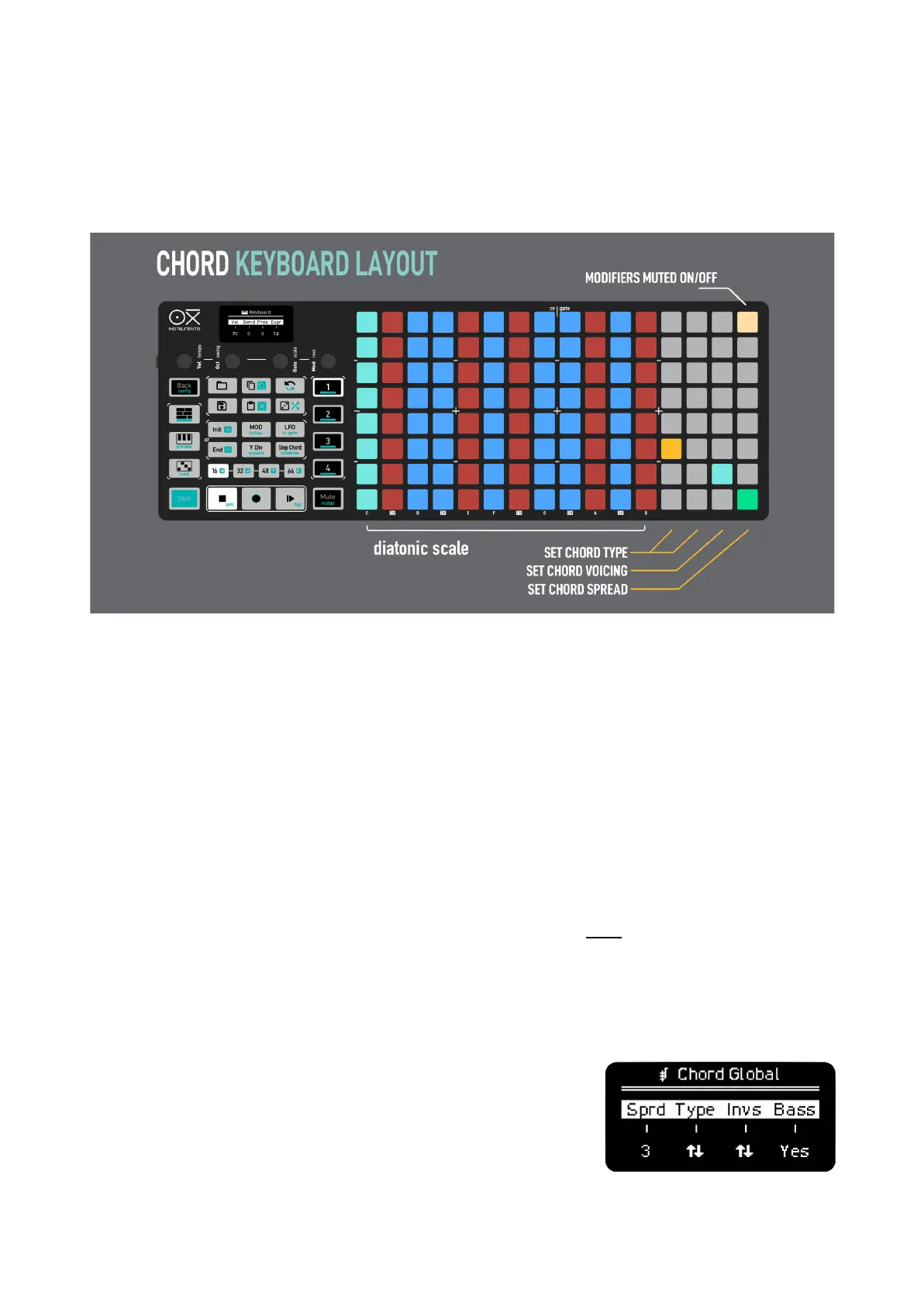
The keyboard layout includes a large amount of intuitive shortcuts and tools to make playing chords
equally fulfilling for the experienced music theorist as for the inexperienced ones, learn and explore
without barriers.
The keyboard is split in two sections, the first 12 columns of the Grid are the perform area that
triggers the chords. Each pad is defined by the root note of the chord it triggers. Each column is a
semitone filtered by scale, moving vertically is an octave up or down.
The second section is from the 13th column to the end.
13th and 14th columns select the chord given the scale and the root note played.
15th column selects the voicing of the played chord.
16th selects the spread of notes in the chord. Remember you can play up to 8 notes.
Top right pad toggles between the modifiers of this section to trigger chords when pressed or not.
–––––––––––––––––––––
You can arpeggiate the played chords on the ARP screen.
–––––––––––––––––––––
Hold Step-Chord button while in Keyboard to access Global Chord
settings, the parameters are the following:



 To Next Page