Brewing into Carafe
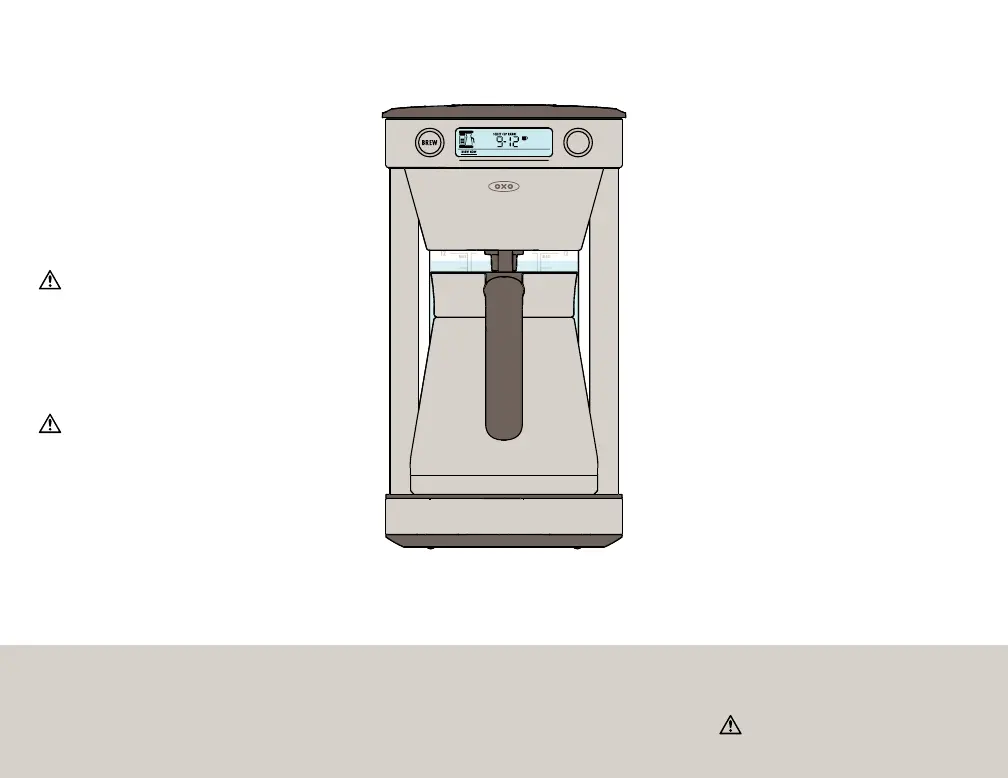
• If the carafe icon starts blinking when you press the
Brew Button, ensure the carafe is properly in place.
• When brewing is complete, the display screen will
show “READY” and the freshness timer will show
how long ago the coffee was brewed.
• If you remove the carafe to sneak a cup during
the brewing process, Coffee Maker will pause
brewing. Replace carafe within 60 seconds to
continue brewing. If the carafe is not replaced
within 60 seconds, Coffee Maker will beep twice
and the brew cycle will be canceled.
• You can cancel at any time by pressing
the BREW button. The machine will then
go to sleep mode.
•
Do not open the brew basket lid
during brew cycle
Note: When making smaller amounts of
coffee in the carafe, OXO recommends
pre-heating the carafe with hot water from
the sink for one minute before brewing.
2
Add filtered water
to water tank
Your Coffee Maker uses all the water you
put in the tank for every brew cycle. Always fill
between the MIN and MAX fill lines.
3
Ensure carafe
is in place
Close both lids.
1
Snap in Large
Brew Basket
Add commercial basket large filter
and ground coffee.
Note: Never use more than 12 level scoops
of ground coffee when using the Large Brew
Basket to avoid overflowing.
Only use the Large Brew Basket
when brewing into carafe.
4
Select
“BREW NOW”
Press either button to wake up Coffee
Maker. Turn knob until “BREW NOW”
is highlighted and press to select.
5
Select
Brew range
Turn knob to desired cup range and
press to select.
Note: Coffee Maker will default to your last
cup selection.
6
Press
BREW button
Display will show “PREHEAT” while
the water is being heated, “BREWING”
when coffee is brewing. Display will
show “READY” and Coffee Maker will
beep when brewing is complete.
9


 To Next Page