11
1
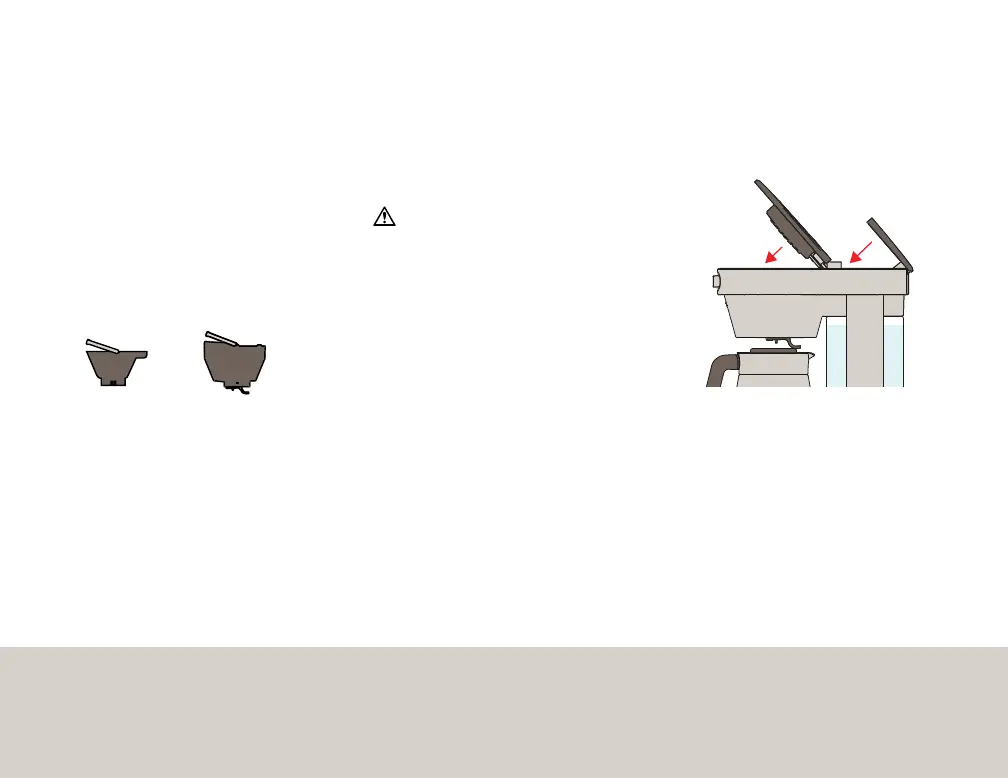
Snap in Large or
Small Brew Basket
Select the Large Brew Basket for 5 or
more cups, and the Small Brew Basket
for 2-4 cups. Add paper filter and
ground coffee. Use 1 level scoop per
cup or adjust to suit your preference.
2
Add filtered water
to water tank
Fill to number of cups desired.
Your Coffee Maker will use all the water
you put in the tank for every brew cycle. If you
are programming the machine to brew in a
carafe, add up to 12 cups of water in the water
tank. If you are programming the machine to
brew in a mug, add up to 4 cups of water in
the water tank.
Note: We recommend using your mug to
measure when not using the carafe to avoid
overflowing.
4
Select
“BREW LATER”
Press either button to wake up Coffee
Maker. Turn knob until “BREW LATER”
is highlighted and press to select.
5
Select
cup range
Turn knob until you reach the desired
number of cups and press to select.
Note: When brewing into a mug, don’t
select a number higher than 4 cups.
6
Set time
Turn knob until you reach your desired
brew time and press to select.
Note: Once the brew time has been selected,
the display will go into sleep mode after a few
seconds. The programmed time will show in
the bottom right corner of the screen.
3
Ensure carafe or
mug is in place and
close both lids
• To cancel after brew time has been selected,
turn the knob to highlight ‘BREW LATER’ and
press the knob to cancel. The alarm symbol
and programmed time will disappear when
wake-up timer is canceled.
• If set in carafe mode, removing the carafe
from the base for more than 60 seconds after
the brew time has been set will also cancel the
programmed brew time.
Setting Brew Later Timer
Large
Brew Basket
5 - 12 Cups
Small
Brew Basket
2 - 4 Cups


 To Next Page