17
OPERATING YOUR SET-TOP (cont.)
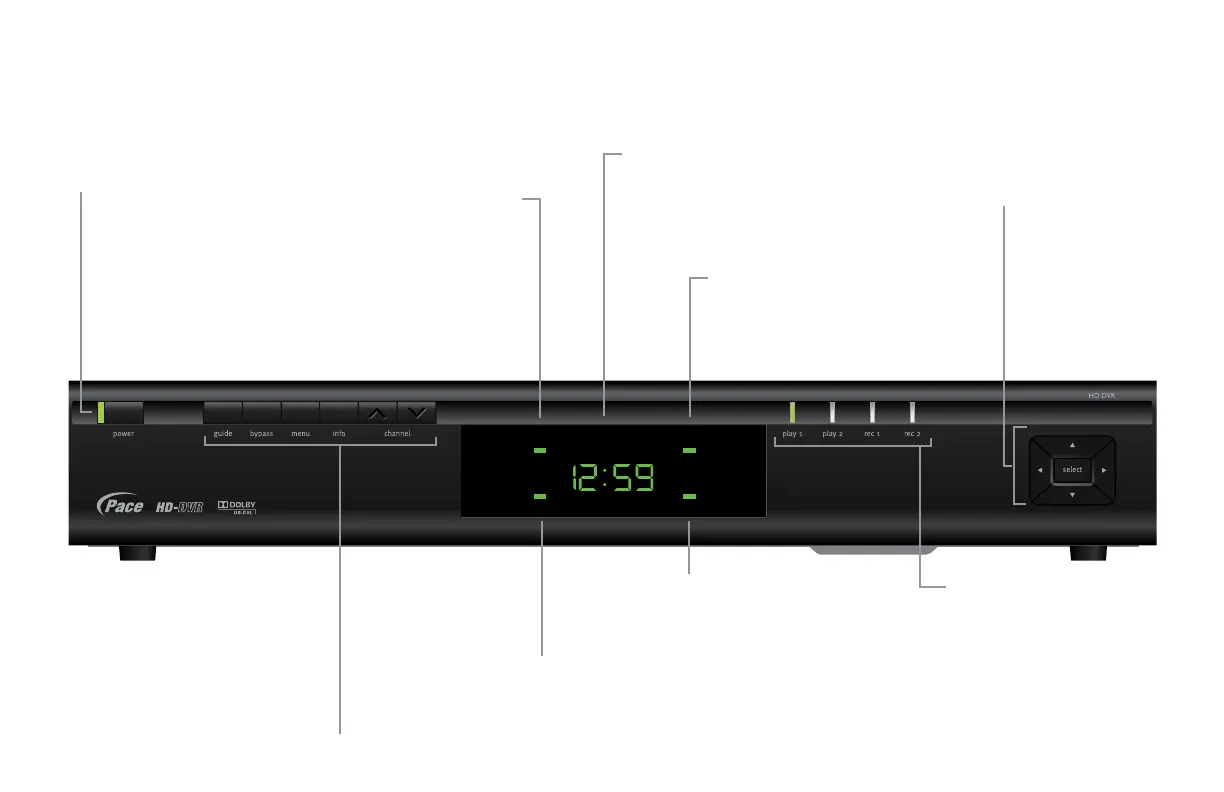
Using the front-panel buttons
TDC770D
HDTV BYPASS
IR RECEIVE MESSAGE
BYPASS light
Lights when RF Bypass is on
guide
To display an on-screen guide
bypass
To turn the RF Bypass feature on/off
menu
To display on-screen menus
info
To display on-screen
information
channel U and D
To change channel up
or down
power button
To turn your set-top on/off
power light (next to button)
Lights green when your set-top is on;
red when your set-top is off; not lighted
when your set-top is disconnected from
the power supply
IR RECEIVE light
Lights when your
set-top is receiving
a signal from your
remote control
HDTV light
Lights when your set-top outputs
High Definition TV (HDTV) content
MESSAGE light
Lights when there is an
unread message and when
you make user settings
front-panel display
Appears when your set-top is turned on
Shows the program channel number or the time
Also displays HDTV settings (see page 26)
play/record lights
Indicate the play or record state
of each display channel
Lights green to signify playback;
lights red to signify record
L, R, U, and D
To move left/right/
up/down in an on-
screen menu/guide
select button
To select items in
menus/guides



 To Next Page