29
3. If you want to change the setting, press U or D. Press the select button to confirm the choice and change to
the new setting.
4. Press the L button. The front panel shows “PiLL” again and the PACE USER SETTINGS menu reappears.
To continue making the settings, see the next section.
NOTE
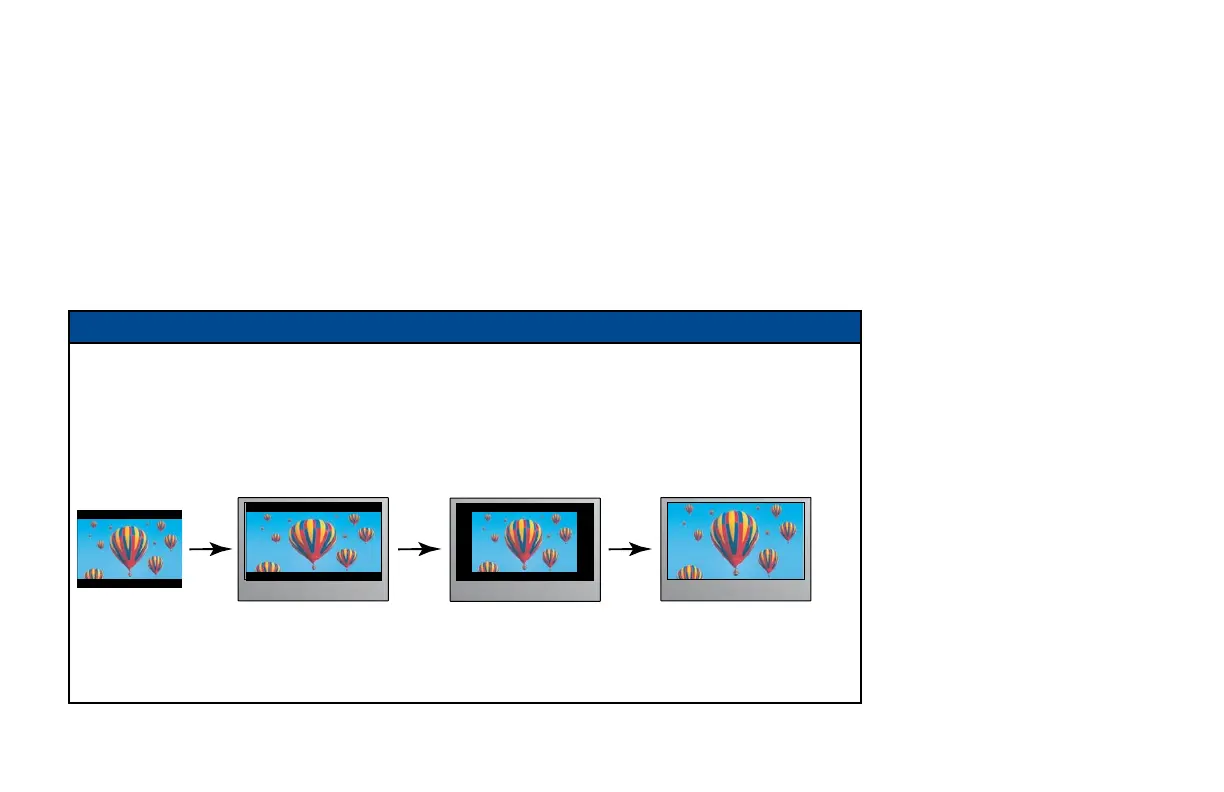
16:9 picture in a 4:3 transmission
Sometimes, 4:3 transmissions may contain a 16:9 picture, with black borders at the top and bottom. On a
16:9 TV, this may display with black borders all the way around the picture. To remove these borders, you can
use the “Zoom function” button on your remote control (could be labeled ZOOM or ASPECT).
See the example below. For more information about using “Zoom”, see page 21.
4:3 transmission 16:9 TV with no automatic
detection of 4:3,
Auto-pillarbox switched off
16:9 TV with no automatic
detection of 4:3,
Auto-pillarbox switched on
Use 'Zoom' to increase the picture size.
(Note: the picture may lose some
definition due to the expansion.)
MAKING USER SETTINGS (cont.)



 To Next Page