System Operations Manual
www.paceworldwide.com
Page 11 of 50
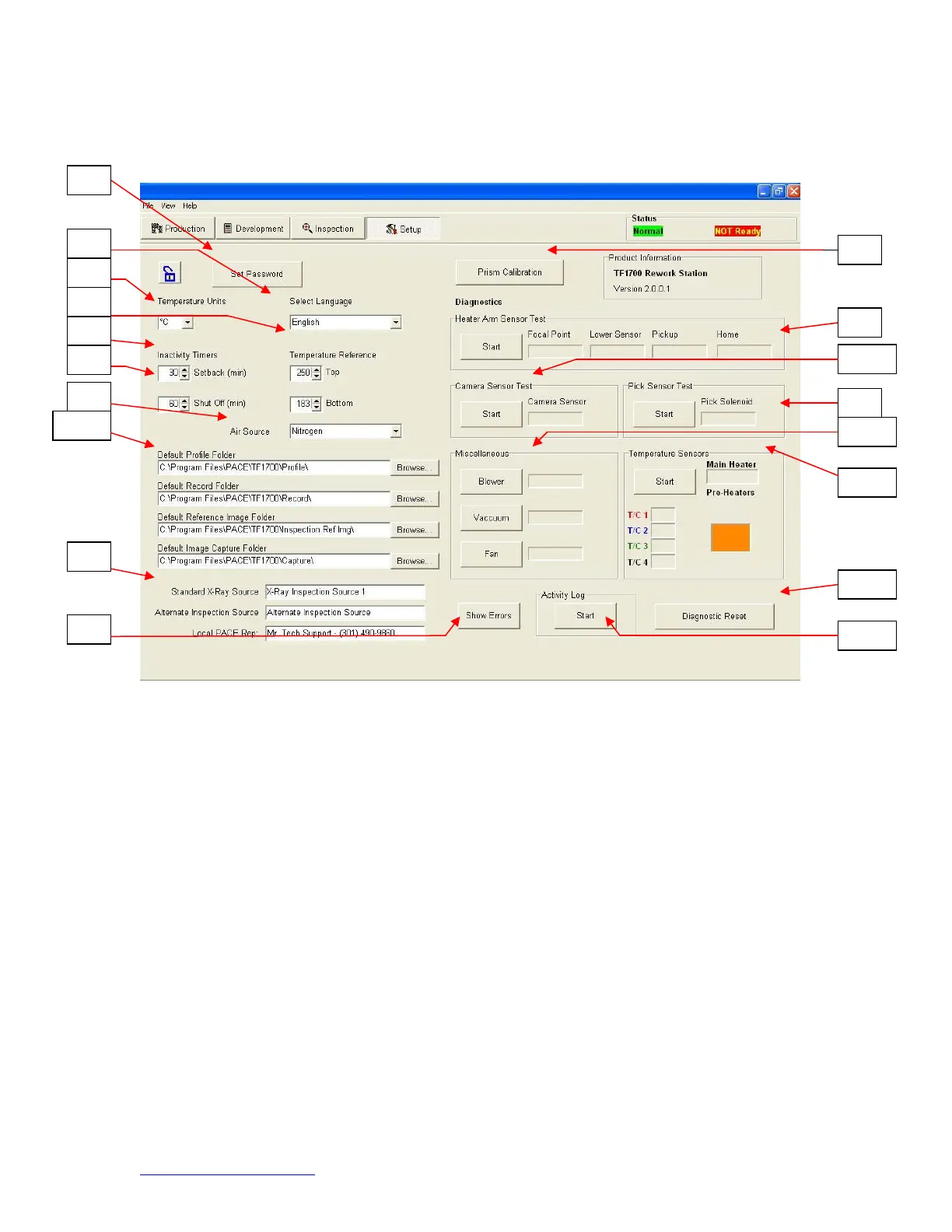
a. Software set up screen features. (Figure 4a)
Figure 4a
i. Set Password. Setup and profile settings can be password protected.
ii. Set Language. Software text language can be changed.
iii. Set temperature for Celsius or Fahrenheit.
iv. Set yellow temperature reference lines on the profile graph.
v. Set setback time. Machine will go into setback after selected idle time.
Setback reduces heater temperatures during extended idle times to
extend heater life.
vi. Set auto shutoff time. Machine will completely shut down after selected
idle time.
vii. Air Source selects internal pump or external N
2
source.
viii. Default location of saved profile files, records, image, and capture.
ix. Changes title of Video Sources on inspection screen.
x. Shows system communication error.
xi. Initiate prism calibration sequence.
xii. Initiate heater arm sensor test. Checks proper orientation and operation
of heater arm position sensors.
xiii. Initiate camera sensor test. Checks proper orientation and operation of
camera position sensor..
xiv. Initiate pick sensor test. Checks proper orientation and operation of pick
position sensor.
xv. Checks operation of heater blower, cooling fan, and vacuum pump.


 To Next Page