System Operations Manual
www.paceworldwide.com
Page 18 of 50
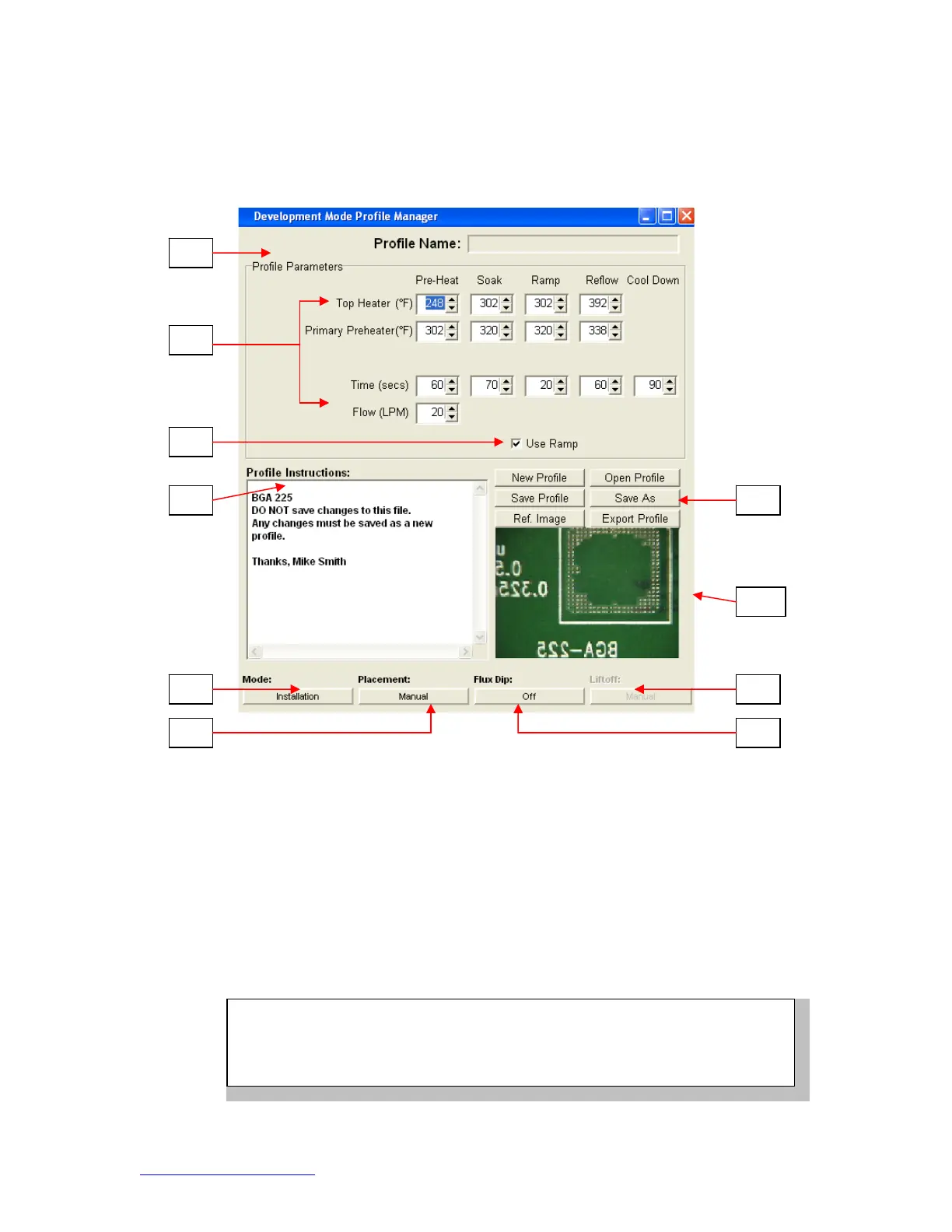
Profile Development Screen Features TF 1700 (Figure 7d)
i. Profile Name. Indicates currently selected profile.
ii. Profile Parameters. Change each zone temperature and time settings
iii. Use Ramp. Enables or disables ramp phase.
iv. Profile Instructions. Allows operator to make notations and instructions.
v. Mode. Choose Installation or removal mode by clicking.
vi. Placement. Choose manual or automatic while in installation mode by
clicking.
vii. Profile Management. Create, save, or recall profiles.
viii. View selected reference images.
ix. Liftoff. Select from Auto or Manual in removal mode by clicking.
x. Flux Dip. Enable or disable flux dip operation by clicking.
i
ix
v
NOTE
The TF 1700 airflow control is manual using the flow meter mounted on
the front housing. The TF 2700 airflow control feature is operated using
the PC software.


 To Next Page