YOUR PHOTOS, VIDEOS, AND MUSIC
POCKET TUNES
TM
DELUXE
143
7
CHAPTER
play them using Pocket Tunes™ Deluxe on
your smartphone.
Pocket Tunes Deluxe supports MP3, WMA,
Protected WMA, AAC, and AAC+ files; you
can transfer these file types to your device.
For more information about Pocket Tunes
Deluxe, go to pocket-tunes.com/userguide/
en/.
Setting up Windows Media Player for
MP3
On a Windows computer, you need to set
Windows Media Player to save your music
files in MP3 format in order for the files to
be compatible with Pocket Tunes.
1 Connect your smartphone to your
computer with the sync cable.
2 Press Applications and select
pTunes .
3 On your computer, open Windows
Media Player, and then click the
full-screen icon in the upper-right
corner to maximize the window.
4 Click To o l s , and then click Options.
5 Click the Rip Music tab, click the
Format pick list, and then select mp3.
Click OK.
6 Click To o l s , and then click Options.
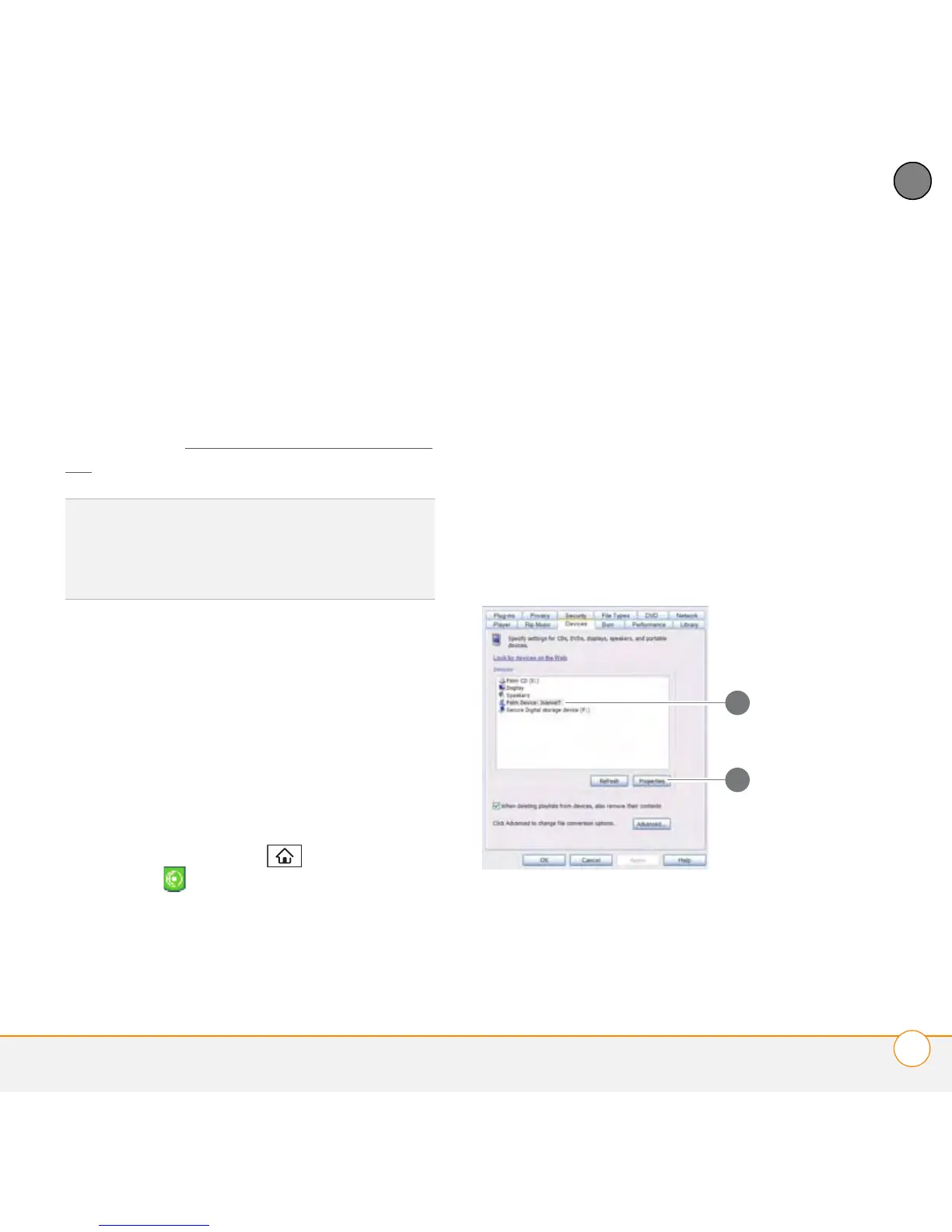
7 Click the Devices tab, select Palm
Device from the Devices list, and then
click Properties.
1 Select your smartphone
2 Click Properties
DID
YOU
KNOW
?
If a call comes in when you’re
listening to music, you can take the call and
the music pauses automatically. After you
finish the call, the music starts again.
1
2



 To Next Page