14
SETTING THE CLOCK
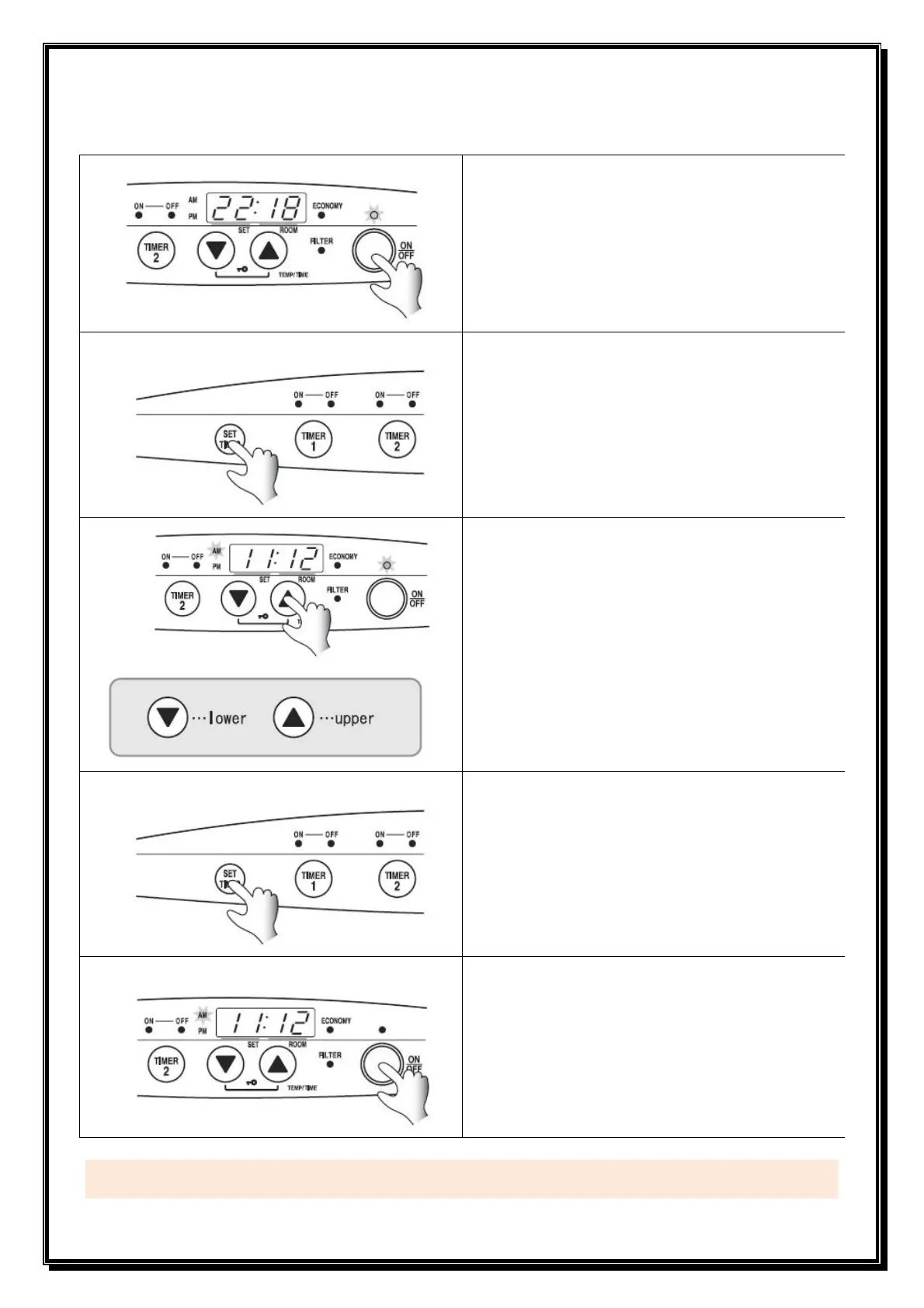
Press ON / OFF button.
• ON / OFF Light glows
• The Set temp and Room temp are displayed on
the screen.
Press SET TIMES button
• Time is displayed.
Adjust the time
• To adjust the time of day press the ▼ down or ▲
up button until the correct time is reached.
[Example] To set clock for 11:12am
(1) Adjust the hour.
Keep pressing the adjustment button until
11.00am is displayed.
(2) Adjust the minute.
Press the adjustment button again until
11:12am is displayed.
Press SET TIMES five times.
• The screen goes back to Set temperature and
Room temperature mode.
Press ON / OFF button to exit clock setting mode.
• ON / OFF Light goes out.
• Clock will be shown on the screen.
Important Information:
If the heather is unplugged or if there is a power failure please reset the clock.
1
2
3
4
5


 To Next Page