16
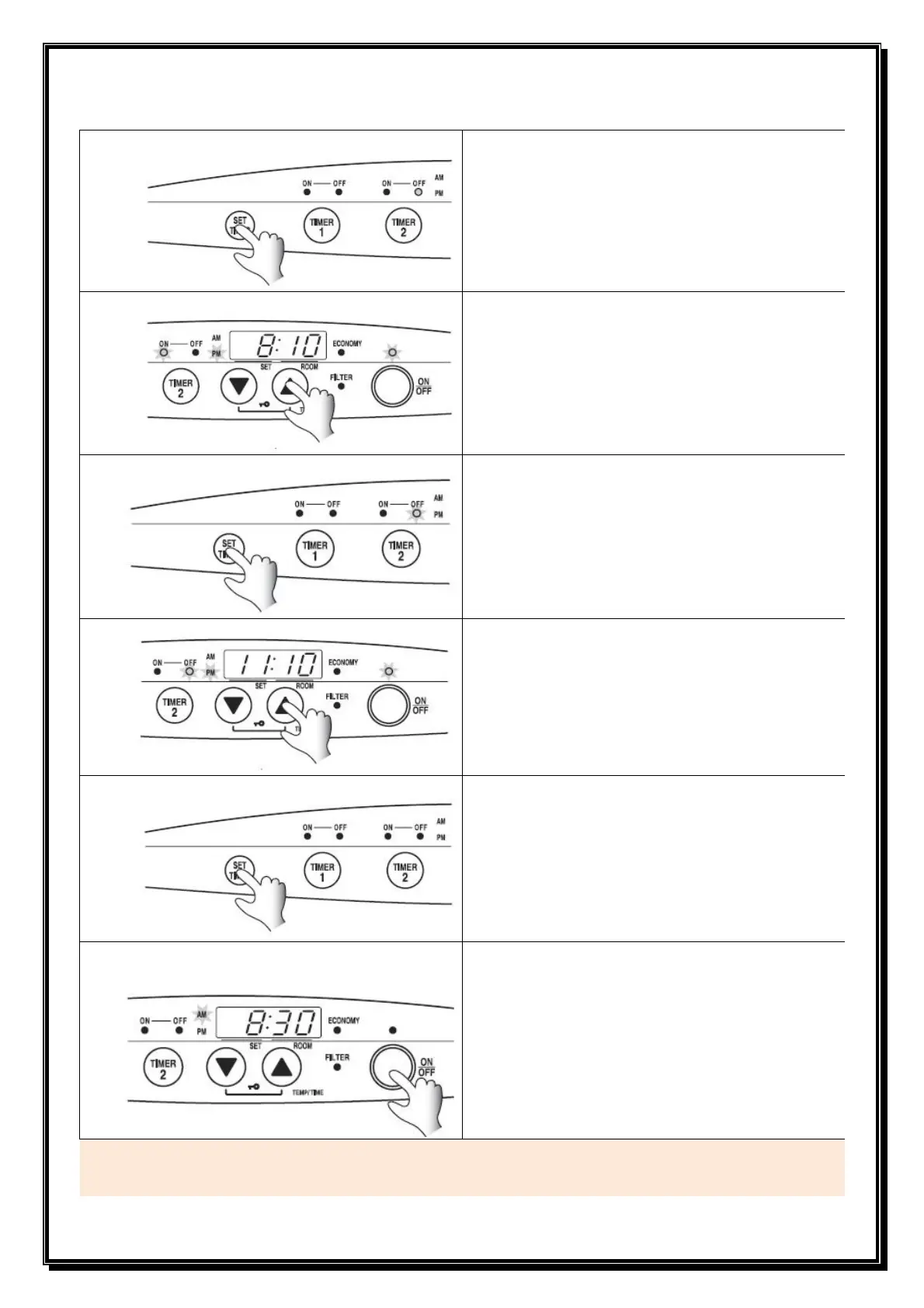
Press SET TIMES button to Set TIMER 2
• TIMER 2 “ON” light flashes.
• TIMER 2 “ON” time is displayed on the screen.
Adjust TIMER 2 “ON” time as required
• To set the TIMER 2 “ON” time press the ▼ down
or ▲ up button until the correct time is reached.
Press SET TIMES button
• TIMER 2 “OFF” light flashes.
• TIMER 2 “OFF” time is displayed on the screen.
Adjust TIMER 2 “OFF” time as required
• To set the TIMER 2 “OFF” time press the ▼
down or ▲
up button until the correct time is
reached.
Press SET TIMES button to exit SET TIMES mode.
• The screen goes back to SET temperature and
ROOM temperature mode.
Press ON / OFF button to turn off
• ON / OFF lamp lights
• The current time will be shown on the screen.
Caution
The operation and shut down times for the timers are stored in memory. If the requested operation and shut
down times for the timers are the same it is not necessary to set up anew.
6
7
8
9
10
11


 To Next Page