24
23
E
N
G
L
I
S
H
CQ-C5403U/C5303U
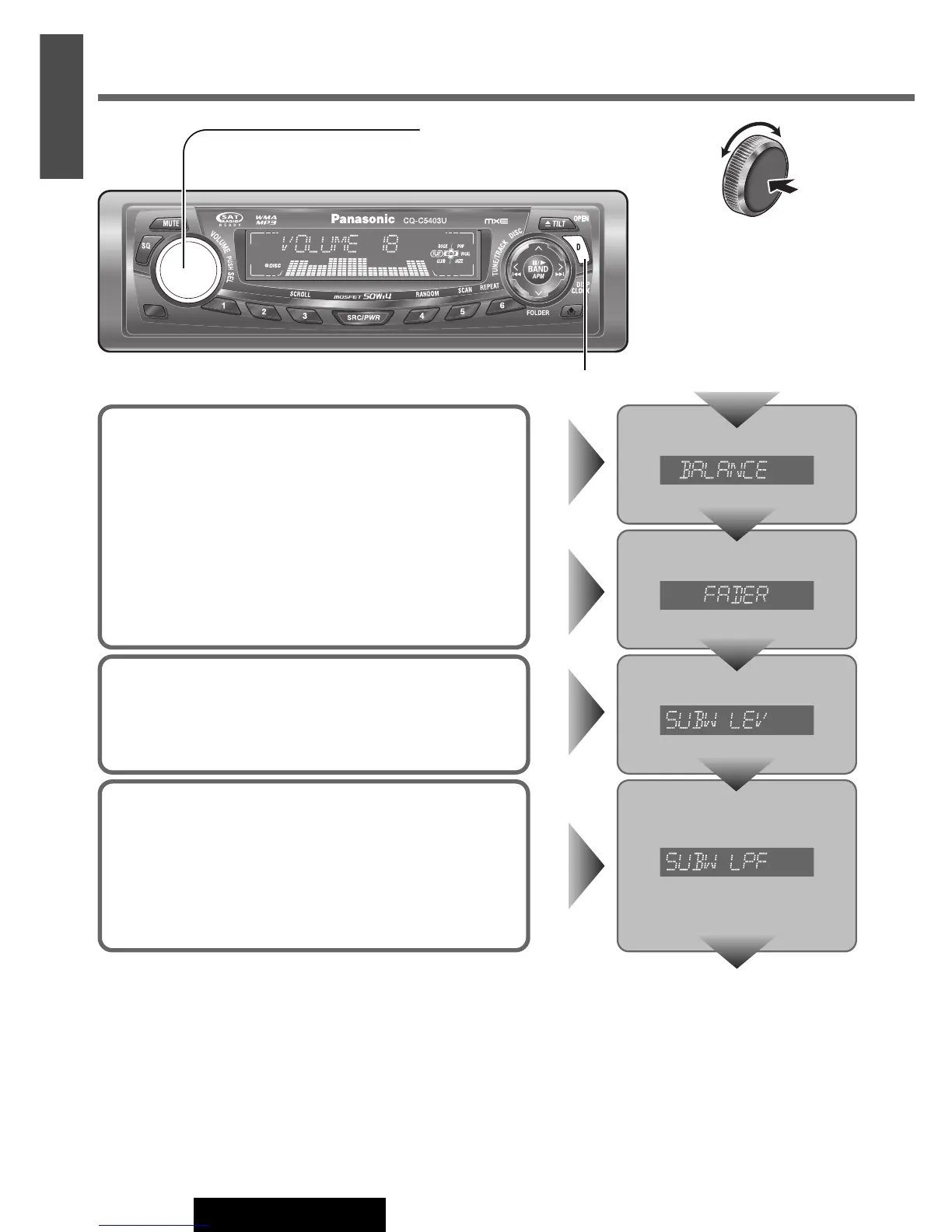
Balance/Fader
You can adjust the sound level among the right, left, front and
rear speakers.
Default: BAL (balance) CNT (center)
FAD (fader) CNT (center)
Setting range: 15 levels each and CNT (center)
Press [VOLUME] (PUSH SEL).
Press [VOLUME] (PUSH SEL).
Subwoofer LPF (Low Pass Filter)
You can select the upper limit frequency of the sound from sub-
woofer.
Default: 80 Hz
Setting range: 80 Hz, 120 Hz
Press [VOLUME] (PUSH SEL).
Subwoofer Level
You can change the subwoofer volume level.
Default: 0
Setting range: MUTE (–∞), – 6 dB to + 6 dB (by 2 dB)
Press [VOLUME] (PUSH SEL).
[D] (DISP) (Return to the regular mode)
Press [VOLUME]
(PUSH SEL: select).
(Press [SEL] on the
remote control unit.)
Audio Settings (continued)
Turn [VOLUME]. (Press [VOL }] or
[VOL
{
] on the remote control unit.)
Regular mode



 To Next Page