42
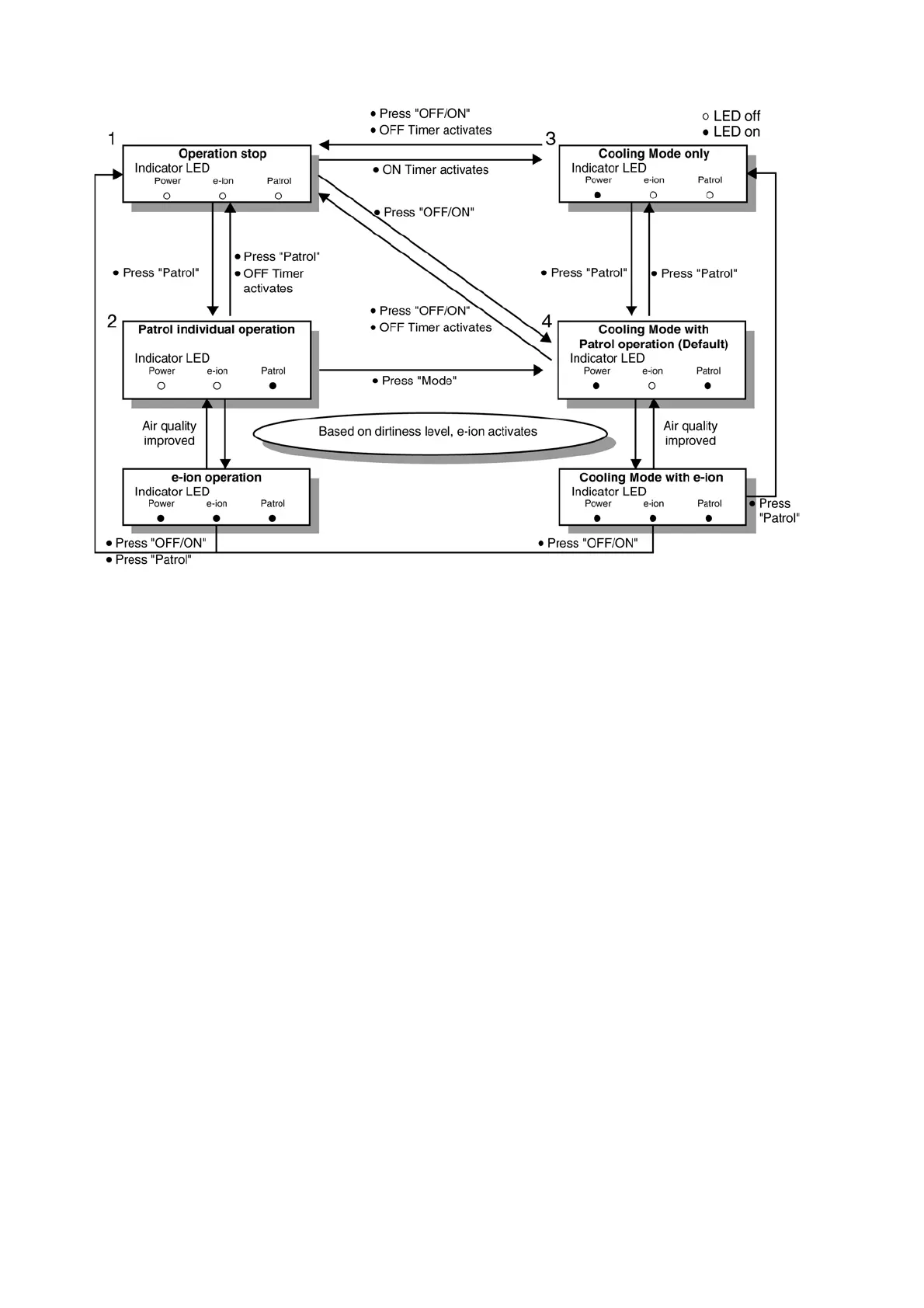
12.9. Patrol Operation
A. Purpose
To monitor air dirtiness level by using gas sensor and activates e-ion operation whenever air is dirty.
B. Control Condition
a. Patrol operation start condition
• When the unit operation is started with “OFF/ON” button.
• When the unit stops, “Patrol” button is pressed, Patrol individual operation will start.
• During cooling only operation, “Patrol” button is pressed.
b. Patrol operation stop condition
When any of the following condition is fulfilled:
• When “OFF/ON” button is pressed.
• During any operation with Patrol, “Patrol” button is pressed again.
• When “e-ion” button is pressed.
• When OFF Timer activates.
c. Patrol operation disable
• To disable the Patrol Operation during unit start (default) with “OFF/ON” button, press “Patrol” button and hold for 5 seconds,
then release.
• To disable the Patrol Operation, press “Patrol” button and hold for 15 seconds, then release.



 To Next Page