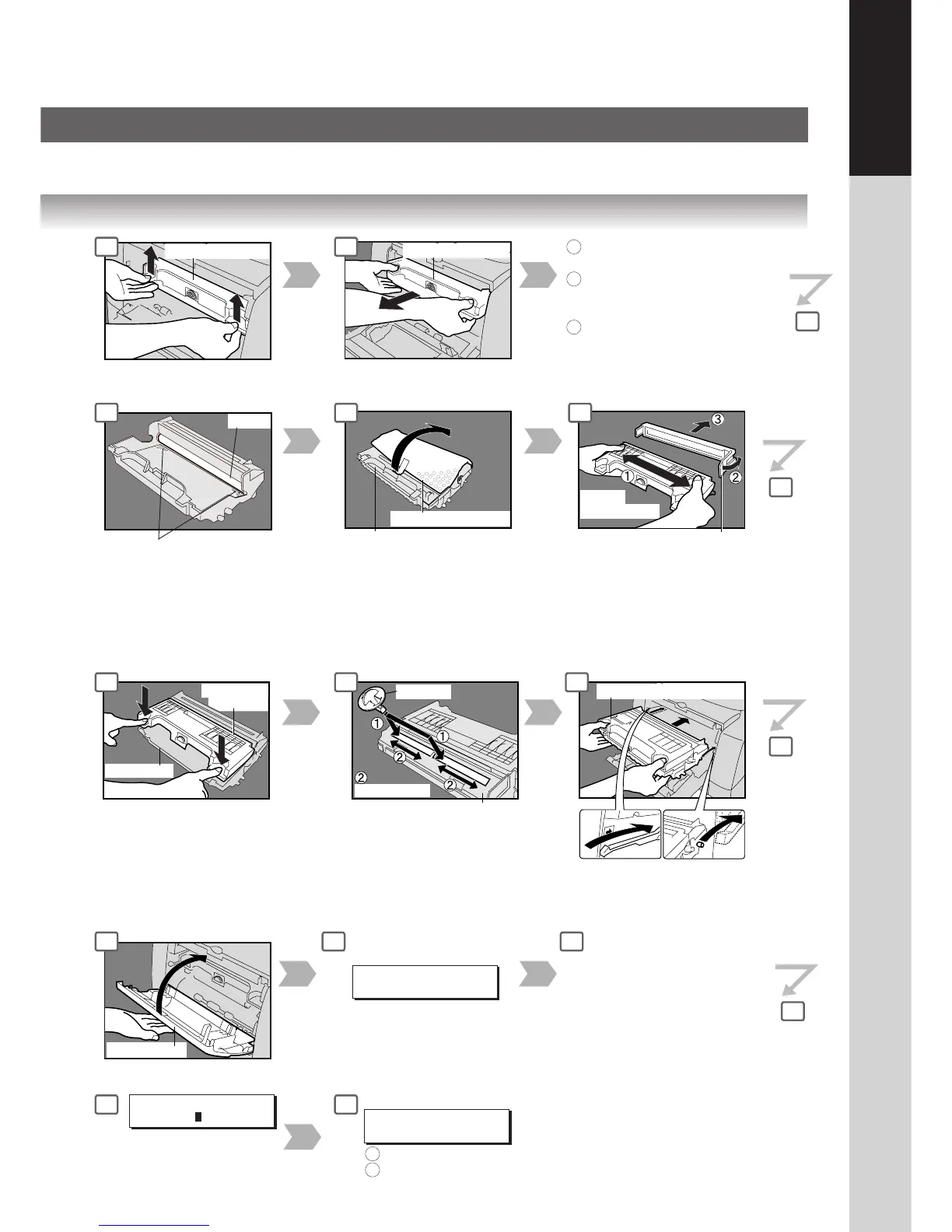
Drum/Toner Unit
(ATTENTION)
● Do not remove the
protective cover unless you
are ready to use it.
Drum/Toner Unit
Place the Drum/Toner Unit
over the Guide Rails and
insert it until it stops.
Front Cover
For replacing the Toner Cartridge only:
For replacing the Drum Unit:
(ATTENTION)
● Be careful not to scratch the surface of the Drum Unit (Green),
and not to touch it with bare hands.
NEW TONER REPLACED?
1:YES 2:NO
Press "1" Key.
Press RESET Key on the Control Panel.
1
2
DRUM REPLACEMENT?
1:YES 2:NO
When Drum Unit is replaced.
Following steps (15 - 18) for
Drum Replacement only:
If set in other function
mode, press the COPY Key.
Press the FUNCTION Key on
the Control Panel.
GENERAL PARAM.(0-9)
ENTER NO. OR ∨
^
Press "5" and SET Keys.
5: Drum Replacement
2
3
4
5
6
7
8
9
10
11
12
13
14
15
16
18
To replace the Toner Cartridge only:
17
1:Select "1: YES" if a new toner
cartridge was installed.
2:Select "2: NO" in all other
cases.
NOTE:
Keep this Cleaner for feature use.
When Toner Cartridge has
been replaced.
To replace the Toner Cartridge:
Perform steps (4 - 14). (Skip step 6)
To replace the Drum Unit:
Perform steps (4 - 18).
(Skip steps 5, 7 and 10)
To replace the Toner Cartridge
and Drum Unit:
Perform steps (4 - 18).
1
2
3




 To Next Page