18
Getting To Know Your Machine
J43, J44, J80:
J44, J82, J83:
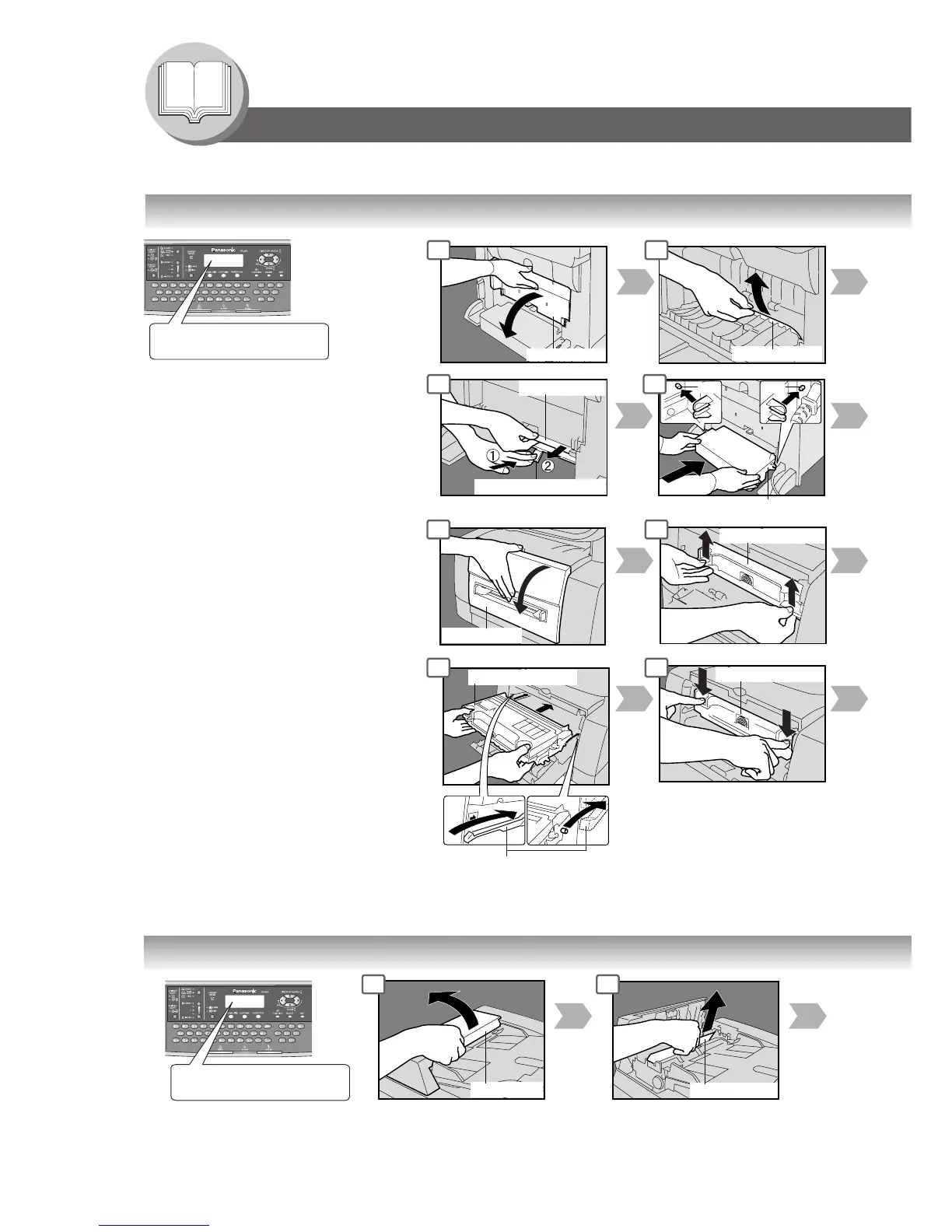
Rear Paper Tray Cover
Pin
Pin
Guide Rails
Drum/Toner Unit
Place the Drum/Toner Unit
over the Guide Rails and
insert it until it stops.
Misfed Paper
Front Cover
Paper Release Knob
Misfed Paper
Drum/Toner Unit
Drum/Toner Unit
Rear Cover
Operation Chart
■ Problem Solving
● Removing Misfed Paper (Paper Feed/Paper Transport/Automatic Duplex Unit Area)
1 2
1 2
REMOVE MISFED PAPER
J44
6 7
(Rear Side)
Misfed Paper
ADF Cover
● Removing Misfed Paper (ADF) : J70, J71, J79, J90, J92, J93
1 2
REMOVE MISFED PAPER
J92
(Ex.)
Remove Misfed Paper
NOTE:
The J## Code indicates the most
probable Jam location. If the jam
message reappears after the jam is
cleared, paper is most likely jammed
at other location(s). Check the Jam
Error Codes Table on page 20 for
other check points and remove all
misfed paper.
6 7
(Ex.)




 To Next Page