265
DP-2330/3030
MAR 2005
Ver. 2.1
DP-2310/3010
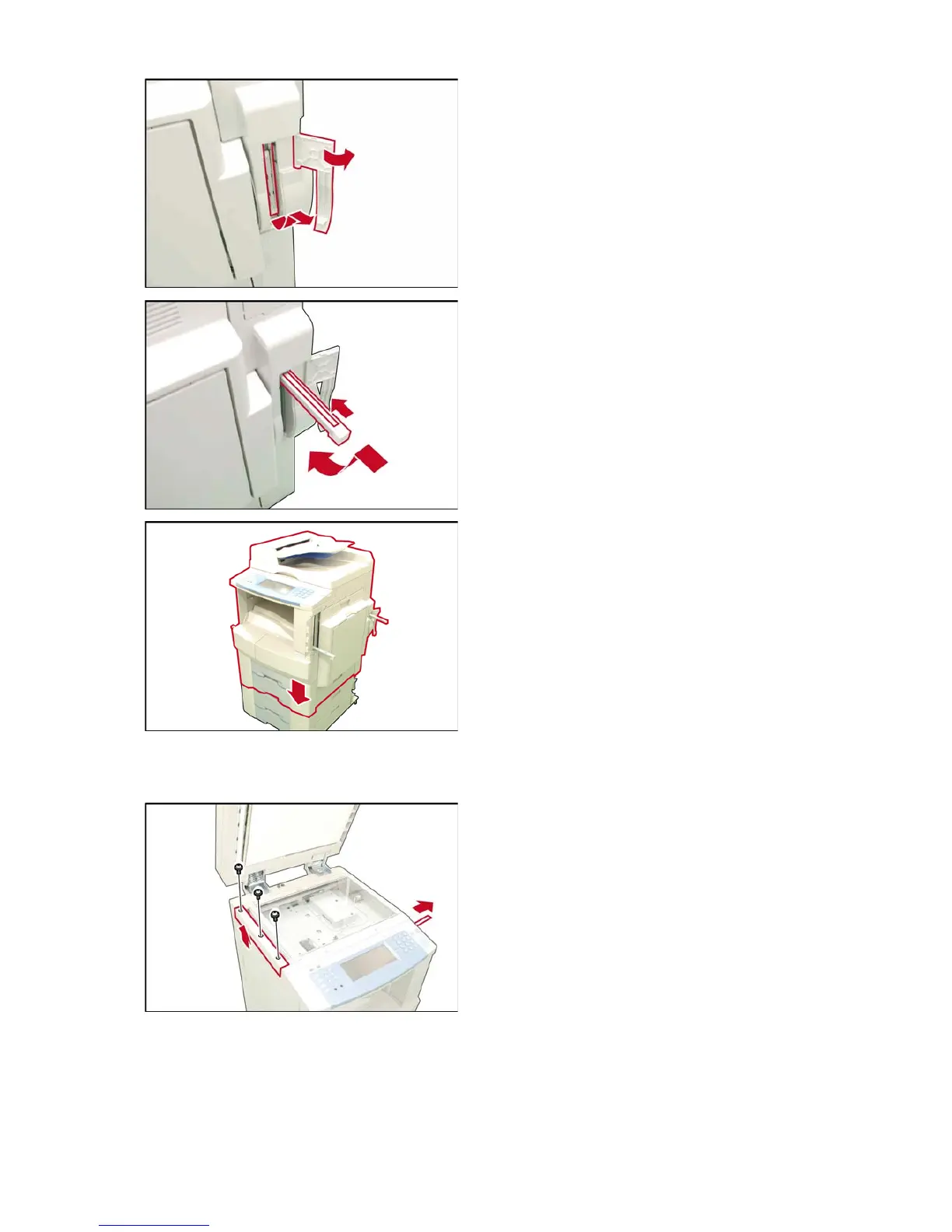
(4) Open the Right Rear Handle Cover, lift up and
pull out the Handle to lock it in place.
Note:
To release the Handle, push the Release Latch
toward the machine, push down the Handle into
the machine.
(5) Lift and place the machine on a suitable
Stand / Paper Tray, aligning with front and side
covers.
<For DP-2310 / 3010>
Stand : (DA-DA310 / DA320)
Paper Tray : (DA-DS303 / DS304)
<For DP-2330 / 3030>
Stand : (DA-DA311 / DA321)
Paper Tray : (DA-DS305 / DS306)
Caution:
The machine weights approximately 181 lb (82 kg)
with the i-ADF pre-installed. To prevent injuries,
use the appropriate number of personnel and the
proper equipment to lift or move the machine.
<Unlocking the Scanner>
(6) Remove the Protective Tape from the Battery.
(7) Remove 3 Screws.
(8) Remove the Left Platen Cover.












 To Next Page