337
DP-2330/3030
MAR 2005
Ver. 2.1
DP-2310/3010
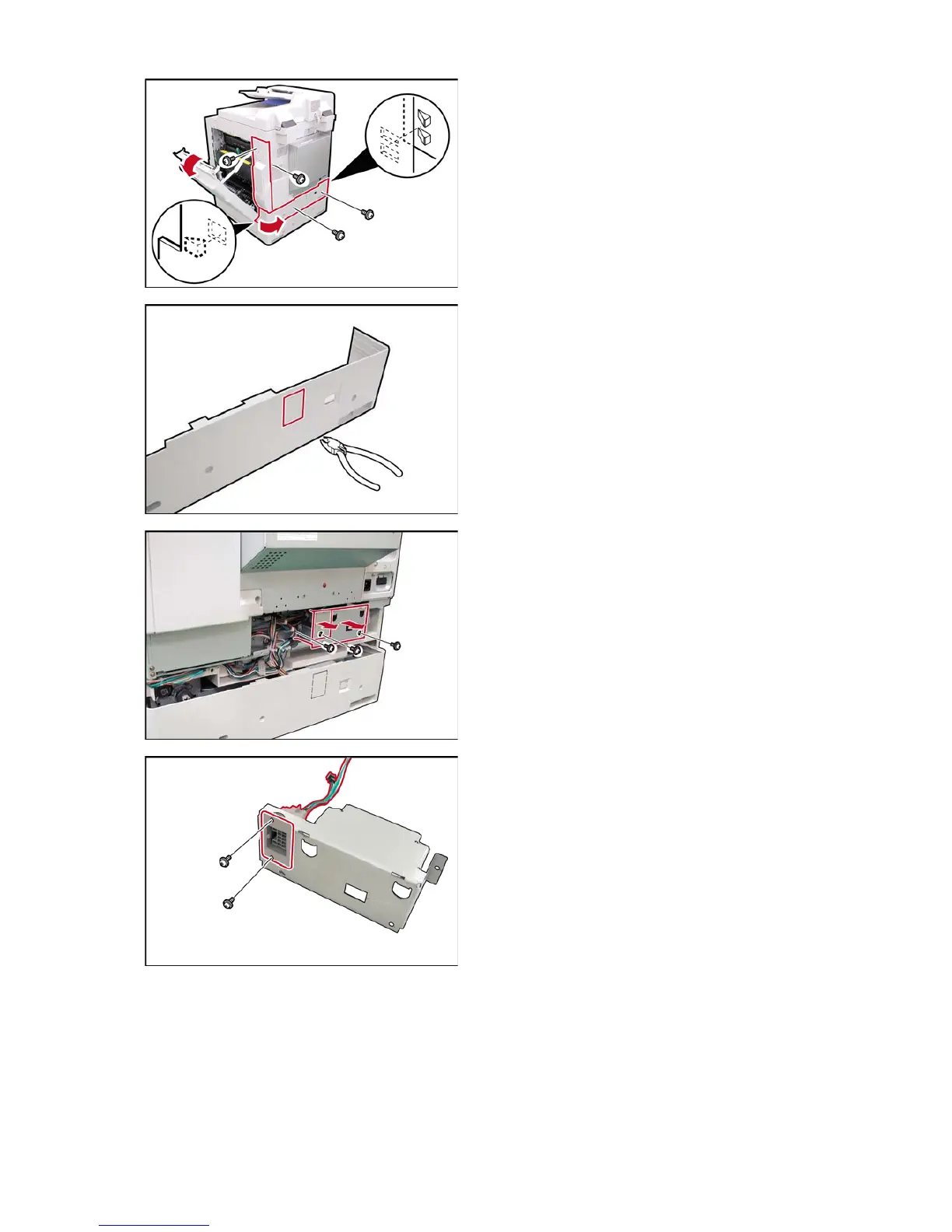
(1) Open the Right Cover.
(2) Remove 2 Silver Screws.
(3) Remove the Right Rear Cover.
(4) Remove 2 Silver Screws.
(5) Remove the Lower Rear Cover.
Caution:
The OPC Drum is sensitive to light. To prevent
optical exposure problems, do not expose the
OPC Drum to direct sunlight or bright light (even if
it is a 1000-Lux fluorescent lamp).
(6) Cut off the Protective Tab on the Rear Cover.
(7) Remove 1 Screw.
(8) Remove the Access Plate.
(9) Remove 2 Screws.
(10) Remove the HP Cover.
(11) Install the Connector of the FNS Harness to the
HP Cover.
(12) Secure the Connector with 2 Screws
(XTW3+6LFC).












 To Next Page