13
Conguring
the Printer Driver
Settings
Opening the Printer Properties Dialog Box
Windows 2000/Windows XP/Windows Server 2003 (Administrator)
To change the printer settings, open the dialog box for the printer properties by performing the following steps.
Note:
In Windows 2000/Windows XP/Windows Server 2003, setting of the properties depends on the logon
account. This section describes properties to be specied by the administrator (system manager). See
"Windows2000/Windows XP/Windows Server 2003 (User)" on page 15 for details on user properties.
Logon to the computer/network using an account with administrator rights.
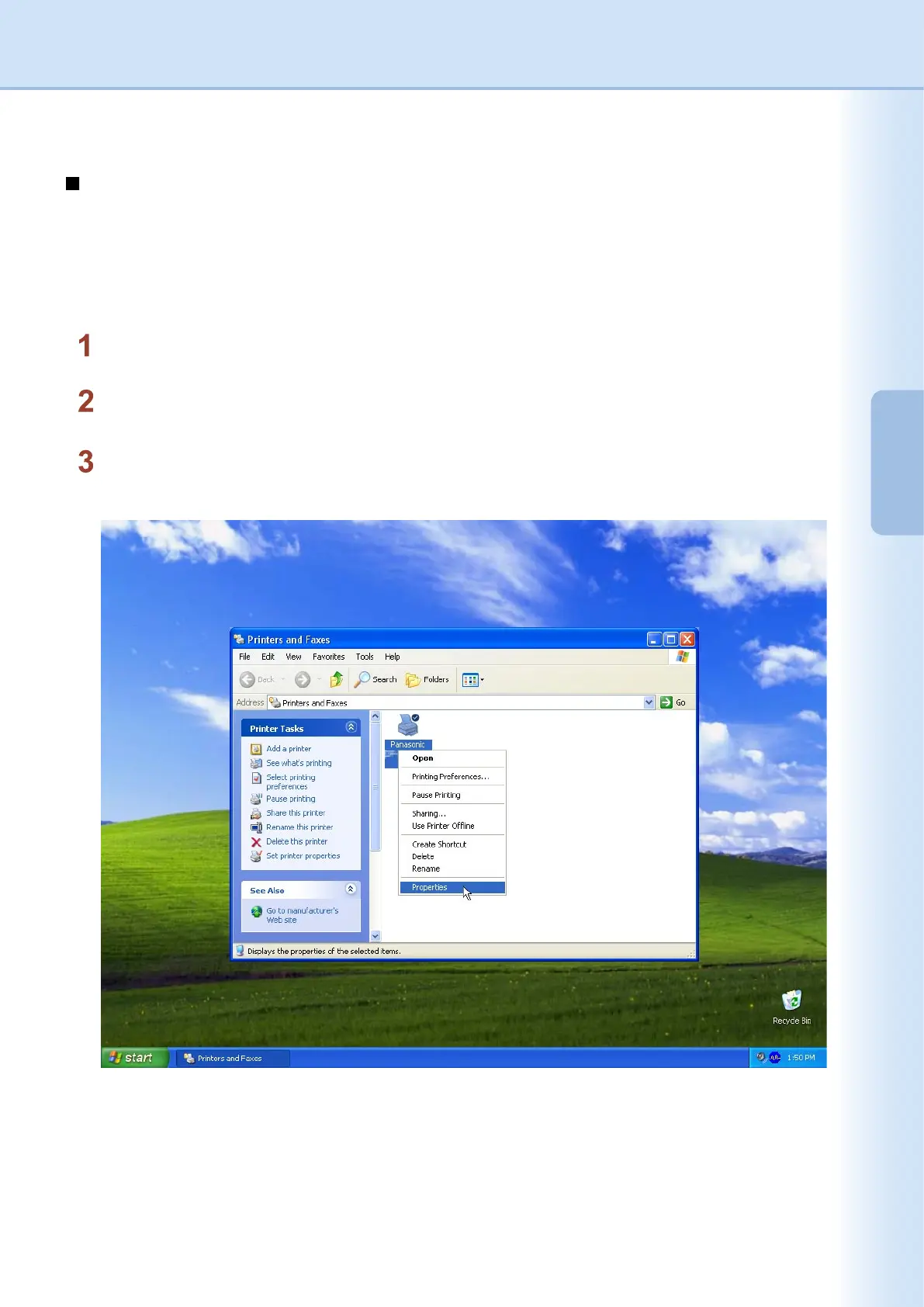
Click the Start button, select Printers and Faxes icon. (for Windows 2000: Click the
Start button, select Settings, and then click the Printers icon)
Right-click on the desired printer icon in the Printer and Faxes folder, and then select Properties in the
pop-up menu.













 To Next Page