50 Installation Manual
Installing the SmartHub
MOUNTING THE SMARTHUB
Location Requirements
• The SmartHub has an IP20 rated enclosure, which means it must be
installed indoors.
• The RS485 cable is about 4’ long, so the SmartHub should be mounted
no more than 3 feet away from the inverter.
• The SmartHub requires an internet connection.
• The SmartHub can be mounted to the wall, or elsewhere with the use of
the din rail and din rail mounts.
Step 1. If the SmartHub cannot be secured to a stud in the wall, insert
drywall anchors prior to installation.
Step 2. Place the SmartHub against the wall and secure with two screws.
Connections
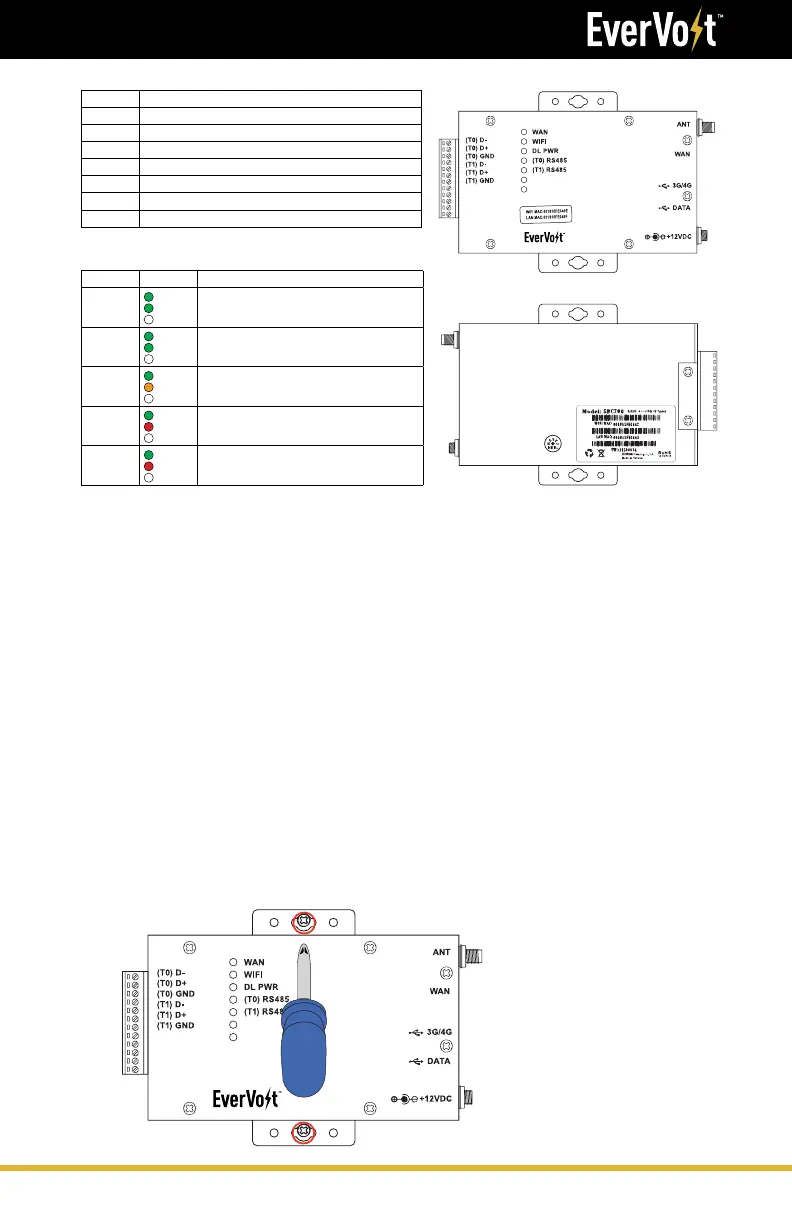
Port Description
ANT Attach the antenna for WiFi connection. (DO NOT USE)
WAN Connect the RJ-45 cable for a LAN connection.
3G/4G Connect a 3G/4G dongle for a cellular connection.
DATA USB flash drive.
(T0) RS485 Connects to the inverter for two-way communication.
(T1) RS485 External RS485 sensor device reserved.
RESET Factory default reset button. Insert a pin and hold for 30 seconds.
LED Definitions
LED Activity Description
WAN
Solid
Flashing
Off
The LAN is connected.
Data is being transmitted or received.
No connection established.
WIFI
(DO NOT USE)
Solid
Flashing
Off
The WIFI is enabled.
Data is being transmitted or received.
WIFI is disabled.
DL PWR
Solid
Solid
Off
Power is on.
System initialization.
There is no Power.
(T0) RS485
Solid
Solid
Off
A command is transmitted to the inverter(s).
A command is received from the inverter(s).
No commands are being transmitted or received.
(T1) RS485
Solid
Solid
Off
A command is transmitted to the device(s).
A command is received from the device(s).
No commands are being transmitted or received.





 To Next Page