(3) To change the setting, press and hold the SET key for 1 second.
(During this time, the setting in progress indicator lights.)
(4) Use the UP and DOWN keys to select the number of connected units.
Example: If
is displayed, pressing the UP key displays .
The setting range is 1 – 48 units (
- ).
(5) Press and hold the SET key for 1 second. (TEST/WARNING turns off.)
(6) Press the HOME key to end the setting process.
8..
Setting the System Address and Outdoor Unit Address in the GHP outdoor unit
*
Set the addresses on the GHP outdoor unit control board.
* The system address is set to “1” at the time of shipment.
Setting the address
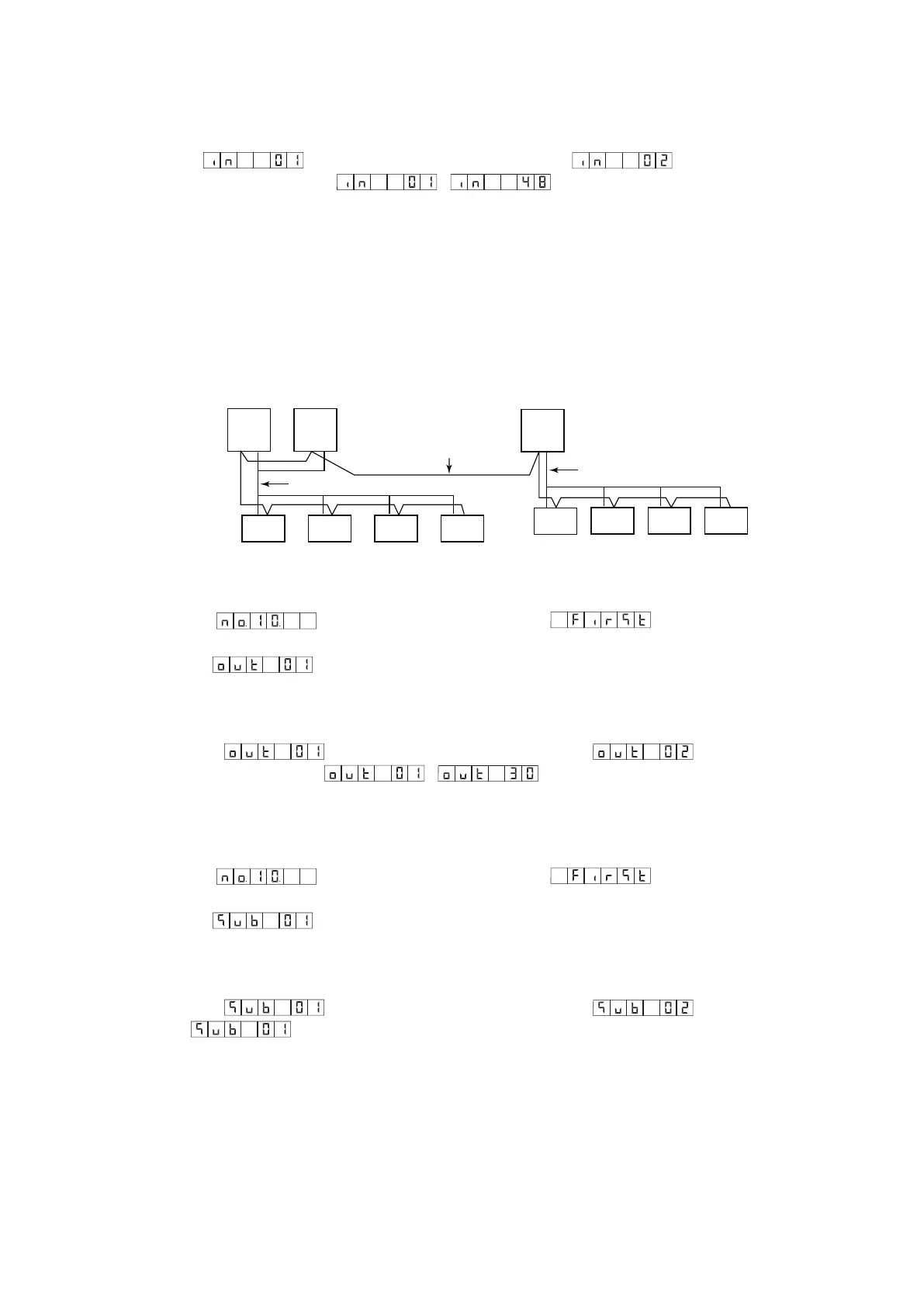
(1) Check the wiring condition of the indoor/outdoor control cables.
Outdoor
unit
1-1
Indoor
unit
Indoor
unit
Indoor
unit
Indoor
unit
Indoor
unit
Indoor/outdoor control cable
Refrigerant tubing
Refrigerant tubing
Indoor
unit
Indoor
unit
Indoor
unit
Outdoor
unit
1-2
Outdoor
unit
2-1
Fig. 4
(2) Set the system address.
1. Select the
(initial settings) menu item to display .
2. Use the UP and DOWN keys to select the system address setting.
Example:
(System address is 1.)
3. To change the setting, press and hold the SET key for 1 second.
(During this time, the setting in progress indicator lights.)
4. Use the UP and DOWN keys to select the system address.
is displayed, pressing the UP key displays .
Example: If
The setting range is 1 – 30 (
- ).
5. Press and hold the SET key for 1 second. (TEST/WARNING turns off.)
6. Press the HOME key to end the setting process.
(3) Set the outdoor unit address.
1. Select the
(initial settings) menu item to display .
2. Use the UP and DOWN keys to select the outdoor unit address setting.
Example:
(Outdoor unit address is 1.)
3. To change the setting, press and hold the SET key for 1 second.
(During this time, the setting in progress indicator lights.)
4. Use the UP and DOWN keys to select the outdoor unit address.
is displayed, pressing the UP key displays .
Example: If
Set to
for the U-20GES3E5.
5. Press and hold the SET key for 1 second. (TEST/WARNING turns off.)
6. Press the HOME key to end the setting process.



 To Next Page