9. Settings for the unit number setting, number of outdoor units, number of indoor
units, and system addresses on the U-10MES2E8
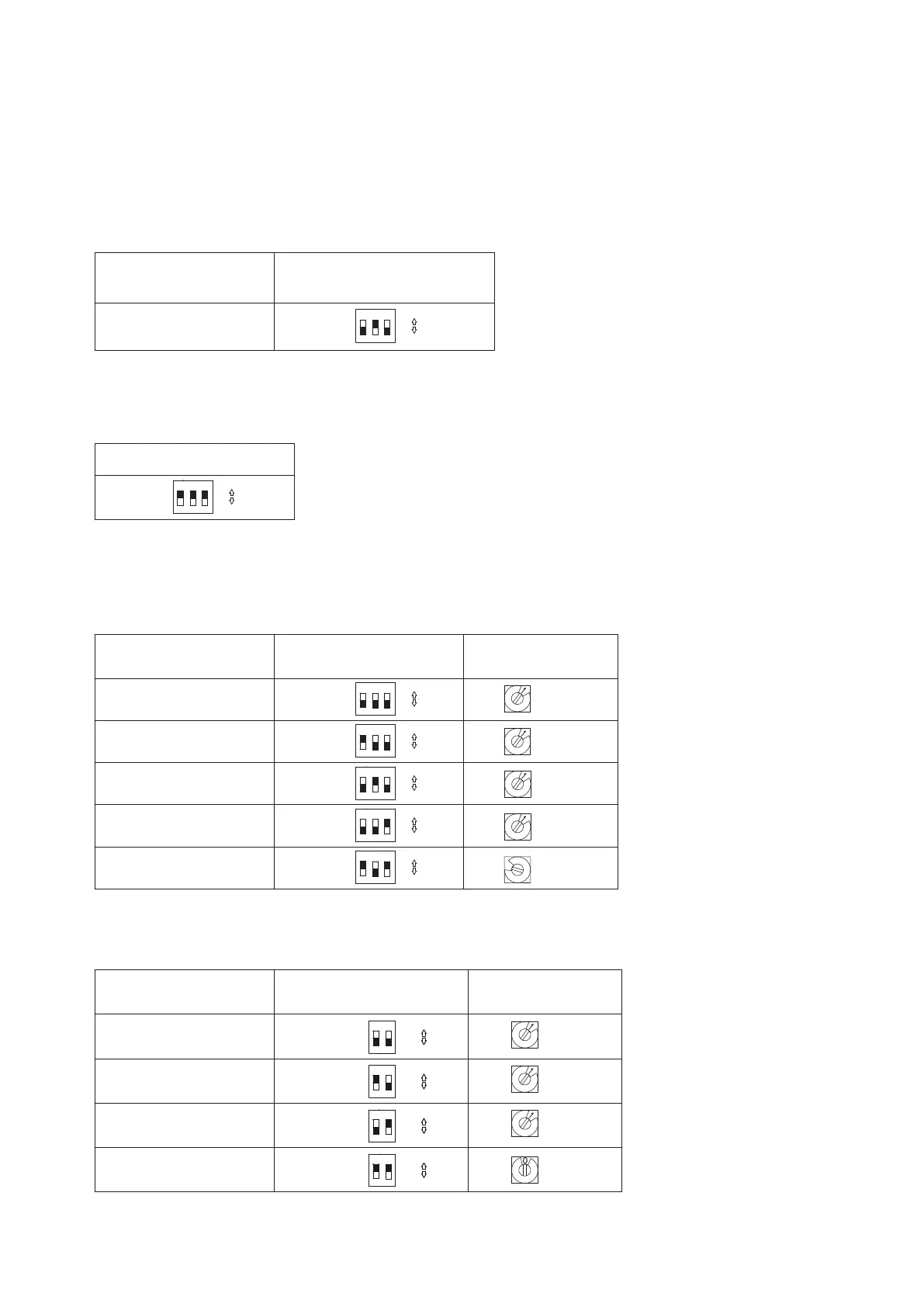
Set the unit number setting, number of outdoor units, number of indoor units, and system addresses on the outdoor unit
control board for the U-10MES2E8.
Unit number setting
Set No.2 unit for the U-10MES2E8.
Only switch 2 of the unit number setting DIP switch SW5 (a 3P DIP switch) should be set to ON.
Unit No. setting
Address setting of outdoor unit
(SW5)
(3P DIP switch)
Unit No. 2 2 ON
1
2
3
ON
ON
OFF
Setting the number of outdoor units
On the U-10MES2E8, all three switches 1~3 of the number of outdoor units setting DIP switch SW6 (a 3P DIP switch)
should be set to ON.
Outdoor unit setting (SW6)
(3P DIP switch)
All ON
1
2
3
ON
ON
OFF
Setting the number of indoor units
Use the indoor units setting switches SW4 (a 3P DIP switch) and SW3 (a Rotary switch RED) to set the number of
connected indoor units.
Example settings for the number of indoor units
No. of indoor units
Indoor unit setting (SW4)
(3P DIP switch)
10 20 30
Indoor unit setting
(SW3)
(Rotary switch RED)
1 unit (factory setting) All OFF
1
2
3
NO
ON
OFF
Set to 1
11 units 1 ON
1
2
3
ON
ON
OFF
Set to 1
21 units 2 ON
1
2
3
ON
ON
OFF
Set to 1
31 units 3 ON
1
2
3
ON
ON
OFF
Set to 1
48 units 1 & 3 ON
1
2
3
ON
ON
OFF
8
Set to 8
Setting the system addresses
Set the same system address as the GHP outdoor unit that is on the same refrigerant system.
Use the system address switch SW2 (a 2P DIP switch) and system address SW1 (a Rotary switch BLK) to set system addresses.
System address No.
System address (SW2)
(2P DIP switch)
10 20
System address (SW1)
(Rotary switch BLK)
System 1 (factory setting)
Both OFF
2
1
OFF
ON
ON
Set to 1
System 11
1 ON
2
1
OFF
ON
ON
Set to 1
System 21
2 ON
2
1
OFF
ON
ON
Set to 1
System 30 1 & 2 ON
2
1
OFF
ON
ON
Set to 0



 To Next Page