2.
Checking performance
(1) Checking the basic performance of indoor and outdoor units
Operate the system in test run mode continuously for at least 30 minutes, and when the refrigerant system has stabi-
lized, from the LED on the board note and record the data for each part. In the case of the W MULTI system, check
the data for all outdoor units in the same refrigerant system. Check the data of the indoor unit on the outdoor unit
board with the smallest outdoor unit address.
How to note down data
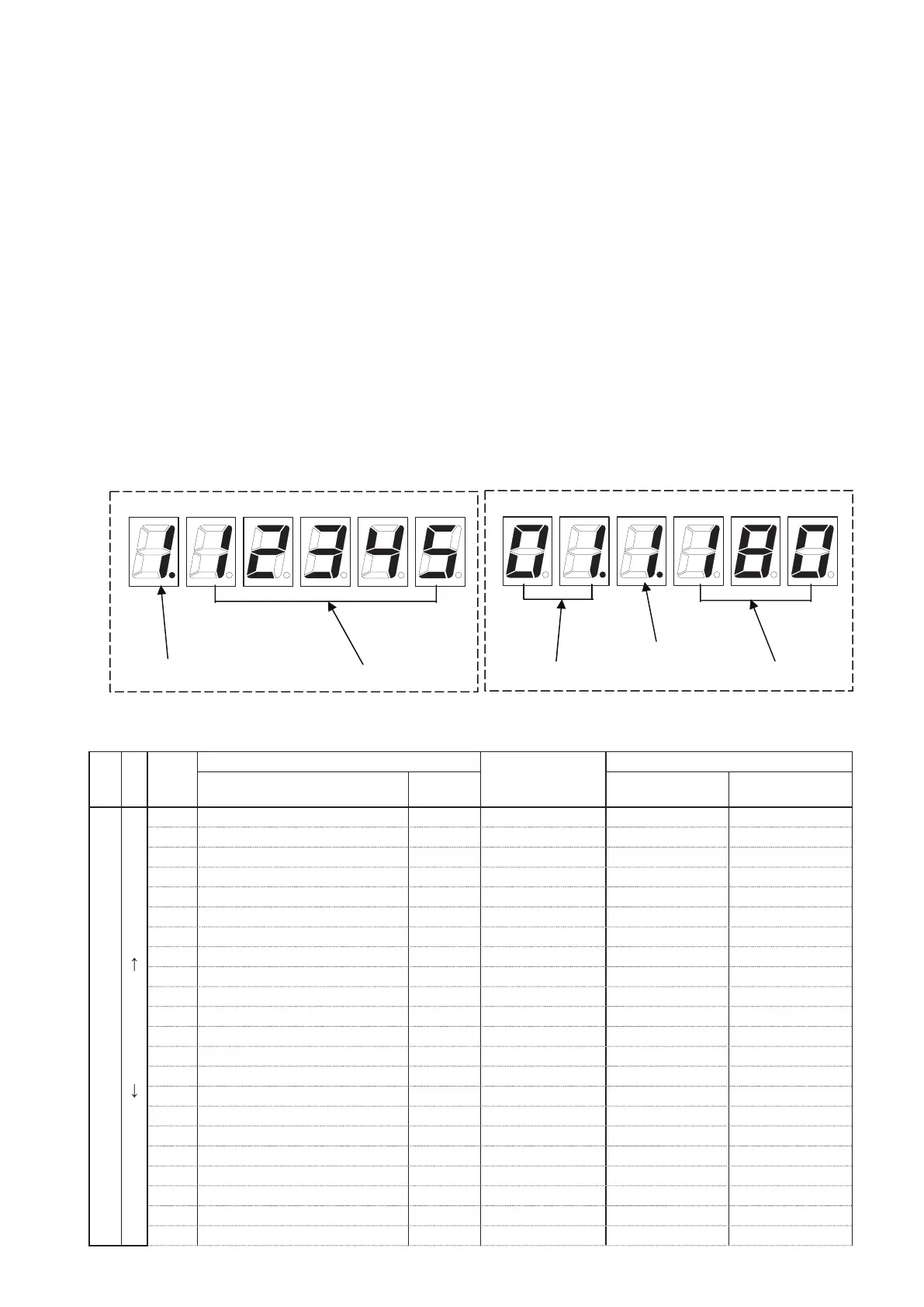
During normal operation, the following displays are repeatedly displayed at 10 second intervals.
• System address, No. of indoor units Example:
(system 01, indoor units 24 units)
• Engine operating hours Example:
(Operating hours 12345 hours)
During this time, press the SET (SW007) key and the system data will be displayed.
When the data is displayed, each press of the UP (SW005) key changes the data code and data displayed in the
order shown in the table below.
If data display proceeds too far, press the DOWN (SW006) key to display the necessary data, and then record the
data.
* If the HOME (SW004) key is pressed for longer than 1 second or no operation is performed for 10 minutes, the
normal display is restored.
● Display examples
[Outdoor unit data] [Indoor unit data]
Assessment of data
As described in the previous item
, display the data in the table below, and record it onto a data sheet, and assess it.
Data
code
Measurement item
Display example
Basic operation data
Data name Unit When COOL When HEAT
Outdoor unit
↑
DOWN UP
↓
1
Engine operation time
Hr
2 Engine operating counts Times
3 Starter operation time Seconds
4 Starter operating counts Times
5 Current oil change time Hr
c Number of compressor oil rells Times
d Number of times oil supplied Times
E Clutch 1 on time Hr
F Number of clutch 1 on operations Times
G Clutch 2 on time Hr
h Number of clutch 2 on operations Times
Data code
Data code
DataData
Indoor unit number.



 To Next Page