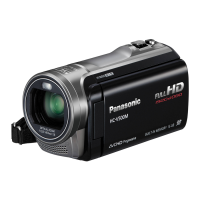
What does “ENVIRONMENT TOO DARK, OR LENS COVER CLOSED.” mean on my Panasonic HC-V270?
- KKelly AllenSep 16, 2025
Before turning on the unit, open the lens cover. This message may also be displayed when recording in a very dark location.
What does “ENVIRONMENT TOO DARK, OR LENS COVER CLOSED.” mean on my Panasonic HC-V270?
Before turning on the unit, open the lens cover. This message may also be displayed when recording in a very dark location.
Why can't scenes be deleted on my Panasonic HC-V270?
Release the protect setting. Any scenes/still pictures where the thumbnails are displayed as cannot be deleted. If the scenes/still pictures are unnecessary, format the media to erase the data. Please be aware that if a media is formatted then all the data recorded on the media is erased and cannot be recovered. Back up important data on a PC, disc etc.
Why can't I see the PDF operating instructions for HD Writer LE 3.0 from my Panasonic HC-V270 Camcorder?
You will need Adobe Acrobat Reader 5.0 or later or Adobe Reader 7.0 or later to read the PDF operating instructions for HD Writer LE 3.0.
Why will the live broadcast screen not be displayed on Panasonic HC-V270?
Make sure the “LUMIX CLUB” Login ID and Password have been input correctly. Use a PC or smartphone to make sure the USTREAM account registration is complete. Use a PC or smartphone to register and set up USTREAM from a “LUMIX CLUB” linked service.
Why can't [Home Cam] be used on Panasonic Camcorder?
Make sure the wireless access point is connected to the Internet. Make sure the wireless access point and this unit are properly connected.
Why does the image color/brightness change or show horizontal bars on my Panasonic HC-V270?
The color or brightness of the image may change, or you may see horizontal bars when recording under fluorescent, mercury, or sodium light. This is not a malfunction. When recording motion pictures, use Intelligent Auto Mode/Intelligent Auto Plus Mode, or set the shutter speed to 1/60 in areas with 60 Hz power, or 1/100 in areas with 50 Hz power. This issue will not affect recorded images in Still Picture Recording Mode.
Why can't I play back scenes/still pictures on my Panasonic Camcorder?
Any scenes or still pictures where the thumbnails are displayed as cannot be played back on your Panasonic Camcorder.
Why is my Panasonic HC-V270 Camcorder not detected by the PC when connected by the USB cable?
After re-inserting the SD card into the unit, reconnect the supplied USB cable. Select another USB terminal on the PC. Check the operating environment. Connect the supplied USB cable again after restarting the PC and turning on this unit again.
Why isn't my Panasonic Camcorder SD card recognized in other devices?
Check that the device is compatible with the capacity or type of SD card (SD Memory Card/SDHC Memory Card/SDXC Memory Card) that you inserted. Refer to the operating instructions of the device for details.
What does 'CONDITION TOO DARK, OR OPEN LENS COVER' mean on my Panasonic HC-V270 Camcorder?
Before turning on the unit, open the lens cover. This message may also be displayed when recording in a very dark location.
Lists compatible SD memory cards (SD, SDHC, SDXC) and their specifications.
Identifies and describes the main external parts of the video camera.
Details about compatible batteries and power sources for the unit.
Information on using SD cards for recording, including types and compatibility.
Instructions on how to power the unit on and off using the power button or LCD monitor.
Explains how to switch between recording and playback modes, and between motion/still picture modes.
Overview of Wi-Fi capabilities and usage precautions.
Step-by-step guide to recording video, including screen indications.
Instructions for capturing still images, including focus indications.
Overview of Wi-Fi capabilities and usage precautions.
Guides on connecting the unit to wireless access points or smartphones.
Common problems and their solutions, categorized by power and operation.
| Sensor type | MOS BSI |
|---|---|
| Total megapixels | 2.51 MP |
| Optical sensor size | 1/5.8 \ |
| Effective megapixels (image) | 2.2 MP |
| Digital zoom | 3000 x |
| Optical zoom | 50 x |
| Image stabilizer | No |
| Focal length range | 2.06 - 103 mm |
| Focal length (35mm film equivalent) | 33.6 - 1740 mm |
| Camcorder media type | Memory card |
| Compatible memory cards | SD, SDHC, SDXC |
| Internal storage capacity | - GB |
| Focus adjustment | Manual |
| Built-in light | - |
| Shutter speed (photo) | 1/2000 - 1/2 s |
| Shutter speed (video) | 1/8000 - 1/25 s |
| Built-in display | Yes |
| Display diagonal | 2.7 \ |
| Display resolution (numeric) | 230400 pixels |
| Camcorder type | Handheld camcorder |
| Minimum illumination | 1 lx |
| Supported aspect ratios | 3:2, 4:3, 16:9 |
| Product color | Black |
| Video formats supported | AVC, H.264, MPEG4 |
| Maximum video resolution | 1920 x 1080 pixels |
| Image formats supported | JPG |
| Maximum image resolution | 4224 x 2376 pixels |
| Still image resolution(s) | 1920 x 1080, 3408 x 2272, 1728 x 1152, 3136 x 2352, 640 x 480 |
| USB 2.0 ports quantity | 1 |
| Component video (YPbPr/YCbCr) out | 0 |
| Wi-Fi standards | 802.11b, 802.11g, Wi-Fi 4 (802.11n) |
| Battery voltage | 3.6 V |
| Battery capacity | 1940 mAh |
| Battery life (max) | - h |
| Cables included | HDMI, USB |
| Depth | 116 mm |
|---|---|
| Width | 530 mm |
| Height | 59 mm |
| Weight | 216 g |