16
VQT3J56
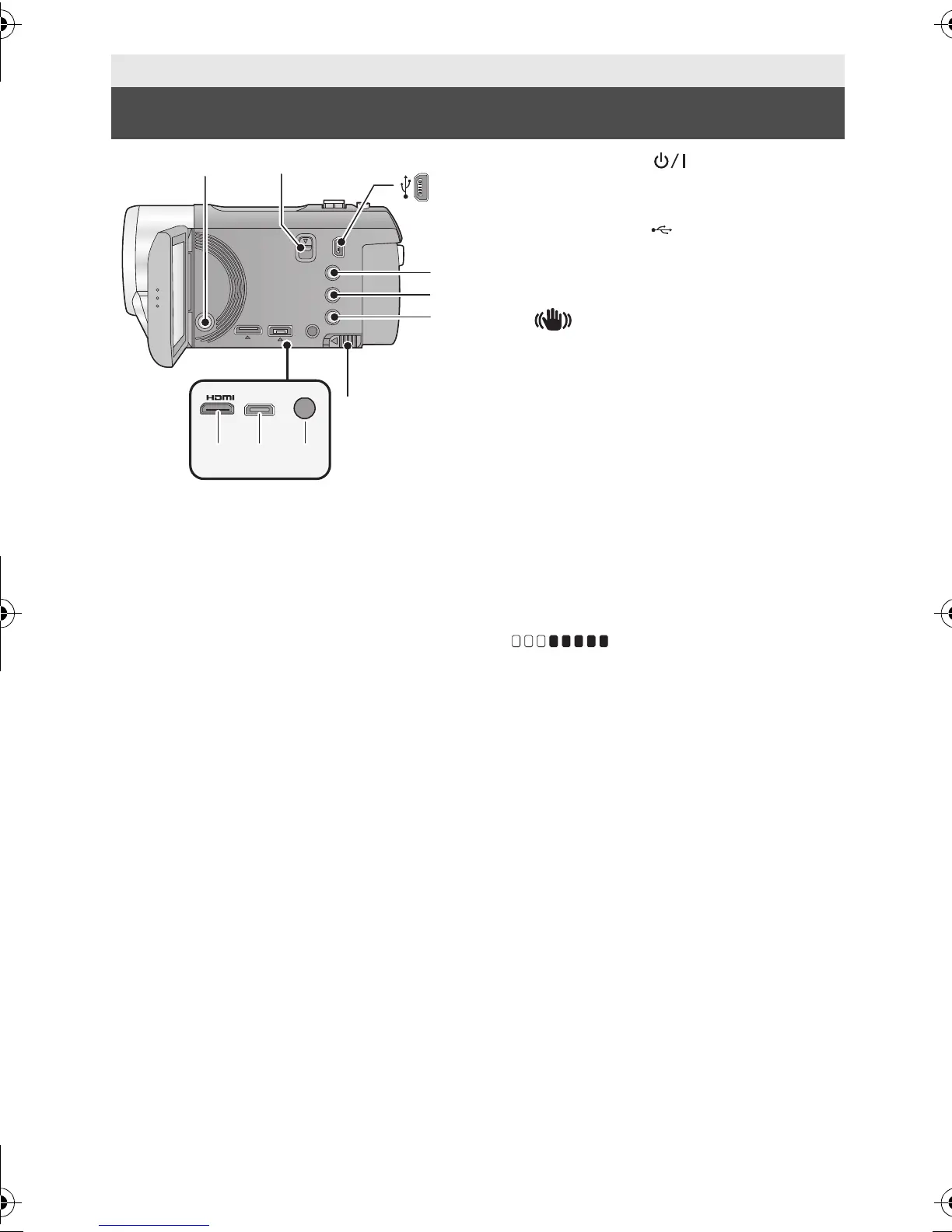
1 Power button [ ] (l 24)
2 Shoe adaptor release lever
[SHOE ADAPTOR RELEASE] (l 157)
3 USB terminal [ ] (l 107, 112, 126)
4 Intelligent auto/Manual button
[iA/MANUAL] (l 34, 73)
5 Optical image stabilizer button
[ O.I.S.] (l 48)
6 1080/60p button [1080/60p] (l 49)
7 Battery release lever [BATT] (l 19)
8 HDMI mini connector [HDMI]
(l 96, 100)
9 AV multi connector [AV MULTI] (l 96,
115)
≥ Use the AV multi cable (only the supplied
cable).
10 Microphone terminal [MIC]
≥ A compatible plug-in powered microphone
can be used as an external microphone.
≥ Audio will be stereo (2 ch) with the
external microphone input.
≥ (Microphone input level
meter) is displayed when the external
microphone is connected. (l 67)
≥ When the unit is connected with the AC
adaptor, sometimes noise may be heard
depending on the microphone type. In this
case, please switch to the battery for the
power supply and the noise will stop.
Preparation
Parts identification and handling
HDC-SD90&TM90-P-VQT3J56_mst.book 16 ページ 2011年1月13日 木曜日 午前9時18分















 To Next Page