96
VQT3J56
≥ Use the AV multi cable (supplied) or HDMI mini cable (optional) and check the output
settings. (l 99)
≥ HDMI is the interface for digital devices. If you connect this unit to a HDMI compatible high
definition TV and then play back the recorded high definition images, you can enjoy them
in high resolution with high quality sound.
1 Connect this unit to a TV.
Advanced (Playback)
Watching Video/Pictures on your TV
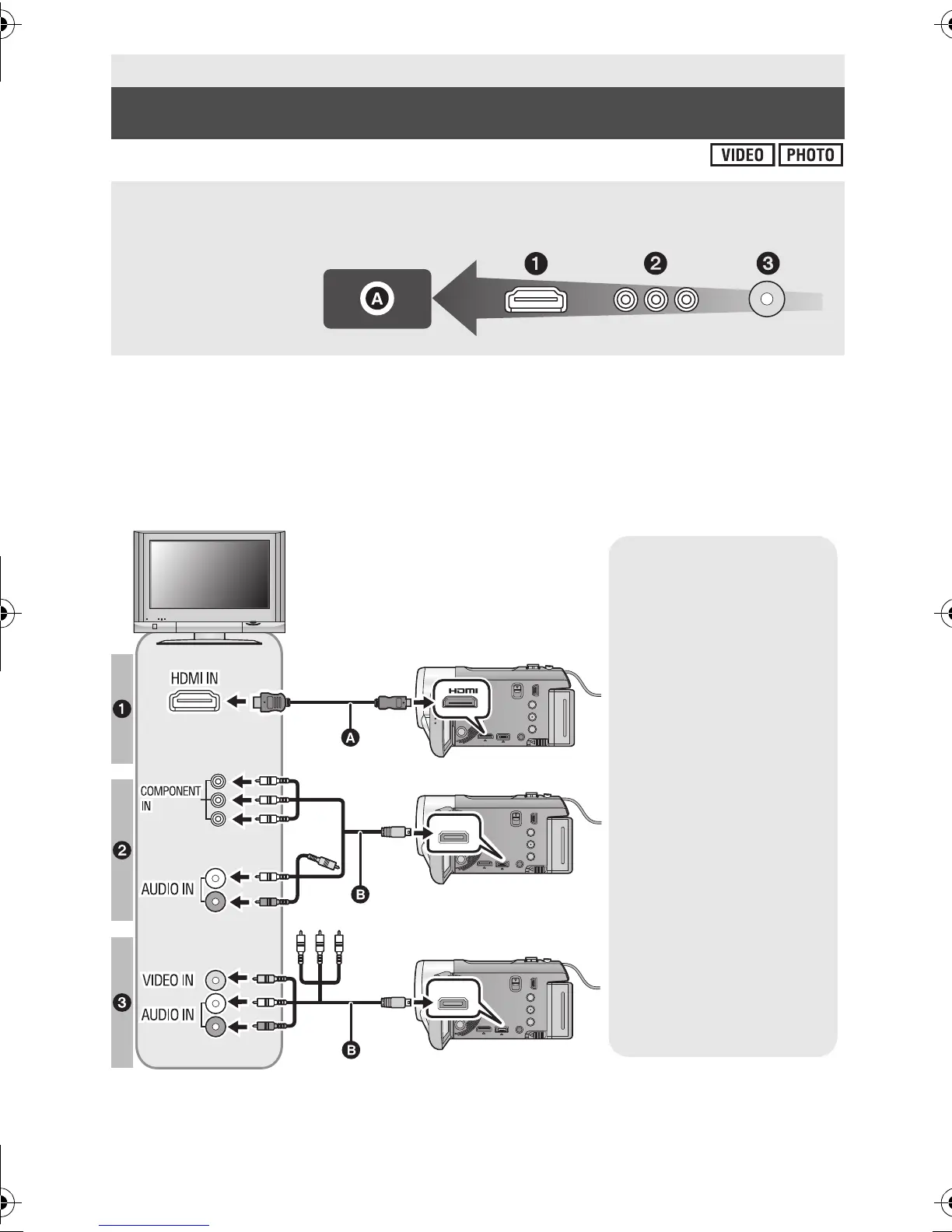
Confirm the terminals on your TV and use a cable compatible with the terminals.
Image quality may vary with the connected terminals.
A High quality
1 HDMI terminal
2 Component
terminal
3 Video terminal
AV MULTI
AV MULTI
A HDMI mini cable
(optional)
≥ Be sure to connect to the
HDMI terminal.
B AV multi cable
(supplied)
Picture quality
1 High definition images
when connecting to
HDMI terminal
2 High definition images
when connecting to
component terminal
compatible with 1080i
Standard images
when connecting to
component terminal
compatible with 480i
3 Standard images
when connecting to
video terminal
HDC-SD90&TM90-P-VQT3J56_mst.book 96 ページ 2011年1月13日 木曜日 午前9時18分















 To Next Page