26 VQT3A10
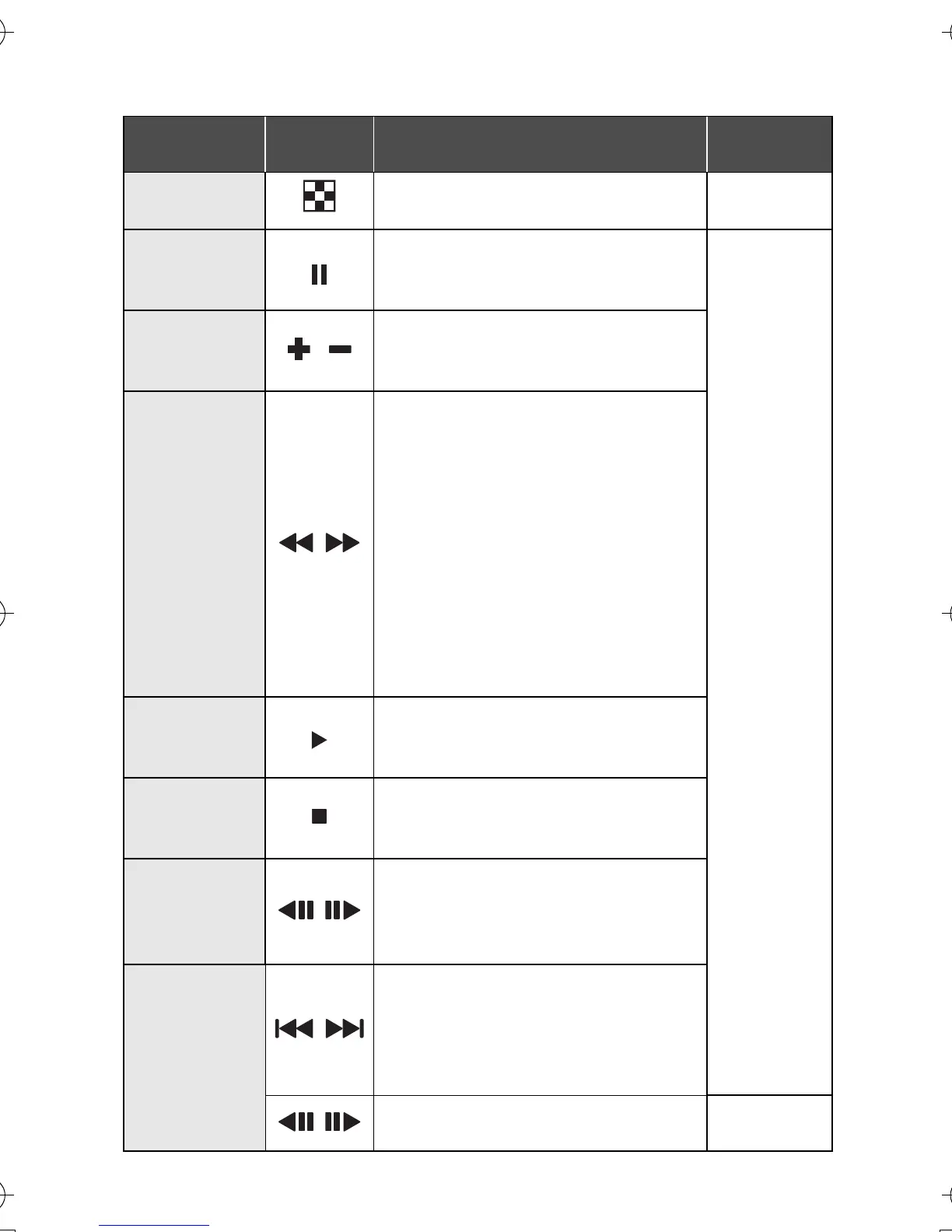
∫ Playback operation
Playback
operation
Icon Operating steps
Playback
data
Thumbnail
display
Press T during pause or stop.
(l 27)
Scenes/
still pictures
Pause
Press MENU/SET button or
playback button during
playback.
Scenes
Volume
adjustment
/
Press T or W during playback.
T: Increases the volume
W: Decreases the volume
Fast
forward/
rewind
playback
/
Continue pressing 1 (fast
forward playback) or 2
(rewind playback) during
playback or pause.
≥ During fast forward/rewind
playback, a playback bar
showing the playback position
is displayed.
≥ It will play back at a speed of
5k only while being pressed.
Once it is released, scenes will
be played back normally.
Playback
Press MENU/SET button or
playback button during pause
or stop.
Stop
Press W during pause.
≥ It will return to the beginning of
the scene.
Frame-by-
frame
playback
/
With the playback paused,
press 1 (Frame-by-frame
playback) or 2 (Reverse
frame-by-frame playback).
To the next
(previous)
scenes/still
pictures
/
Press 1 or 2 during playback
or stop.
≥ If 2 is pressed during
playback, it will go into stop
mode.
/
Press 1 or
2 during
playback.
Still
pictures
HM-TA1EP_EB_GC-VQT3A10_mst.book 26 ページ 2010年7月14日 水曜日 午後5時5分


 To Next Page