EasyManua.ls Logo

Panasonic KX-TCA175 - Page 32

Panasonic KX-TCA175
90 pages
Print Icon
To Next Page IconTo Next Page
To Previous Page IconTo Previous Page
Loading...
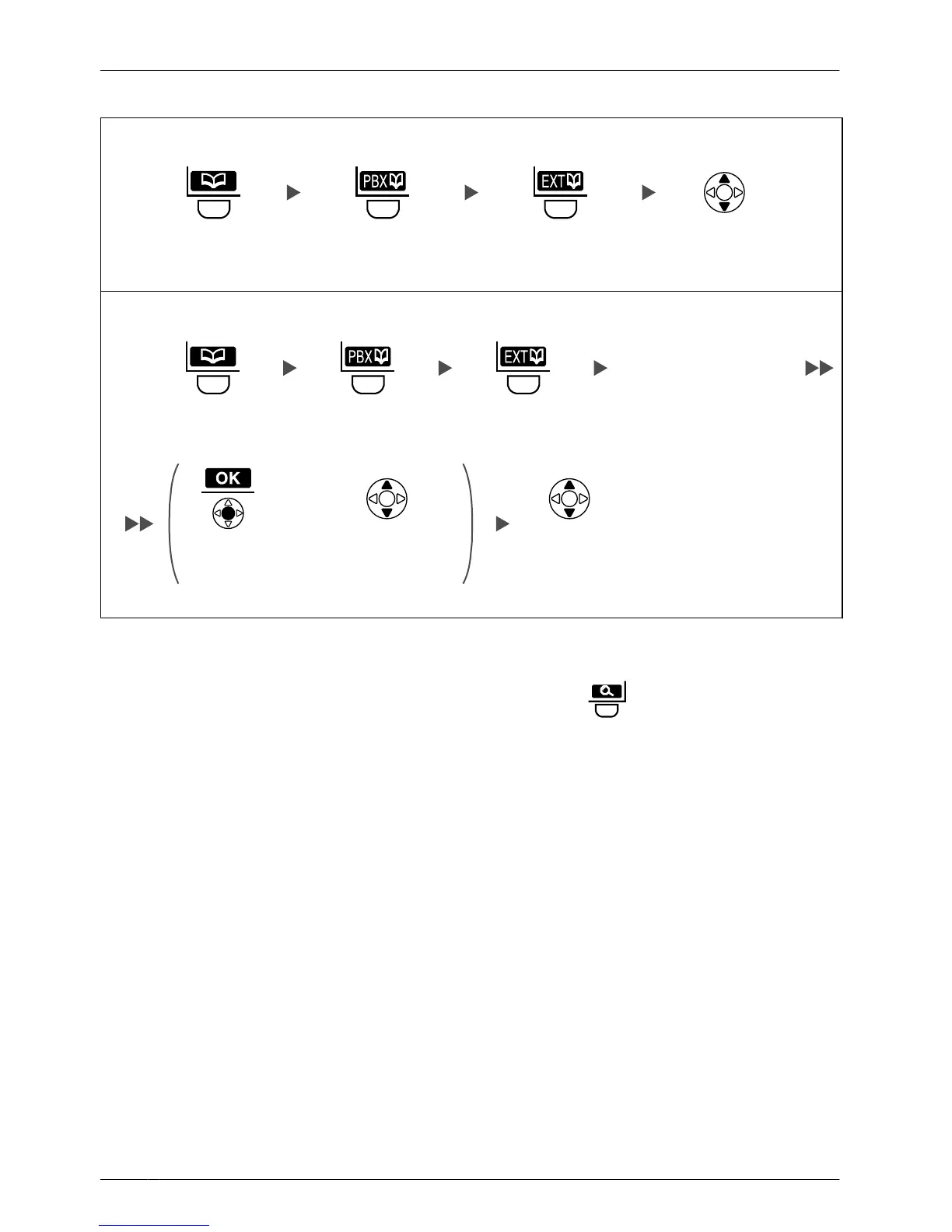
PBX Extension Phonebook
Scrolling through all items
Press the left
soft key.
Press the left
soft key.
Press the left
soft key.
Press Up or Down
repeatedly.
Searching by name or first character(s) of name
Press the left
soft key.
Enter name or
the first character(s)
of the desired name.
OR
Press the left
soft key.
Press the left
soft key.
Press
Up or Down.
Select the
desired item.
(if required)
Press Centre.
• To enter characters, see page 55.
•
While an item is displayed you can:
– Return to the "<Enter Name>" display by pressing
, then search for another
item.
– Search for another item by pressing the dial key that corresponds to the letter you
are searching for. If there is no entry that corresponds to the letter you selected, the
next entry will be displayed.
32
Operation

Table of Contents