EasyManua.ls Logo

Panasonic KX-TCA175 - User Manual

Panasonic KX-TCA175
90 pages
Print Icon
To Next Page IconTo Next Page
Loading...
Model No.
KX-TCA175
Operating Instructions
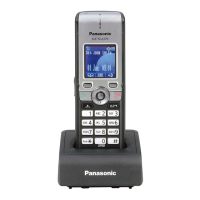
DECT Portable Station
Thank you for purchasing a Panasonic DECT Portable Station.
Please read this manual carefully before using this product and save this manual for
future use.
Please use only the battery provided and charge the battery for about 7 hours before
using the handset for the first time.
Note:
In this manual, the suffix of each model number is omitted unless necessary.

Table of Contents

Questions and Answers

  • D
    dixonrichardAug 17, 2025
    Why my Panasonic Telephone handset does not work?
    • W
      William McintoshAug 17, 2025
      Your Panasonic Telephone handset might not be working because the battery is drained. In this case, charge the battery fully. Alternatively, the power might be off. Turn it on or re-insert the battery and try again.
  • R
    Robert DudleyAug 20, 2025
    What to do if I cannot make or receive calls on my Panasonic KX-TCA175 Telephone?
    • R
      Robert WalkerAug 20, 2025
      If you're unable to make or receive calls on your Panasonic Telephone, it could be because the handset is out of range or the CS is busy. Try moving closer to the CS or try again later. It's also possible that the radio channel is busy, or a radio communication error occurred; in this case, try again later.
  • J
    jeremysmithAug 23, 2025
    How to fix a Panasonic KX-TCA175 Telephone that doesn't ring?
    • B
      Brandon McdanielAug 23, 2025
      If your Panasonic Telephone isn't ringing, the ringer volume might be set to 'Off'. Adjust the ringer volume level to resolve this.
  • N
    Nicholas SmithAug 26, 2025
    How to fix Panasonic KX-TCA175 when it cannot dial?
    • I
      itorresAug 26, 2025
      If your Panasonic Telephone cannot dial, it may be due to several reasons. One possibility is that the key lock mode is on. To cancel this mode, press for about 2 seconds. Another reason could be that the radio channel is busy or a radio communication error occurred, in which case you should try again later. Also, the number that you dialled may be restricted by the PBX.
  • P
    Patricia PenaAug 28, 2025
    Why does my Panasonic KX-TCA175 Telephone still beep and show 'needs to be charged' after charging for 7 hours?
    • H
      harperandrewAug 28, 2025
      If your Panasonic Telephone beeps and flashes 'needs to be charged' after a 7-hour charge, the battery charge contacts may be dirty. Clean the battery charge contacts without damaging them and charge once more. Alternatively, it may be time to replace the battery with a new one.
  • A
    anna22Aug 31, 2025
    How to reduce noise on my Panasonic KX-TCA175?
    • J
      Joseph RobertsAug 31, 2025
      To reduce noise on your Panasonic Telephone, place the handset and CS away from other electrical appliances and move closer to the CS.
  • T
    Teresa DurhamSep 3, 2025
    Why is the charge indicator flashing red rapidly on my Panasonic KX-TCA175?
    • A
      Austin TuckerSep 3, 2025
      If the charge indicator on your Panasonic Telephone is flashing red rapidly, the charger is not connected properly. Make sure the battery is inserted properly and set the handset in the charger correctly.
  • J
    Jennifer WilliamsSep 5, 2025
    What does it mean when my Panasonic KX-TCA175 displays 'No Service' and beeps?
    • T
      tyrone88Sep 6, 2025
      If your Panasonic Telephone displays 'No Service' and you hear beep tones, it indicates that the handset is out of range. Move closer to the CS or try again later. It is also possible that the CS or PBX is out of service.
  • S
    Steven MatthewsSep 8, 2025
    What to do if my Panasonic Telephone stops working during operation?
    • D
      Daniel CookSep 8, 2025
      If your Panasonic Telephone stops working during operation, turn the handset off, then turn it back on. You can also try re-inserting the battery.
  • R
    Ricky RobinsonSep 12, 2025
    Why is my headset not working with my Panasonic Telephone?
    • R
      Ronald CastilloSep 12, 2025
      If your headset isn't working with your Panasonic Telephone, make sure the headset tone setting is set to 'On'. Also, ensure that the headset jack is connected properly.

Summary

Before Initial Use

Accessories (included)

Lists all items included in the package, such as AC adaptor, charger, battery, and belt clip.

Installation

Details the steps for installing the product, including battery and charger connection.

Charging the Battery

Explains how to charge the battery and the expected charging time before first use.

Setting the Password

Details the procedure for setting a 4-digit handset password for security features.

Before Operating the Handset

Location of Controls

Identifies and explains the function of various buttons and indicators on the handset.

Key Lock

Explains how to lock and unlock the handset keys to prevent accidental use.

Selecting the Display Language

Guide on how to choose the language for the handset display.

Editing the Names of the Flexible Keys

Steps to customize the labels for the flexible keys on the handset.

Adjusting the Ringer Volume

How to set the volume for incoming calls.

Adjusting the Receiver;Speaker;Headset Volume

How to adjust audio volume during a conversation for different audio outputs.

Display

Details the icons, status indicators, and information shown on the handset display.

Soft Keys

Explains the functions assigned to the soft keys and their context-dependent behavior.

Operation

Operation Outline

Provides a general overview of navigating menus and using functions via the display and keys.

Function Menus

Explains how to access main and sub menus to configure handset settings and features.

Function Keys

Details the functions assigned to specific keys and how to activate them.

Flexible Keys

Explains the purpose of flexible keys and how their colors indicate line status.

Making Calls

Provides instructions on how to make calls to extensions, outside parties, and via phonebook/logs.

Searching for an item stored in the Phonebook

Step-by-step guide on how to search for entries within the handset phonebook.

PBX System Phonebook

Instructions for searching items in the PBX System Phonebook by name or character.

Receiving Calls

Explains how to answer intercom calls, outside calls, group calls, and use call pickup.

Caller ID

Details how Caller ID information is displayed and managed on the handset.

During a Conversation

Instructions on how to transfer calls, hold calls, retrieve calls, and manage three-way conferences.

Useful Features

Covers various useful features including Call Forwarding, Do Not Disturb, Call Waiting, and Paging.

Making Use of the Voice Mail Service

Guide on how to listen to and leave messages using the voice mail service.

Using the Handset Phonebook

Handset Phonebook Overview

Information on storing contacts, setting ring patterns, and security features for the handset phonebook.

Private Ring

How to organize entries into private ring categories and set custom ring patterns.

Storing an Item in the Handset Phonebook

Step-by-step guide on how to store a new entry in the handset phonebook.

Editing a Stored Item

Instructions on how to edit existing entries in the handset phonebook.

Assigning Hot Keys

Guide on assigning phonebook entries to hot keys for quick dialing.

Entering Characters

Explains how to input characters and digits using the handset keypad and character modes.

Locking the Handset Phonebook

Instructions on how to lock the phonebook to prevent unauthorized access.

Deleting Stored Items

Deleting Items from Handset Phonebook

How to delete individual or all entries from the handset phonebook.

Configuring Handset Settings

Changing the Initial Settings

Guide on how to navigate menus to customize various handset settings.

Handset Setting Menu Layout

Provides a hierarchical view of the main and sub-items available within the handset settings menu.

Incoming Option

Configuration options for ringer volume, ringer type, memo alarm, power save, and headset ringer.

Talk Option

Settings related to speaker, receiver, headset volume, and talk-on-charger options.

Answer Option

Configuration for answering calls via any key, quick answer, and auto answer.

Key Option

Settings for function keys, soft keys, and key lock types.

Display Option

Options for display language, backlight, LCD contrast, standby display, category names, and guidance.

System Option

Options for registering/cancelling handsets, selecting bases, system lock, and changing PIN.

Other Option

Options for changing password, line access codes, and resetting handset settings.

Memo Alarm Setting

How to set up and configure memo alarms with different modes and settings.

Troubleshooting and Error Messages

Troubleshooting Common Issues

Common problems like handset not working, not ringing, or not dialing, with possible causes and solutions.

Error Messages

Lists various error messages, their possible causes, and recommended solutions.

Important Information

Battery Information and Care

Details operating times, battery warnings, and cleaning contacts for optimal battery performance.

Important Safety Instructions

General safety precautions to reduce the risk of fire, electric shock, and injury.

For Your Safety

Warnings and precautions related to product installation, modification, and usage.

Ni-MH Battery Usage and Charging

Important information regarding the correct use, charging, and potential "memory effect" of Ni-MH batteries.

For Best Performance

Guidance on operating range, noise interference, and optimal handset holding for call quality.

Product Repair, Disposal, and Return

Important notices regarding data backup, privacy, and procedures for repair, disposal, or return.

RF Specification

Technical specifications related to radio frequency, including band, carriers, bit rate, and output power.

System Requirements

Lists compatible CS models, PBX models, and required PBX software versions for this handset.

Declaration of Conformity

Declaration of compliance with R&TTE Directive for CE and UK models, with a link for conformity declarations.

Panasonic Communications Co., Ltd.

Copyright Information

Copyright notice for the material, specifying usage rights and prohibitions.

Panasonic KX-TCA175 Specifications

General IconGeneral
TypeCordless Phone
Talk TimeUp to 10 hours
Standby TimeUp to 120 hours
Battery TypeNi-MH
DisplayLCD
RangeUp to 300m outdoors, 50m indoors
Caller IDYes
Call WaitingYes
SpeakerphoneYes
IntercomYes
Number of Handsets1
Answering MachineNo
Color OptionsBlack
Weight140 g (with battery)

Related product manuals