EasyManua.ls Logo

Panasonic KX-TCA175 - Before Operating the Handset; Location of Controls

Panasonic KX-TCA175
90 pages
Print Icon
To Next Page IconTo Next Page
To Previous Page IconTo Previous Page
Loading...
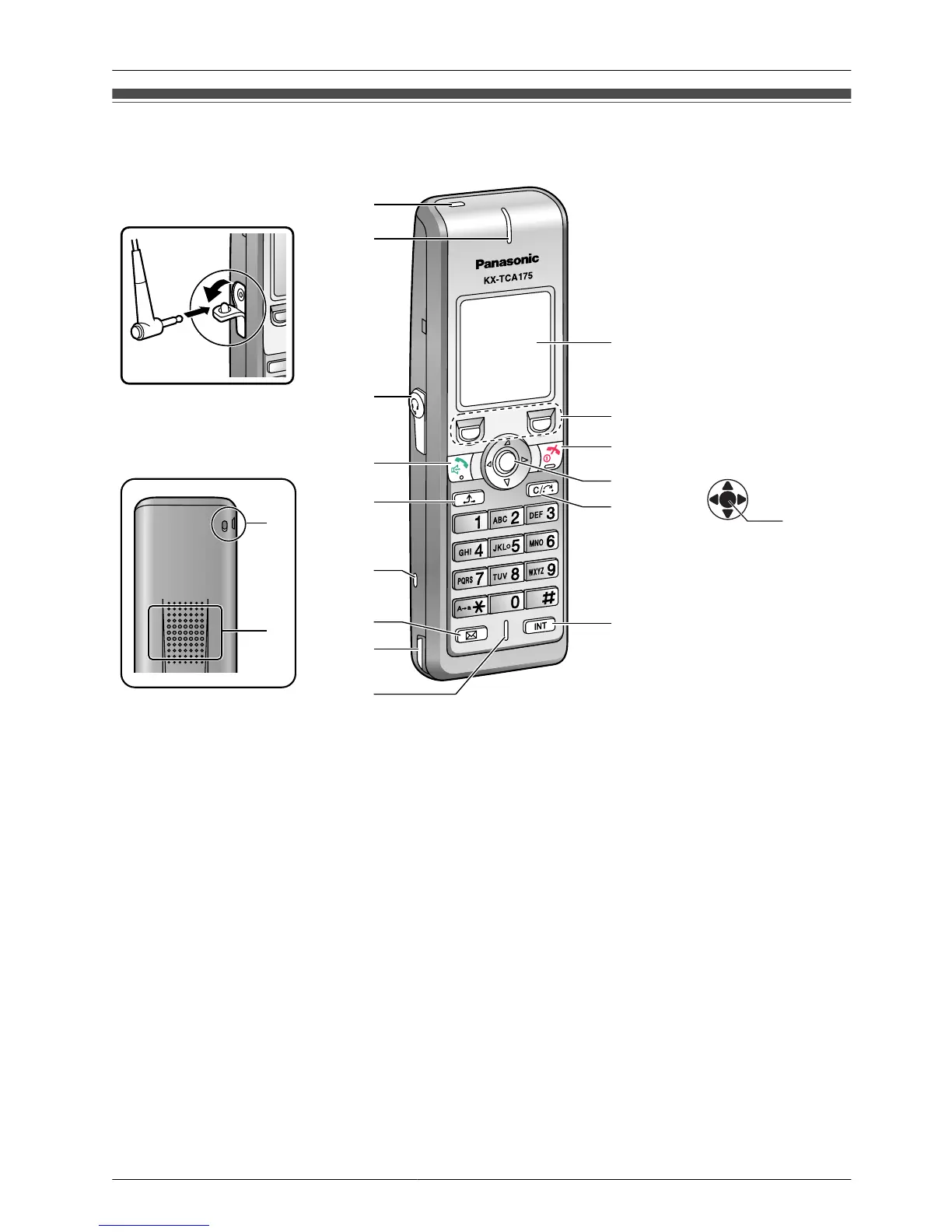
Location of Controls
The headset is an optional
accessory.
Open the cover.
C
D
E
G
F
H
I
J
K
L
M
O
N
A
B
L Press POWER for
more than 2 seconds.
[Power On]
Standby mode
[Power Off]
Blank display
M
Up
Down
Left
Right
Centre
You can use the
Navigator Key to move
the cursor in the
desired direction.
Pressing down the
centre of the key
confirms a selection.
[Back View]
P
F
A Ringer/Charger Indicator
B Receiver
C Headset Jack
D TALK/SP-PHONE (Speakerphone)
Used to make or answer calls, or toggle between the Receiver/Hands-free
*1
mode
during a conversation.
E HOLD
Used to place a call on Hold.
F Strap holes
Used to attach phone straps and similar items.
G Message
Used to leave a message waiting indication, or to call back the party who left a
message waiting indication.
H Charge Contact
9
Before Operating the Handset

Table of Contents

Related product manuals