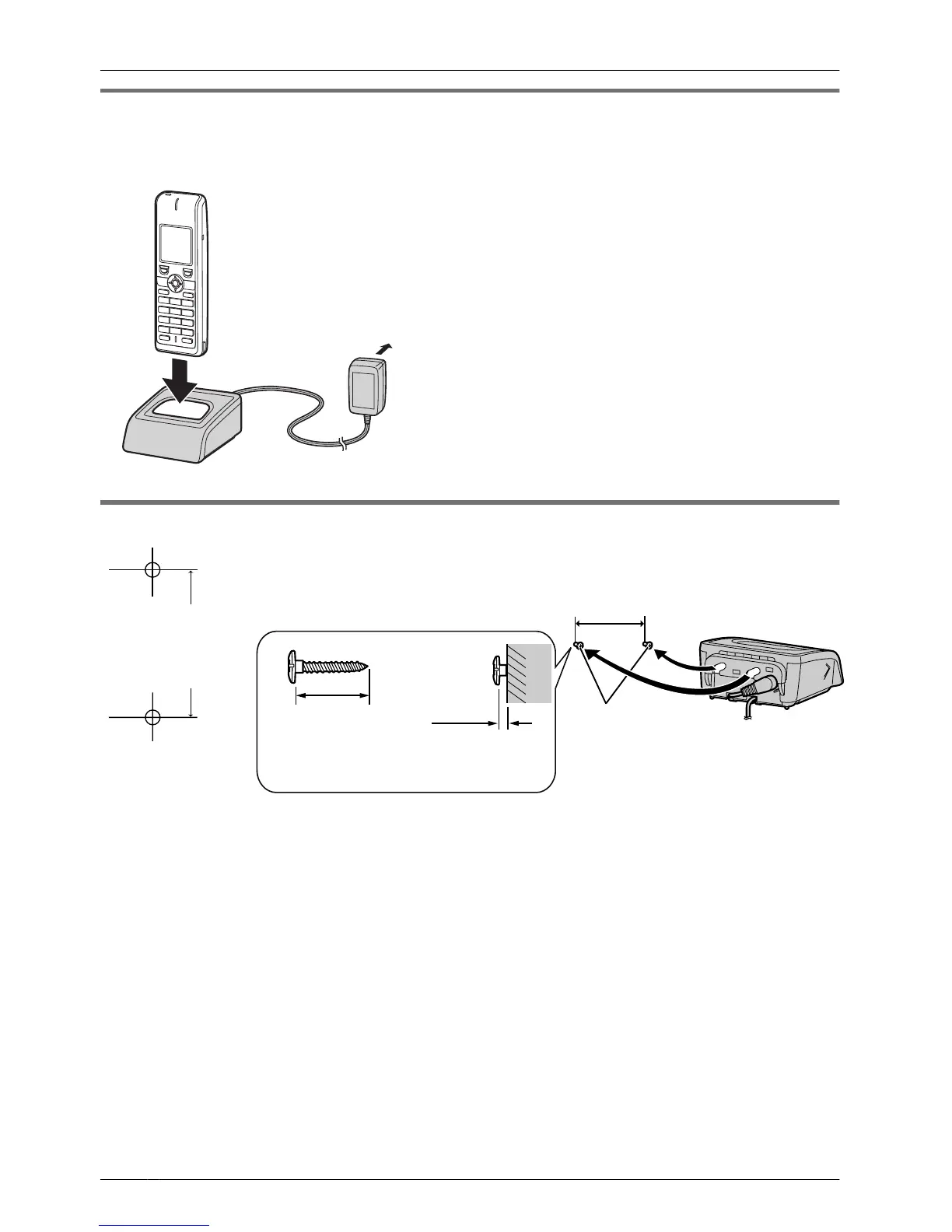
Charging the Battery
At the time of shipment, the battery is not charged. Please charge the battery for about
7 hours before using the handset for the first time.
• When the battery has been
completely charged, the charge
indicator will change from red to
green. For more information, see
"Battery Information" on page 78.
• It is normal for the handset and
charger to feel warm while the
battery is charging.
• Keep devices sensitive to magnetic
fields away from the charger.
• Use only the included charger.
Charger Wall Mounting
1. Install the two screws in the wall, spacing them 25 mm apart.
Screws
25 mm
20 mm or longer
Space
(2 mm)
• Recommended screw size is
M4 x 20.
2. Mount the charger securely on the wall.
• When you print out this page for wall mounting purposes, the printed output distance
may
deviate slightly from the indicated measurement. In this case, use the measurement
indicated. When mounting the charger, ensure that the correct screws are used for the
type of wall.
• Make sure that the wall that the charger will be attached to is strong enough to support
the total weight of the handset and charger (approx. 190 g). If not, it is necessary for the
wall to be reinforced.
• When this product is no longer in use, make sure to detach it from the wall.
• When inserting screws, avoid pipes and electrical cables, etc, that may be present/
buried.
• The screw heads should not be flush to the wall.
• Certain types of wall may require plugs to be anchored in the wall before the screws are
inserted.
6
Before Initial Use



 To Next Page