Using the Telephone
Helpline Tel.No. : U.K. 08700 100 076 R.O.I. 01289 8333 5
Location of Controls
Icon Displays Flashes
Î
Ï
Û
Ú
Ò
Ô
[X]
Í
[A]
Within range of a base unit
Intercom mode
Making or answering calls
Less than 30% battery capacity
30% to 50% battery capacity
50% to 100% battery capacity
In Direct Call mode
In Call Prohibition mode
Key Lock ON
SMS mail icon
Answering System ON
Out of range
Paging or another unit pages the
handset
Outside call is received
Û - Recharge battery
Ò - Fully charged
A SMS mail (text message) has
arrived. If flashing quickly, SMS
memory is full
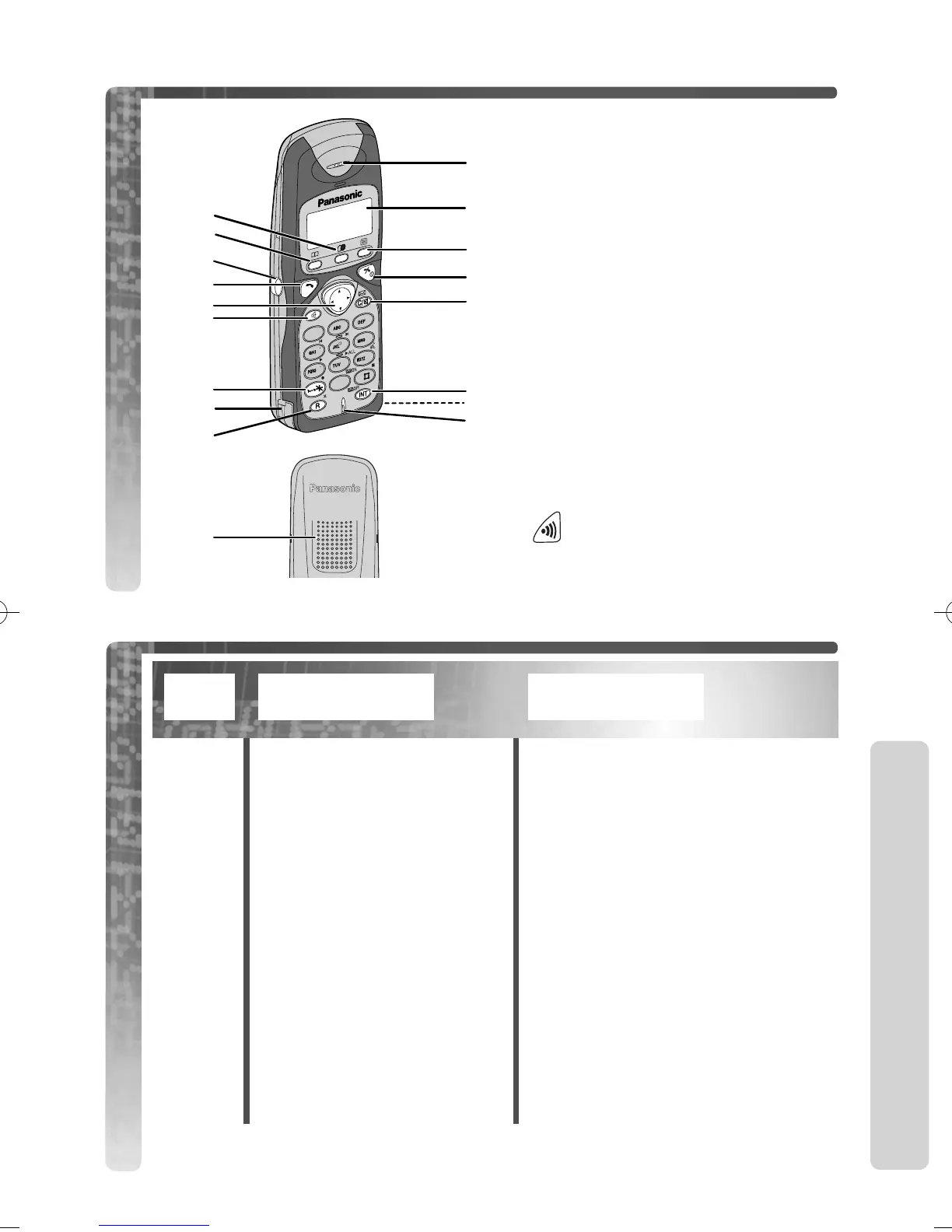
Handset controls
# - Receiver
$ - Display
% - Function/OK Button
& - Talk Off/Power Button
' - Clear/Mail/Mute Button
( - Intercom Button
) - Charge Contact
* - Microphone
+ - Redial/Pause Button
, - Phonebook Button
- - Headset Jack
. - Talk Button
/ - Navigator Key
0 - Speakerphone Button
1 - Upper / Lower Case Button
2 - Charge Contact
3 - Recall Button
4 - Speaker
Base unit controls
-Page button
.












 To Next Page