EasyManua.ls Logo

Panasonic KX-TG6071 - User Manual

Panasonic KX-TG6071
56 pages
Print Icon
To Next Page IconTo Next Page
Loading...
This unit is compatible with Caller ID. To use this feature, you must
subscribe to the appropriate service offered by your telephone service
provider.
Please read these Operating Instructions before using the unit and save for
future reference.
For assistance, visit our website:
http://www.panasonic.com/help for customers in the U.S.A. or Puerto
Rico.
Charge the handset battery for 7 hours before initial use.
Operating Instructions
5.8 GHz Expandable Digital Cordless Answering System
Model No. KX-TG6071
with 2 Handsets
Model No.
KX-TG6072
with 3 Handsets
Model No.
KX-TG6073
5.8 GHz Digital Cordless Answering System
with 4 Handsets
Model No.
KX-TG6074
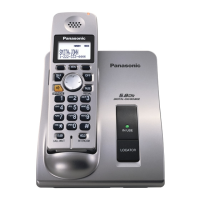
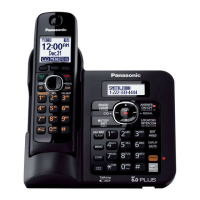
Model shown is KX-TG6071.
TG607X.book Page 1 Tuesday, December 12, 2006 1:56 PM


Other manuals for Panasonic KX-TG6071

Questions and Answers

  • A
    Alicia SanchezSep 23, 2025
    Why I cannot operate the answering system on my Panasonic Answering Machine?
    • B
      Bobby WintersSep 23, 2025
      If you cannot operate the answering system of your Panasonic Answering Machine, someone might be operating the answering system or someone is talking on a conference call. Try again later.
  • Z
    zsmithAug 23, 2025
    How to fix a blank display on a Panasonic Answering Machine?
    • P
      Pamela OwensAug 25, 2025
      If your Panasonic Answering Machine handset display is blank, make sure the battery is properly installed and fully charged.
  • M
    Martin GrossAug 25, 2025
    Why is my Panasonic Answering Machine not ringing?
    • M
      Matthew JohnsonAug 26, 2025
      If your Panasonic Answering Machine handset or base unit does not ring, the ringer volume might be turned off. Adjust it.
  • J
    John GravesAug 27, 2025
    Why I cannot make a call on my Panasonic Answering Machine?
    • N
      Nicholas WhiteAug 27, 2025
      If you cannot make a call on your Panasonic Answering Machine, the dialing mode may be set incorrectly. Change the setting. Also, the base unit or another handset might be in use, so try again later.
  • A
    Angela HayesAug 27, 2025
    Why doesn't my Panasonic Answering Machine show the caller's name?
    • D
      Debra DominguezAug 27, 2025
      If the handset does not display the caller’s name and/or phone number on your Panasonic Answering Machine, you may not have subscribed to Caller ID service, so contact your telephone service provider to subscribe. If your unit is connected to any additional telephone equipment such as a Caller ID box or cordless telephone line jack, disconnect the unit from the equipment and plug the unit directly into the wall jack. Other telephone equipment may be interfering with this unit. Disconnect the other equipment and try again. The caller requested not to send caller information. Generally, caller information is displayed from the 2nd ring.
  • C
    Christopher NicholsSep 16, 2025
    How to automatically edit caller ID numbers on my Panasonic Answering Machine?
    • J
      Jacqueline AguilarSep 16, 2025
      If the caller list/incoming phone numbers are not edited automatically on your Panasonic Answering Machine, the Caller ID number auto edit feature might be turned off. Turn it on and try again. You need to call back the edited number to activate Caller ID number auto edit.
  • S
    Shirley AdamsSep 13, 2025
    Why is Slow Talk not working on my Panasonic Answering Machine?
    • K
      Kelly PriceSep 13, 2025
      If the Slow Talk feature does not work on your Panasonic Answering Machine, you cannot use the Slow Talk feature if you are on a conference call.
  • J
    Jack MooreSep 14, 2025
    Why doesn't my Panasonic Answering Machine announce caller names?
    • O
      Omar MorrisSep 15, 2025
      If the handset or base unit of your Panasonic Answering Machine does not announce the displayed caller names or phone numbers, the handset or base unit’s ringer volume might be turned off, so adjust it. Also, the Talking Caller ID feature might be turned off, so turn it on. If the ring count for the answering system is set to “2” or “Toll saver”, select a different setting. If the base unit and another handset are having an intercom call, your handset does not announce caller information.
  • M
    michaelmitchellSep 5, 2025
    What to do if handset rings while programming my Panasonic Answering Machine?
    • Z
      zkellySep 6, 2025
      If, while programming your Panasonic Answering Machine, the handset starts to ring, a call is being received. Answer the call and start again after hanging up.
  • J
    johnwilsonSep 3, 2025
    Why I cannot program items on my Panasonic Answering Machine?
    • C
      chaynesSep 3, 2025
      If you cannot program items on your Panasonic Answering Machine, programming is not possible while either the base unit or another handset is being used. Try again later.

Summary

Product Introduction and Features

Key Product Features

Highlights special features like Handset voice enhancer, Talking Caller ID, and Slow Talk.

Safety and Performance Guidelines

Important Safety Instructions

Provides essential safety precautions to reduce risks of fire, electric shock, or injury.

Safety Warnings and Precautions

Details specific warnings for installation, battery handling, and medical considerations.

Getting Started: Preparation

Setting Up the Base Unit

Instructions for connecting the AC adaptor and telephone line cord to the base unit.

Setting Up the Handset

Instructions for connecting the AC adaptor to the handset charger.

Battery Installation and Charging

Steps for installing the battery and charging the handset before initial use.

Making and Answering Calls

Making Calls

Covers using the handset, speakerphone, adjusting volume, and redial list.

Answering Calls and Auto Talk

Steps to answer calls using the handset or base unit, including auto talk feature.

Phonebook Operations

Adding and Finding Phonebook Entries

Instructions for adding, editing, and searching for contacts in the phonebook.

Caller ID Service

Using Caller ID Features

Details on displaying caller information, missed calls, and custom name display.

Programming and Customization

Programmable Settings Overview

Introduces customization options accessible via menus and direct commands.

Direct Command Programming

Instructions for programming features using specific code sequences.

Answering System Functions

Answering System Basics

Overview of the answering system's capabilities and important usage notes.

Listening to Messages (Base Unit)

How to access and manage recorded messages using the base unit.

Listening to Messages (Handset)

Accessing and managing messages via the handset, including voice guidance.

Remote Operation and Voice Guidance

Operating the answering system remotely via phone and using voice prompts.

Remote Command Operations

Using dial keys for direct control of the answering system remotely.

Voice Mail Service

Using Voice Mail Service

Overview of the provider's Voice Mail system and its integration.

Listening to Voice Mail Messages

How to access new Voice Mail messages.

Multi-unit Operation

Intercom Calls

Making and answering intercom calls between handsets and the base unit.

Useful Information

Error Message Troubleshooting

Lists common error messages and their solutions.

General Troubleshooting

Resolves common issues like the unit not working or no dial tone.

Panasonic KX-TG6071 Specifications

General IconGeneral
BrandPanasonic
ModelKX-TG6071
CategoryCordless Telephone
LanguageEnglish

Related product manuals