EasyManua.ls Logo

Panasonic KX-TG6021C - User Manual

Panasonic KX-TG6021C
56 pages
Print Icon
To Next Page IconTo Next Page
Loading...
This unit is compatible with Call Display. To use this feature, you must
subscribe to the appropriate service offered by your telephone service
provider.
Please read these Operating Instructions before using the unit and save for
future reference.
For assistance, please call 1-800-561-5505 or visit us at
www.panasonic.ca
Charge the handset battery for 7 hours before initial use.
Operating Instructions
5.8 GHz Expandable Digital Cordless Phone
Model No. KX-TG6021C
with 2 Handsets
Model No.
KX-TG6022C
with 3 Handsets
Model No.
KX-TG6023C
5.8 GHz Expandable Digital Cordless
Answering System
Model No. KX-TG6031C
Model No. KX-TG6051C
with 2 Handsets
Model No.
KX-TG6032C
Model No. KX-TG6052C
with 3 Handsets
Model No.
KX-TG6033C
Model No. KX-TG6053C
5.8 GHz Digital Cordless
Answering System
with 4 Handsets
Model No.
KX-TG6034C
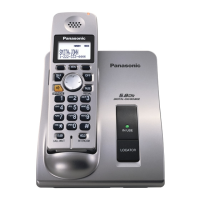
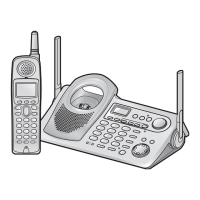
Model shown is KX-TG6021C.
TG602X_603X_605XC(e).book Page 1 Tuesday, December 26, 2006 1:55 PM

Questions and Answers

  • K
    kaitlyn59Sep 23, 2025
    Why can't I operate the answering system on my Panasonic KX-TG6021C?
    • J
      Jill WebsterSep 23, 2025
      Someone might be operating the answering system. If someone is on a conference call, you cannot operate the answering system; try again later.
  • D
    Daniel JacksonAug 23, 2025
    What to do if I cannot hear a dial tone on my Panasonic Cordless Telephone?
    • D
      Daniel BrownAug 23, 2025
      Check that the telephone line cord is properly connected. If it is, disconnect the unit and connect a known working telephone. If the working telephone operates correctly, the unit needs repair. If not, contact your telephone service provider.
  • O
    Oscar JohnsAug 25, 2025
    Why does my Panasonic KX-TG6021C handset not ring?
    • W
      walljamesAug 25, 2025
      The ringer volume might be turned off. Adjust the ringer volume.
  • C
    campbelldakotaAug 26, 2025
    Why can't I program items on my Panasonic KX-TG6021C?
    • R
      Ryan LeeAug 27, 2025
      Programming is not possible while the base unit or another handset is in use. Try again later.
  • E
    ehahnAug 27, 2025
    Why is there static or sound cutting in and out on my Panasonic Cordless Telephone?
    • M
      Miss Kristen BlanchardAug 27, 2025
      Move the handset and base unit away from other electrical appliances. Try moving closer to the base unit. You can also turn on the clarity booster feature. If you have DSL service, connect a noise filter between the base unit and the telephone line jack.
  • J
    john27Sep 17, 2025
    Why can't I dial the phone number edited in the caller list on my Panasonic KX-TG6021C Cordless Telephone?
    • K
      Kelsey GrossSep 17, 2025
      The phone number you dialed might have an incorrectly edited pattern (for example, the long distance "1" or the area code is missing). Edit the phone number with another pattern.
  • R
    Richard RichardsonSep 14, 2025
    Why can't I page the base unit on my Panasonic KX-TG6021C Cordless Telephone?
    • I
      iibarraSep 14, 2025
      The base unit is in use. Try again later.
  • C
    Christina ClarkSep 15, 2025
    Why does the Slow Talk feature not work on my Panasonic KX-TG6021C Cordless Telephone?
    • K
      Katherine PerrySep 15, 2025
      If you are on a conference call, you cannot use the Slow Talk feature.
  • D
    dwoodSep 6, 2025
    What to do if I can't set the alarm on my Panasonic KX-TG6021C Cordless Telephone?
    • E
      Erik RodriguezSep 6, 2025
      You must first set the date and time in order to set the alarm. If that doesn't work, the handset may have lost communication with the base unit; move closer and try again.
  • K
    Karen AndersonSep 3, 2025
    Why does my Panasonic KX-TG6021C unit not record new messages?
    • J
      Julie HernandezSep 3, 2025
      The answering system might be off, so turn it on. The message memory might be full, so erase unnecessary messages. If you subscribe to Voice Mail, messages are recorded by your telephone service provider, not your telephone.

Panasonic KX-TG6021C Specifications

General IconGeneral
TypeCordless Telephone
Number of Handsets1
Frequency2.4 GHz
Caller IDYes
RangeUp to 1000 feet
DisplayLCD
SpeakerphoneYes
Call WaitingYes
Answering MachineNo
Backlit DisplayYes
Phonebook Capacity50
IntercomYes
ExpandableUp to 6 handsets
Power SourceRechargeable battery

Related product manuals