EasyManua.ls Logo

Panasonic KX-TG7621 - Page 41

Panasonic KX-TG7621
100 pages
Print Icon
To Next Page IconTo Next Page
To Previous Page IconTo Previous Page
Loading...
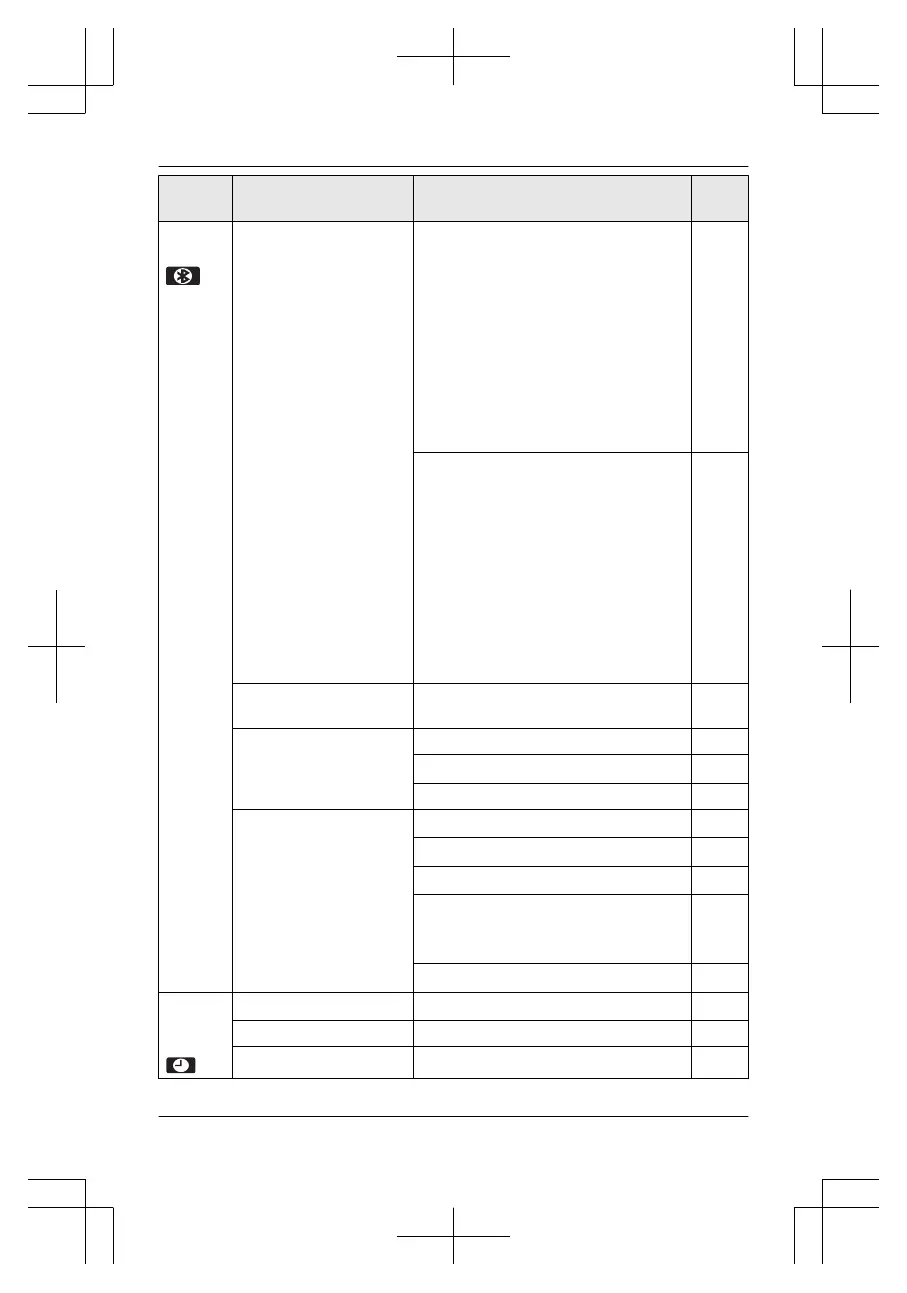
Main
me
nu
Sub-menu 1 Sub-menu 2 Page
Blueto
ot
h
Link to cell
1:00 Add new device
*
2
(for CELL 1)
20
C
onnect
*
1
/Disconnect
*1
22
R
inger volume
(
Handset/Base unit
*1
)
R
inger tone
(Handset)
S
elect unit to ring
*
1
21
R
ing as cell (limited)
*
1
21
R
egistration 20
2
:00 Add new device
*
2
(for CELL 2)
20
C
onnect
*
1
/Disconnect
*1
22
R
inger volume
(
Handset/Base unit
*1
)
R
inger tone
(Handset)
S
elect unit to ring
*
1
21
R
ing as cell (limited)
*
1
21
R
egistration 20
P
honebook
tr
ansfer
57
Headset Add new device
58
Connect
*
1
/D
isconnect
*1
58
Registration
58
Settings
Auto connect
*
1
22
C
ell area code
*1
23
C
ell line only mode
*1
22
C
ell line select
Ha
ndset
Base unit
*1
23
Set PIN
*1
23
S
et
da
te &
time
Date and time
*
1
18
A
larm
50
Time adjustment
*
1
For assistance, please visit http://www.panasonic.com/help
41
Programming

Table of Contents

Related product manuals