EasyManua.ls Logo

Panasonic KX-TG7921E - User Manual

Panasonic KX-TG7921E
52 pages
Print Icon
To Next Page IconTo Next Page
Loading...
Operating Instructions
Model No. KX-TG7861E
KX-TG7862E
KX-TG7863E
KX-TG7864E
KX-TG7921E
KX-TG7922E
KX-TG7923E
Digital Cordless Answering System
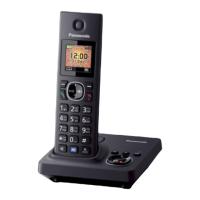
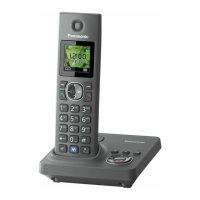
Model shown is KX-TG7861.
Before initial use, see “Getting Started”
on page 11.
Thank you for purchasing a Panasonic product.
Please read these operating instructions before using the unit and save them for
future reference.
Please access our online customer survey:
http://panasonic.net/pcc/tel/q
TG78xx_79xxE(en)_0407_ver112.pdf 1 2015/04/07 11:32:50

Questions and Answers

  • L
    Lori RyanSep 8, 2025
    Why is caller information not displayed on my Panasonic KX-TG7921E Telephone Accessories?
    • C
      Christina TylerSep 8, 2025
      If caller information is not displayed on your Panasonic Telephone Accessories, you must subscribe to a Caller ID service. Also, if your unit is connected to any additional telephone equipment, remove it and plug the unit directly into the wall jack.
  • G
    grodriguezAug 23, 2025
    How to reset PIN on Panasonic KX-TG7921E?
    • C
      Crystal RichardsAug 23, 2025
      If you cannot remember the PIN for your Panasonic Telephone Accessories, change the PIN using the following method: 1 M N (right soft key) #132 2 *7000 3 Enter the new 4-digit base unit PIN. a MOKN 4 MbN: “Yes” a MOKN a MeN
  • D
    davidphillipsAug 25, 2025
    What to do if my Panasonic Telephone Accessories does not record new messages?
    • T
      Trevor HicksAug 25, 2025
      If your Panasonic Telephone Accessories unit does not record new messages, there are several possible reasons: * The answering system might be turned off. In this case, turn it on. * The message memory could be full, so you should erase unwanted messages. * The recording time may be set to “Greeting Only”, so you should change the setting.
  • H
    heatherburchAug 27, 2025
    How to fix Panasonic KX-TG7921E when I cannot hear a dial tone?
    • D
      Dawn MirandaAug 27, 2025
      If you cannot hear a dial tone on your Panasonic Telephone Accessories, ensure you are using the supplied telephone line cord, as your old cord may have a different wiring configuration. Also, check that the base unit’s AC adaptor or telephone line cord is properly connected.
  • T
    Tim LyonsAug 27, 2025
    What to do if Panasonic Telephone Accessories handset display is blank or dark?
    • S
      Sean ChavezAug 28, 2025
      If your Panasonic Telephone Accessories handset display is blank or dark, it could be due to several reasons: * The handset might be in screen saver mode. To activate the display again, press M N when on a call, or press MeN at all other times. * “LCD in charging” could be set to “Off” while on charge, so you can change the setting. * The power may be off, so you can turn the power on.
  • L
    Laura EvansSep 22, 2025
    What to do if liquid entered my Panasonic KX-TG7921E Telephone Accessories?
    • C
      Clarence LoveSep 22, 2025
      If liquid or other form of moisture has entered your Panasonic Telephone Accessories handset/base unit, disconnect the AC adaptor and telephone line cord from the base unit. Remove the batteries from the handset and leave to dry for at least 3 days. After the handset/base unit are completely dry, reconnect the AC adaptor and telephone line cord. Insert the batteries and charge fully before use.
  • M
    Madison HarrisonSep 16, 2025
    What does it mean when my Panasonic KX-TG7921E displays the message 'is displayed'?
    • K
      Kathryn CastilloSep 16, 2025
      If you see displayed on your Panasonic Telephone Accessories, the handset is too far from the base unit, so move closer. Also, the base unit’s AC adaptor may not be properly connected, so reconnect it. Finally, the handset might not be registered to the base unit, so register it.
  • K
    Kenneth ZunigaSep 18, 2025
    Why does my Panasonic KX-TG7921E not emit the specified number of rings?
    • K
      keith43Sep 18, 2025
      If the unit does not emit the specified number of rings on your Panasonic Telephone Accessories, it is because if the first ring is turned off, the number of rings decreases by 1 from the specified number of rings.
  • K
    Kevin RiceSep 7, 2025
    Why does my Panasonic KX-TG7921E base unit not ring?
    • J
      Jordan SmithSep 7, 2025
      If the base unit does not ring on your Panasonic Telephone Accessories, it is likely that the ringer volume is turned off. Adjust the ringer volume to resolve this.
  • A
    Amy GarzaSep 4, 2025
    What to do if I cannot operate the answering system remotely on Panasonic KX-TG7921E?
    • M
      Michael BruceSep 4, 2025
      If you cannot operate the answering system remotely on your Panasonic Telephone Accessories, it could be due to the following reasons: * The remote access code is not set, so you should set the remote access code. * You are entering the wrong remote access code. If you have forgotten your remote access code, enter the remote access code setting to check your current code. * The answering system is turned off, so you should turn it on.

Panasonic KX-TG7921E Specifications

General IconGeneral
ModelKX-TG7921E
Number of Handsets Included1
Maximum Number of Handsets6
DECT TechnologyYes
DECT StandardDECT 6.0
Maximum Indoor Range50 meters
Maximum Outdoor Range300 meters
Caller IDYes
Phonebook Capacity100 entries
Talk Time15 hours
Standby Time170 hours
SpeakerphoneYes
IntercomYes
Conference CallYes
Battery TypeNi-MH
Eco ModeYes
Headset JackYes
LanguagesMultiple
TypeCordless Phone
Display1.8 inch LCD
Frequency1880-1900 MHz

Related product manuals