INSTALLATION
56 Installation Manual
2.7.5 Internal Modem Card (KX-TVS300 only)
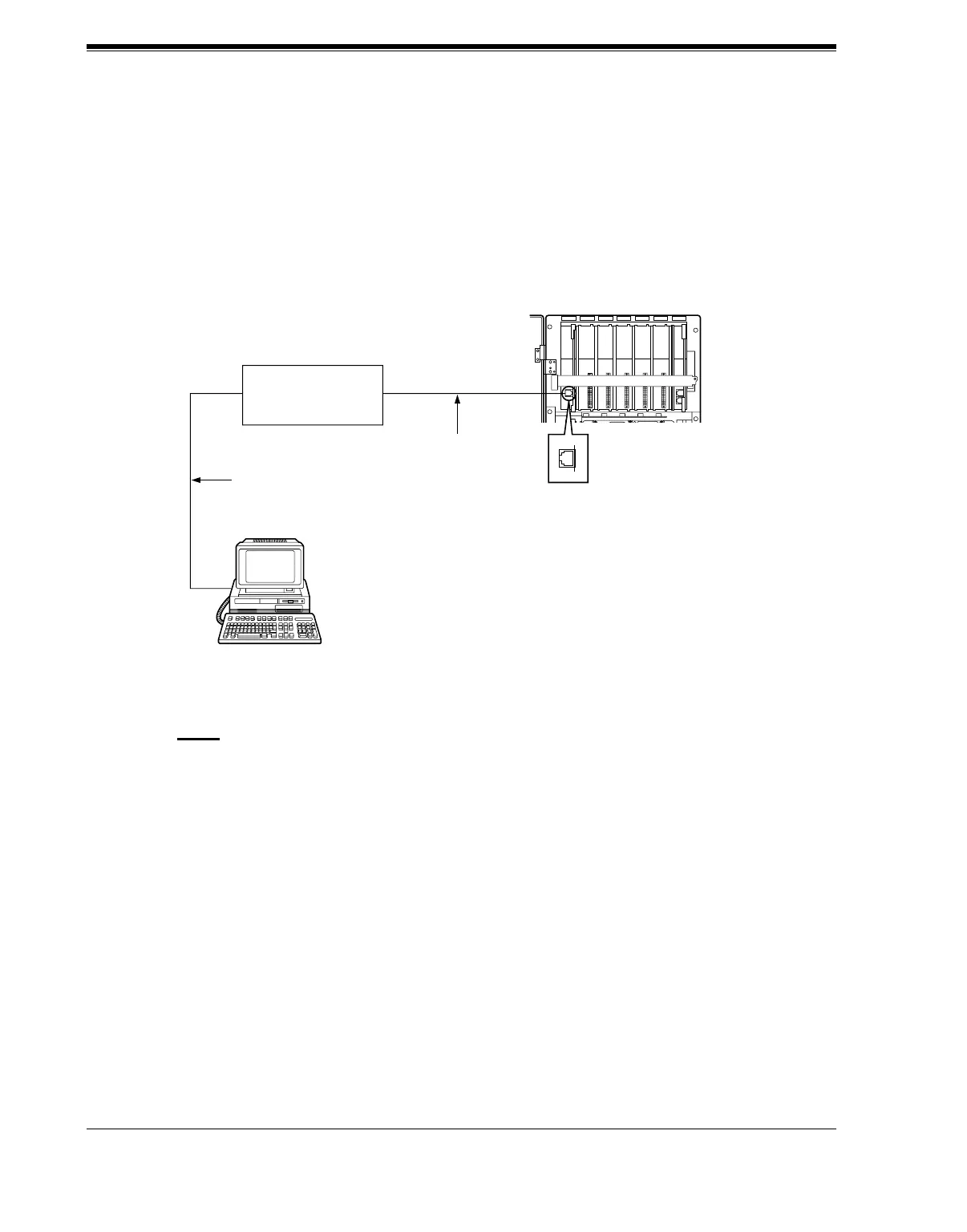
The Internal Modem Card allows programming and maintenance of the KX-TVS300 from a
remote location.
Insert the telephone line from the Central Office into the modular jack on the internal modem
card. Guide the telephone cord through either one of the two ferrite cores and under the cable
clip. Close the ferrite core and the cable clip.
Notes
• The internal modem can also be connected to the Central Office via your PBX. This
will save you a CO line. However, the actual data transfer rate of the internal modem
(maximum 33600 bps) will be subject to the throughput limitations of the PBX.
• If you start the VPS with the internal modem card properly installed, the following
message will appear on the screen: "Modem Card Initialization Completed".
If "Modem Card Initialization Failed" appears instead, retry after ensuring that the
modem card has been properly installed.
Telephone Line
Personal Computer
with Modem
Central Office
(Public Exchange)
Modular Jack of the
Internal Modem Card
KX-TVS300
Telephone Line
SLOT 6MODEM SLOT 5 SLOT 4 SLOT 3 SLOT 2 SLOT 1













 To Next Page