35
Terminal
No.
Name/Description
1) File No. (SELECT 0 to SELECT 2: All OFF)
Input when changing the le number of 0 to 2047.
Specify the le number in the binary system as D0 to D15 and turn on SET IN.
Indicate values in the binary system as ON/OFF of D0 to D15 with D0 being the lowest digit value.
Example: When selecting the le No. 618
Select “0000 0010 0110 1010”, which represents 618 in a 16-bit binary system, by specifying ON/OFF
of D0 to D15 as shown in the below table.
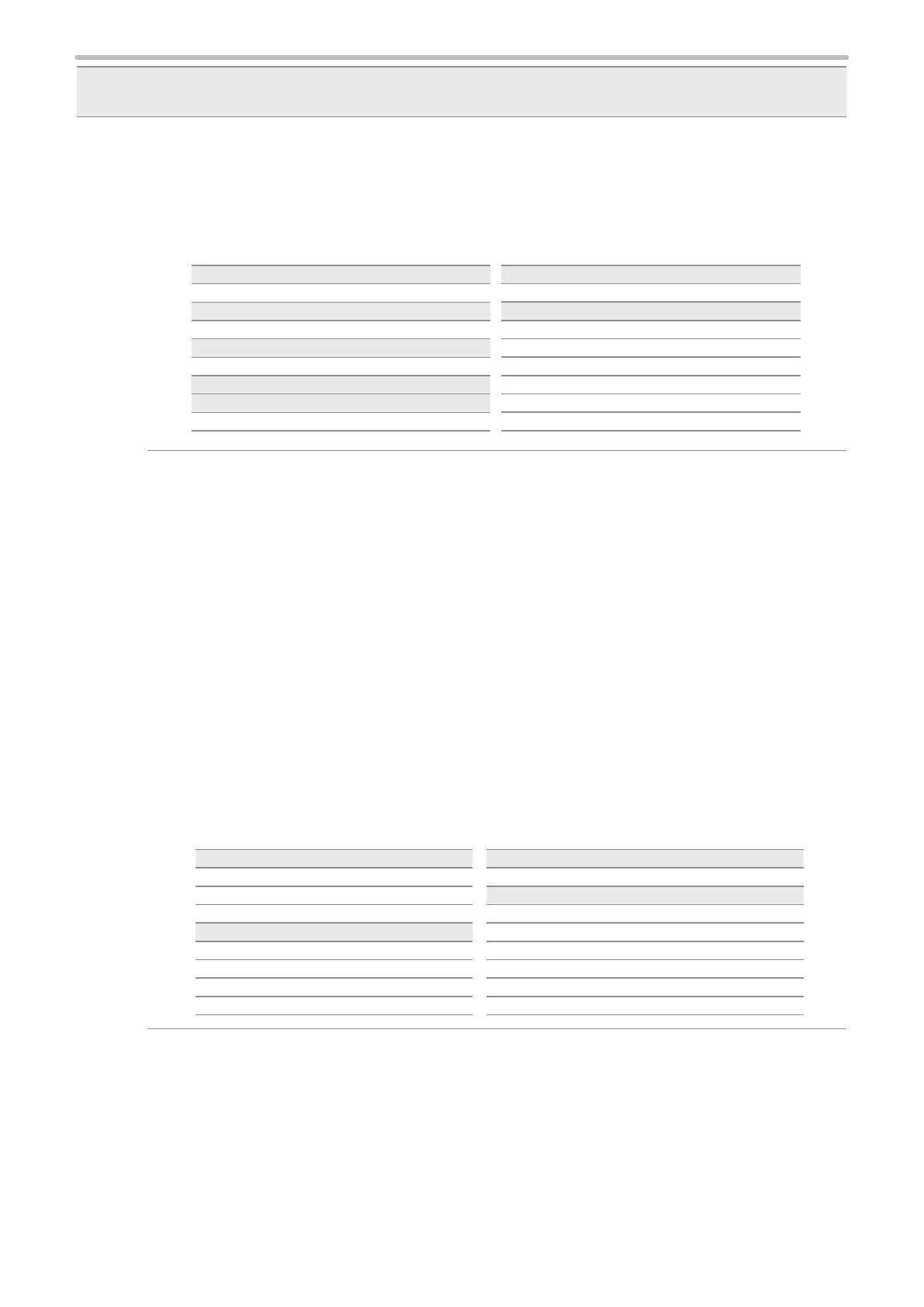
Terminal File No.(Binary) Input
D0 0 OFF
D1 1 ON
D2 0 OFF
D3 1 ON
D4 0 OFF
D5 1 ON
D6 1 ON
D7 0 OFF
Terminal File No.(Binary) Input
D8 0 OFF
D9 1 ON
D10 0 OFF
D11 0 OFF
D12 0 OFF
D13 0 OFF
D14 0 OFF
D15 0 OFF
2) Count-up value correction (SELECT 1: ON)
3) Count-down value correction (SELECT 0 and SELECT 1: ON)
Input this number when you change the next marking value of the counter function. The counter value
is specied by the step times of count-up or count-down. The step value indicates a value to increase or
decrease per one counting-up or counting-down.
Specify the count-up/count-down with SELECT 0 to 2 input.
Specify the target counter No. with D0 to D7 and specify the step times with D8 to D15. Then, turn on SET
IN.
• To select the counter No., specify D0 to D7. The counter No. 0 to 7 is assigned at D0 to D7
respectively.
In case two or more counter numbers are specied, step values of all the specied counter numbers
are changed.
• To specify the step times of the count-up/count-down, specify a value with D8 to D15 in the binary
system. Indicate values in the binary system as ON/OFF of D8 to D15 with D8 being the lowest digit
value.
Example: Count up or count down the counter No. 3 by two steps
• Turn ON D3 which represents the counter No. 3.
• Select “0000 0010”, which represents the step times 2 in a 8-bit binary system, by specifying ON/
OFF of D8 to D15 as shown in the below table.
D0 to D7: Counter No. 0 to 7 D8 to D15: Step times
Terminal Counter No. Input
D0 0 OFF
D1 1 OFF
D2 2 OFF
D3 3 ON
D4 4 OFF
D5 5 OFF
D6 6 OFF
D7 7 OFF
Terminal Step times (Binary) Input
D8 0 OFF
D9 1 ON
D10 0 OFF
D11 0 OFF
D12 0 OFF
D13 0 OFF
D14 0 OFF
D15 0 OFF



 To Next Page