52
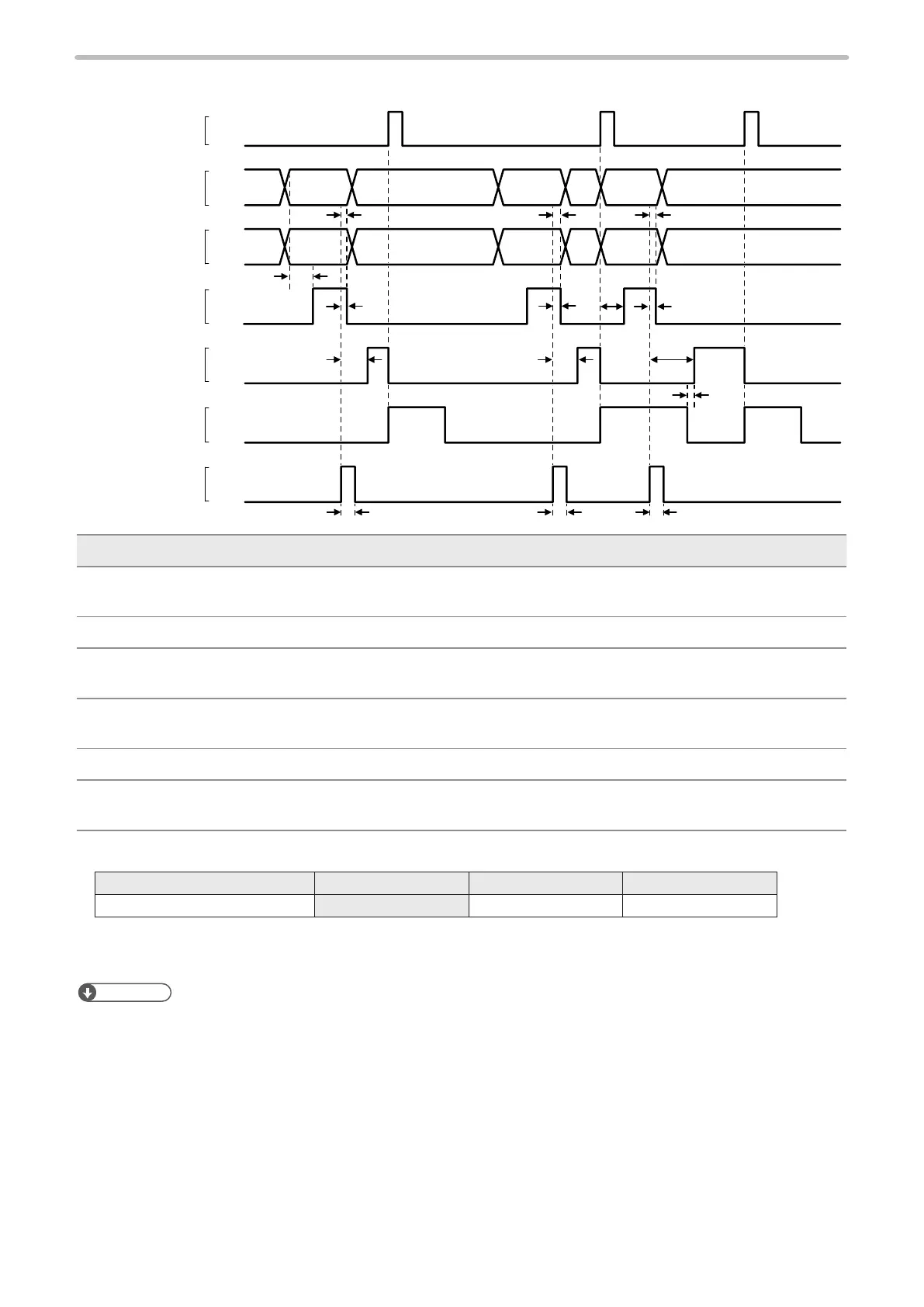
2-4-9 Rank/Offset marking
ON
OFF
ON
OFF
ON
OFF
ON
OFF
ON
OFF
ON
OFF
OFF
T1 T1
T6 T2
T4
T5
T2
T2
T2 T2 T2
T7
*1 *1 *1
SET IN
SET OK OUT
READY OUT
MARKING OUT
D0 to D15 IN *2
TRIG. IN
SELECT 0 to 2 IN
Data A
Data A
Data B
Data B
Data C
Data C
Item Time Remarks
T1 ― Period for creating marking data. It varies depending on the quantity of data to be
marked.
T2 0ms or more Keep the input until the SET OK is turned to ON.
T3 2 to 510ms One-shot output. Set the output time on the environment setting screen. There is a
margin for the setting value.
T4 ― When T5 < T1: T4 = T1 - T5
When T5 > T1: T4 is 1ms or less.
T6 0ms or more Turn ON the SET after MARKING is turned to ON.
T7 0.5ms or more After a lapse of 0.5ms or more from specifying SELECT 0 IN to SELECT 2 IN and D0 IN
to D15 IN, turn on SET IN.
*1 : Input SELECT 0 to 2 as the table below.
Number input target SELECT 0 (No. 20) SELECT 1 (No. 21) SELECT 2 (No. 22)
Data No. of rank/external offset ON OFF OFF
*2 : Specify the data number of rank/external offset function by using D0 to D15. Refer to “Operation of input signal on I/O
connector” (P.34).
Reference
• Input SET IN for the rank/offset data when the laser pumping is completed, and the internal shutter opens.
• When the rank/external offset function is used, READY will not be output until the data number and SET IN are input.
• Enter the data number input and SET IN every time for each marking trigger even there is no change to the marking
data.
• Close the shutter if you want to reset the data number already set.
• Do not input SET IN for the next data until MARKING output turns on by inputting the marking trigger after inputting SET
IN.
• READY will be output even when the marking data is not congured to the data number input.
• If the rank or external offset functions are used with the marking to the ying object, make sure that the marking interval
time is enough to the required period to input the marking data and to conrm the marking ready output.



 To Next Page