63
3-3 Connection Check
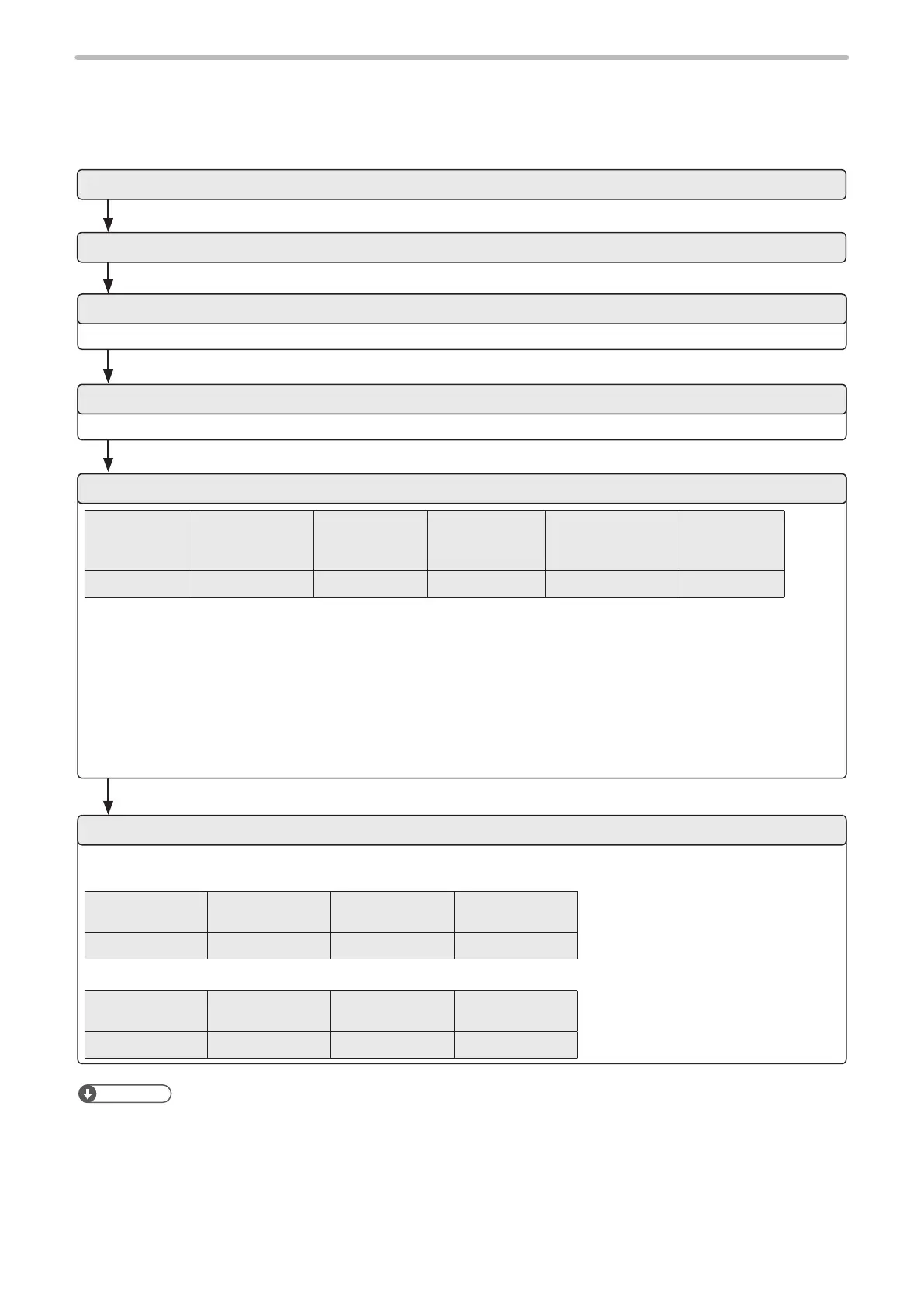
Verify if the communications between the laser marker and external control device have been established properly in the
following procedure:
Refer to “1-3-2 Communication condition setting” (P.21).
Refer to “1-3-3 Shift to remote mode” (P.23).
Start code
STX
Command
“FNO”
Sub command
“S”
Data:
File No.
“2047”
Check sum*1
Delimiter
CR
02 46 4E 4F 53 32 30 34 37 30 35 0D (HEX)
The transmission data above is just a sample. Check sum ON/OFF and delimiter content vary depending on the
communication environment settings.
*1 : For the command above, calculate the check sum value as follows:
Convert the data from the start code to those before the check sum into the hexadecimal values according to the
ASCII code table and add them all together. Check sum is the value calculated by converting the lower two digits of
the total value into two characters in the ASCII code.
• 02(HEX) + 46(HEX) + 4E(HEX) + 4F(HEX) + 53(HEX) + 32(HEX) + 30(HEX) + 34(HEX) + 37(HEX) = 205(HEX)
• 30 35 (HEX) is the value converted the lower two digits character (lower one-byte) 05 (HEX) into two characters
in the ASCII code
When the connection and communication condition settings are appropriate, the laser marker returns response data.
Example of response data for normal communication
Start code
ACK
“00” Check sum Delimiter
06 30 30 36 36 0D (HEX)
Example of response data for abnormal communication
Start code
NAK
“06” Check sum Delimiter
15 30 36 37 42 0D (HEX)
1. Turn ON the power of the external control device
2. Turn ON the key switch of laser marker.
3. Coordinate the communication conditions between laser marker and external control device
4. Set the laser marker to the remote mode
5. Change the le number of the laser marker (transmit the FNO command)
6. Check the response from the laser marker
Reference
• To use Ethernet, the delimiter is [CR] xed. To use RS-232C, select either [CR] or [CR] [LF].
• Check sum cannot be added with Ethernet communication.



 To Next Page