64
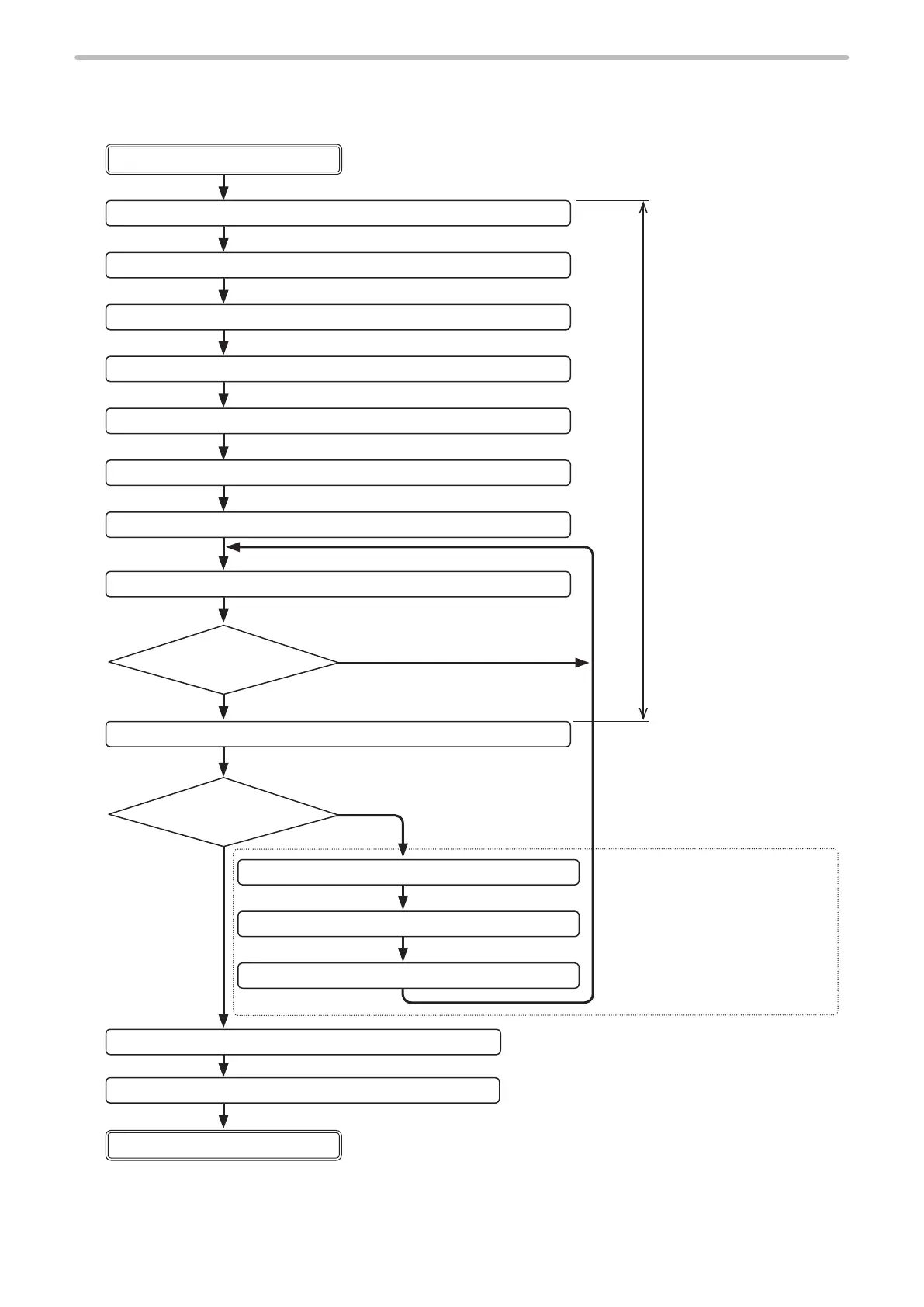
3-4 Control Sample
This paragraph gives the sample of ow chart for control of laser marker by serial communication.
Change setting contents
1. Laser pumping (ON) LSR command
Remote mode OFF
2. Marking character string setting
MCS command or STR command
3. General condition setting ALC command
4. Character condition setting STC command
5. Laser power setting LPW command
6. Scan speed setting SSP command
7. Shutter (open) setting SHT command
8. Status request STS command
10.
Command reception mode ON
MKM command
11. Various conditions setting Various command
12.
Command reception mode OFF
MKM command
13. Shutter setting (close) SHT command
14. Laser pumping (OFF) LSR command
When “10. Command reception
mode ON” is transmitted, the
commands unacceptable during
shutter open become settable
and various conditions can be set.
After setting various conditions,
set marking ready ON by “12.
Command reception mode OFF”.
The interval between “1 Laser
pumping ON” and “9 Marking
trigger” should be about 20
seconds or more with the LP-V
series, and about 15 seconds
or more with the LP-400 and
LP-W series.
Send STS command
again after a while.
“READY”: ON
Yes
To nish the marking
To change the settings
No.
Remote mode ON
9. Marking trigger MRK command



 To Next Page