44
2-3-2 Connecting sample with external devices
This paragraph exemplies a basic interface sample with external device such as a PLC.
• Make sure that the power is turned OFF at wiring.
Notice
• Short-circuiting IN COM. and OUT COM. in supplying power might cause the short out and also cause the failure of the
laser marker. Please make sure to check the power wiring before running the laser marker.
• IN COM. and OUT COM. on the I/O connector are connected with IN COM. and OUT COM. on the Input/Output terminal
respectively and internally. Therefore, inverting the power supply wiring might cause a short circuit, resulting in the
failure of the laser marker.
• Do not apply the voltage exceeding the maximum applied voltage, or devices may be broken.
• Do not apply the electric current for input (output) terminal exceeding the maximum output current, or devices may be
broken.
• When the terminal block is connected with the external power supply, do not use A1 [+12V OUT] and B1 [0V OUT] of I/O
terminal block. If a short bar is installed, remove it.
⿎
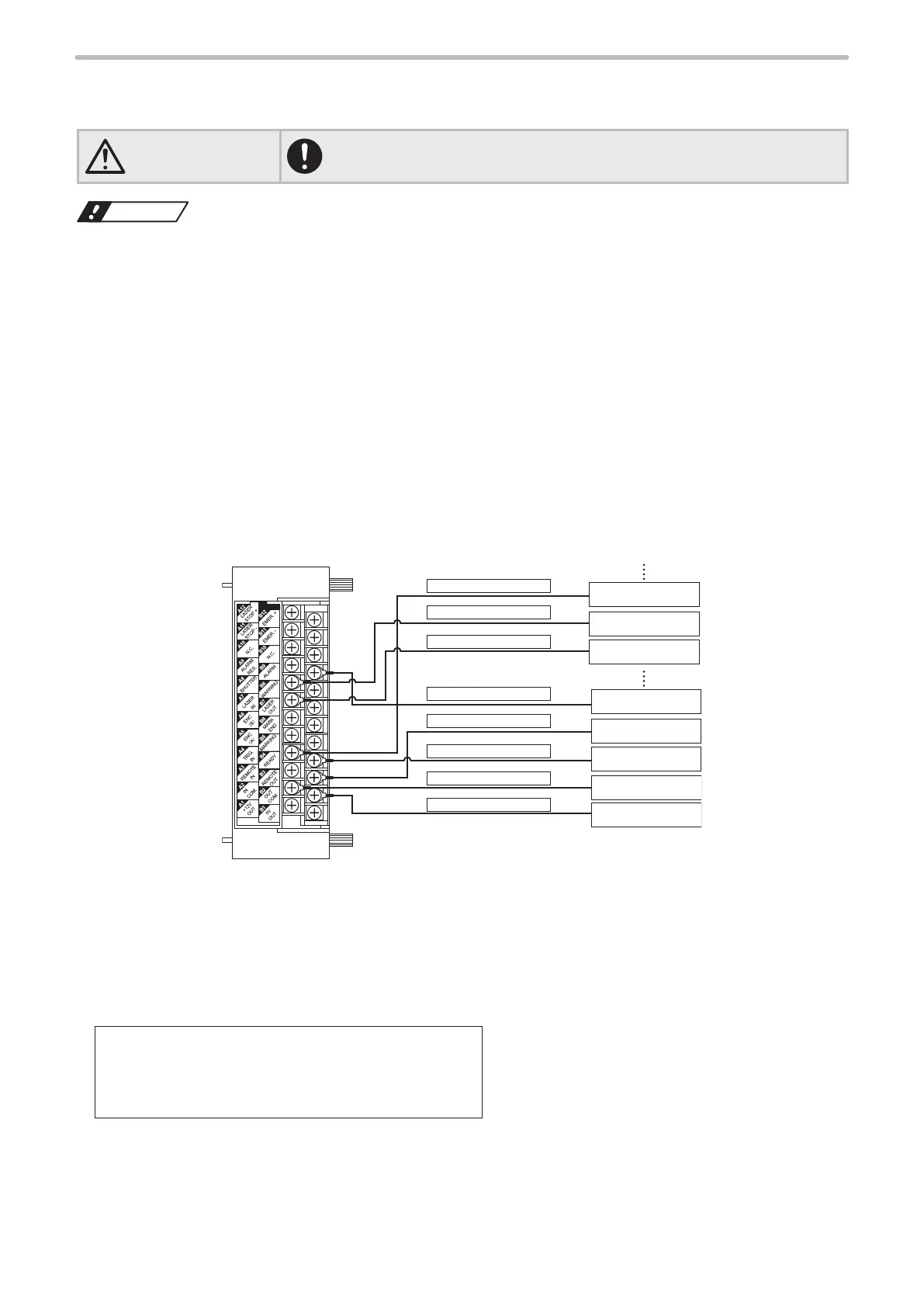
Connecting sample for NPN models (Controlled by external devices)
[LP-4xx(T)U / LP-4xx(T)U-A / LP-4xxS9(T)U / LP-4xxS9(T)U-A / LP-VxxU / LP-VxxU-A /
LP-W series]
A7
:
LASER IN
B2
:
OUT COM
A2
:
IN COM.
A4
:
TRIG.IN
B3
:
REMOTE OUT
B9
:
ALARM
A8
:
SHUTTER
B4
:
READY
0V
24V
Terminal Block
Output (Y2)
Input (X2)
Input (X1)
Input (X0)
Output (Y1)
Output (Y0)
• When laser marker is controlled by the external device such as PLC, connect A2 [IN COM.] to the external power (+),
and B2 [OUT COM.] to the external power (-) for NPN type laser marker.
• Connect B12 [EMER.+] to B11 [EMER.-] to release the emergency stop function. (Opening between B12 - B11 turns off
the laser pumping and marking is disabled.)
• Connect A12 [LASER STOP +] to A11 [LASER STOP -] to release laser stop function. (Opening between A12 - A11
closes the auto-shutter, and changes the status of the device into invalid for marking.)
• At the factory shipments, the following terminals are already short-circuited by short bars. When connecting to any
external devices, remove the short bar(s) from the terminals to be used, to connect the devices.
A1 [+12V OUT] ― A2 [IN COM.]
B1 [0V OUT] ― B2 [OUT COM.]
B12 [EMER. +] ― B11 [EMER. -]
A12 [LASER STOP +] ― A11 [LASER STOP -]
• “Output simulation” and “I/O check monitor” can simulate ON/OFF state on each connector. Please use these functions
in checking the wiring. Refer to the Operation/Maintenance Manual.



 To Next Page