45
⿎
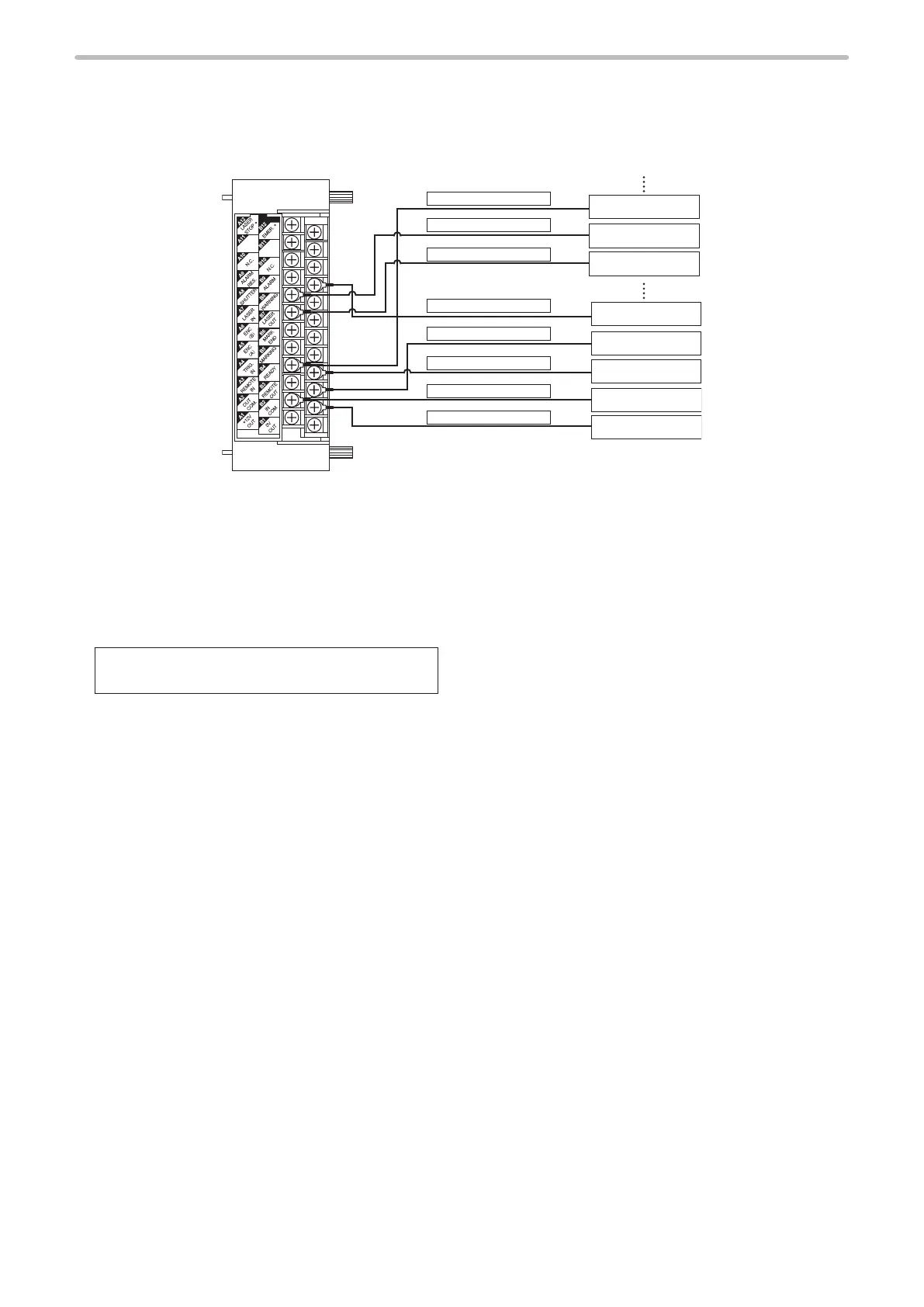
Connecting sample for PNP models (Controlled by external devices)
[LP-4xx(T)U-C / LP-4xxS9(T)U-C / LP-VxxU-C]
RESERVE
RESERVE
A7
:
LASER IN
B2
:
IN COM
A2
:
OUT COM.
A4
:
TRIG.IN
B3
:
REMOTE OUT
B9
:
ALARM
A8
:
SHUTTER
B4
:
READY
0V
24V
Terminal Block
Output (Y2)
Input (X2)
Input (X1)
Input (X0)
Output (Y1)
Output (Y0)
• When laser marker is controlled by the external device such as PLC, connect B2 [IN COM.] to the external power (-), and
A2 [OUT COM.] to the external power (+) for NPN type laser marker.
• Connect B12 [EMER.+] to A2 [OUT COM.] to release the emergency stop function. (Opening between B12 - A2 turns off
the laser pumping and marking is disabled. )
• Connect A12 [LASER STOP +] to A2 [OUT COM.] to release the laser stop function. (Opening between A12 - A2 closes
the auto-shutter, and changes the status of the device into invalid for marking.)
• At the factory shipments, the following terminals are already short-circuited by short bars. When connecting to any
external devices, remove the short bar(s) from the terminals to be used, to connect the devices.
A1 [+12V OUT] ― B2 [IN COM.]
B1 [0V OUT] ― A2 [OUT COM.]
• “Output simulation” and “I/O check monitor” can simulate ON/OFF state on each connector. Please use these functions
in checking the wiring. Refer to the Operation/Maintenance Manual.



 To Next Page