65
⿎
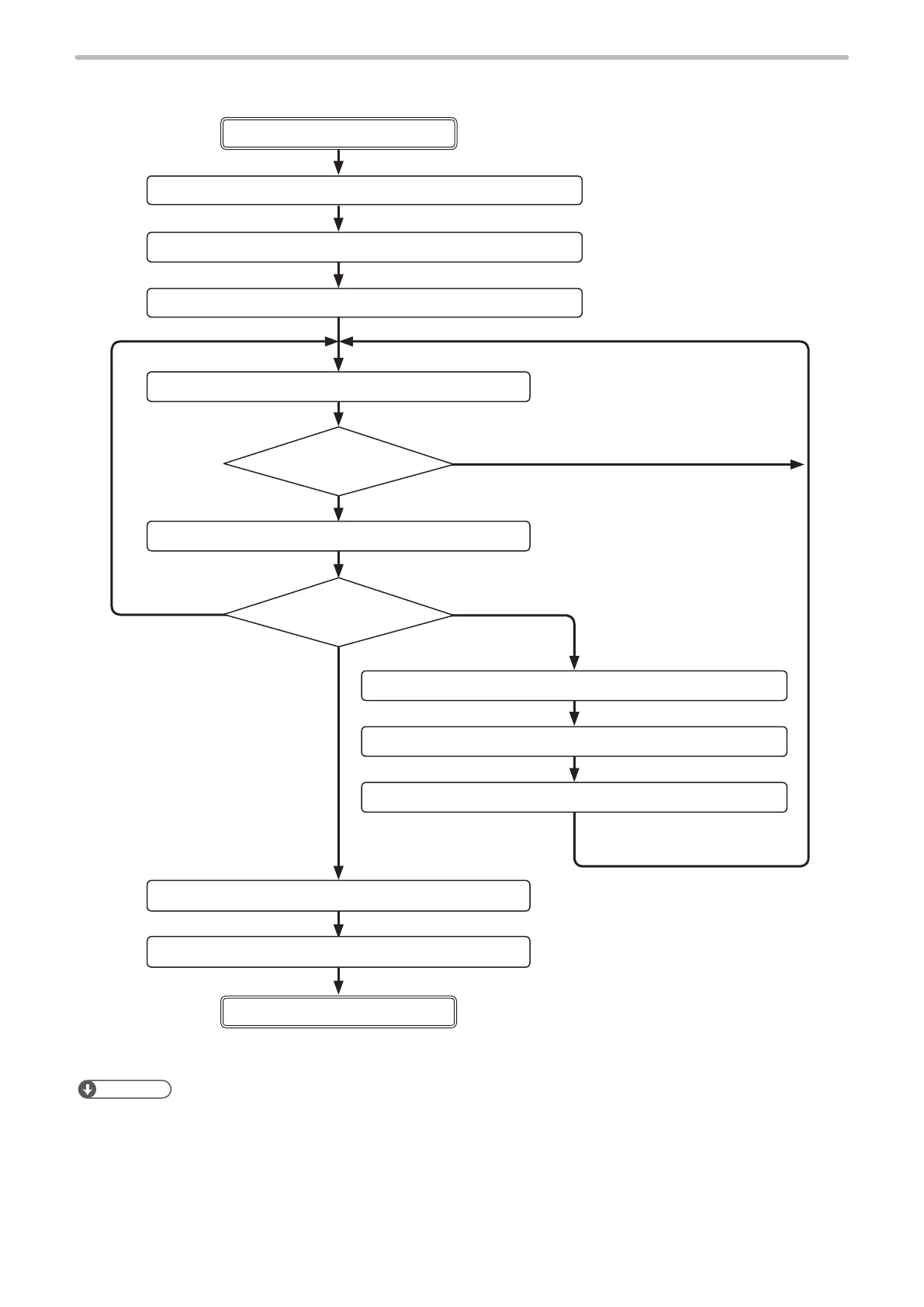
Control sample 1-1: Changing the marking characters
Change the character
to be marked
1. Laser pumping (ON) LSR command
Remote mode ON
Remote mode OFF
2. Marking character string setting MCS command or STR command
3. Shutter setting (open)
SHT command
4. Status request STS command
5. Marking trigger
MRK command
6. Command reception mode ON
MKM command
7. Marking character string setting MCS command or STR command
8. Command reception mode OFF
MKM command
9. Shutter setting (close) SHT command
10. Laser pumping (OFF) LSR command
Send STS command
again after a while.
* To memorize the last marked
character into the laser marker,
save it with “File Overwriting
Registration (FOR)”.
Send the character
to be marked.
“READY”: ON
Yes
To nish the
marking
Change the character.
Mark the same
character.
No.
Reference
• Other than STR and MCS command, SIN command can be used for changing character of marking command. SIN
command is recommended to use in case faster processing is required.



 To Next Page