95
⿎
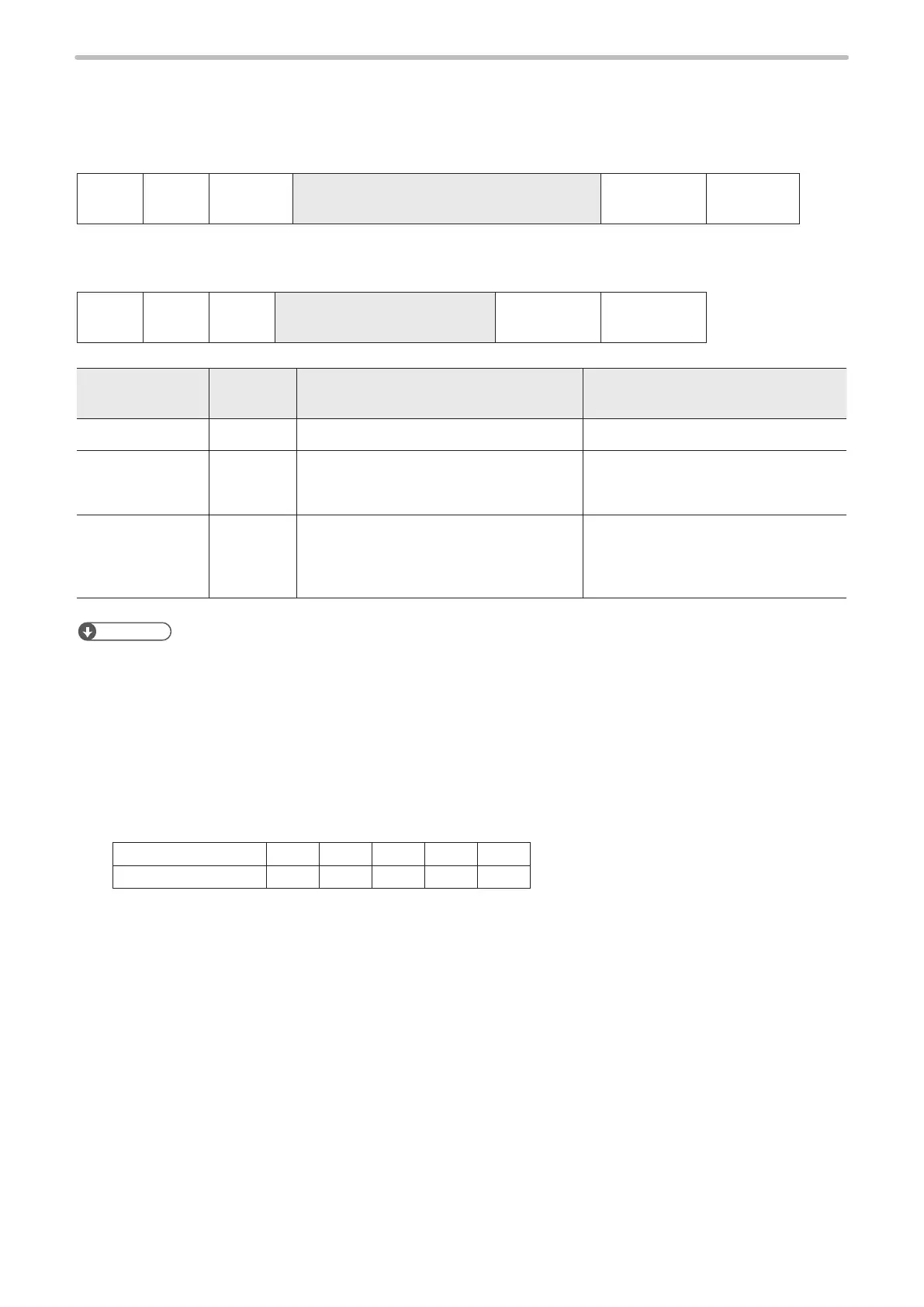
Bar code marking data (ASCII code specied) : BBS
Sets character string to be encoded as a bar code or 2D code by ASCII code. For alphanumeric, symbols and specied
control codes (EOT/FS/GS/RS/US).
• Setting / Readout data of bar code marking data
STX BBS
Sub
command
[Bar code No.] [Line No.] [Bar code data]
Max. 33-byte
(Check sum) Delimiter
Sub command is “S” at the time of setting and “A” for response data at the time of readout.
• Readout request of bar code marking data
STX BBS R
[Bar code No.] [Line No.]
Max. 3-byte
(Check sum) Delimiter
Name
Data length
[byte]
Description Remarks
Bar code No. 1 “0”–“7”
Line No. 1 or 2
1D code: “1”–“2”
2D code: “1”–“9”
2D part of Composite code: “01”–“09”
Species the line for data setting.
Bar code data Max. 30
ASCII code characters within the range
from 04 (HEX) and 1C (HEX) to 7E (HEX).
(Functional characters should not be
included.)
Species the character setting in the
specied line.
Specify the data length with 0-byte in
order to delete the character string.
Reference
• When setting bar code marking data in multiple lines, data in each line are jointed in the order of line numbers and they
are coded as the data in one line. (No line break is inserted for each line.)
• When setting bar code marking data in multiple lines, the total input data should be 255 characters or less.
• If readout data includes function characters (such as “%SFT:0”), the setting character (“%SFT:0”) is read out, but
characters to be actually marked are not.
• If readout data includes characters that cannot be expressed in ASCII code such as Katakana and Kanji (Shift-JIS Code
Specied), only these 2-byte characters are read out in shift-JIS code. In this case, the maximum readout data will be
33-byte or more.
• To input the control codes in the barcode/2D code strings, set the code data as follows:
• The following control codes EOT, FS, GS, RS, or US you can set by using ASCII code.
Control code EOT FS GS RS US
ASCII code (HEX) 04 1C 1D 1E 1F
• To include the control codes other than EOT, FS, GS, RS, or US in the strings, set the all control codes with BRS
command by using these 2-byte alternate codes instead of ASCII code.
• In the case that “GS1 Data Matrix” is selected as bar code type in bar code condition setting, the separator of
variable length AI data is inputted at GS (1D (HEX)) in this command. The separator is coded as “GS”.
• For codes other than GS1 Data Matrix, the separator of variable length AI data “FNC1” cannot be set by this
command. Use BCS command or BRS command to set “FNC1”.



 To Next Page