Recording Mode: a
Taking Pictures with Your Favorite Settings
(Normal Picture Mode)
This mode allows you to take pictures freely
as
more options are available than Auto
Scene Mode [
B
].
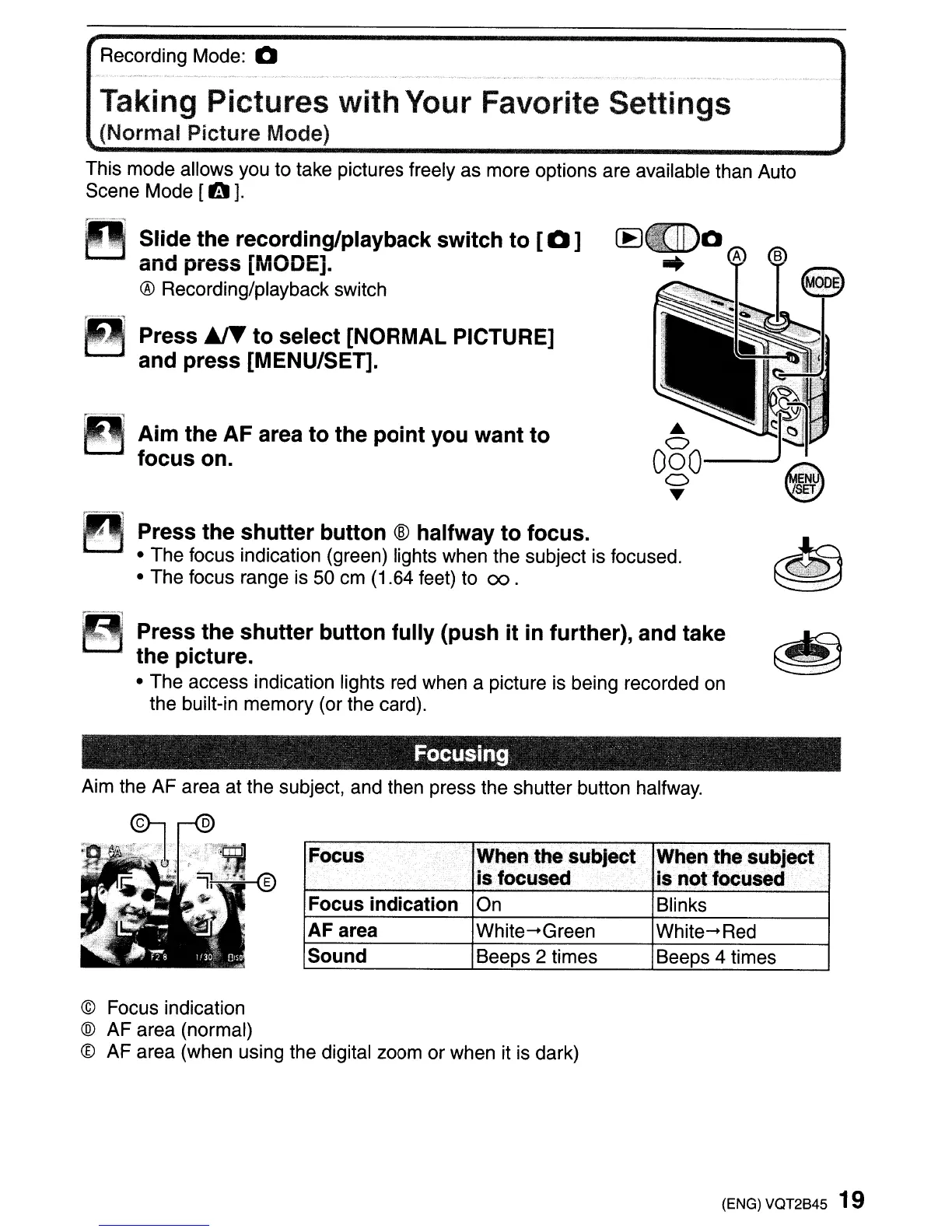
Slide the recording/playback switch to
[a]
and press [MODE].
® Recording/playback switch
~
~-'-'=j
!
~
."-;:~<-
:.,:
Press
~
to select [NORMAL PICTURE]
and press [MENU/SET].
Aim the
AF
area to the point you want to
focus on.
~
Press the shutter button ® halfway to focus.
• The focus indication (green) lights when the subject is focused.
• The focus range is 50 cm (1.64 feet)
to
00.
~
Press the shutter button fUlly (push it in further), and take
the picture.
• The access indication lights red when a picture is being recorded on
the
built-in
memory
(or the card).
Focusing
Aim the AF area at the subject, and then press the shutter button halfway.
~
"""'~W'
'~:.fJ:t,.
,'b.ll
..
·.·.)i;
-
'~,~
'*,,:><
-
--
~
Focus
When
the subject When the subject
is
focused .
is not focused
Focus indication On
Blinks
AF area
White-Green
White-Red
Sound
Beeps 2 times
Beeps 4 times
© Focus indication
®
AF
area (normal)
® AF area (when using the digital zoom
or
when it is dark)
(ENG) VQT2845 19



 To Next Page
 Loading...