Playback Mode:
[E
*
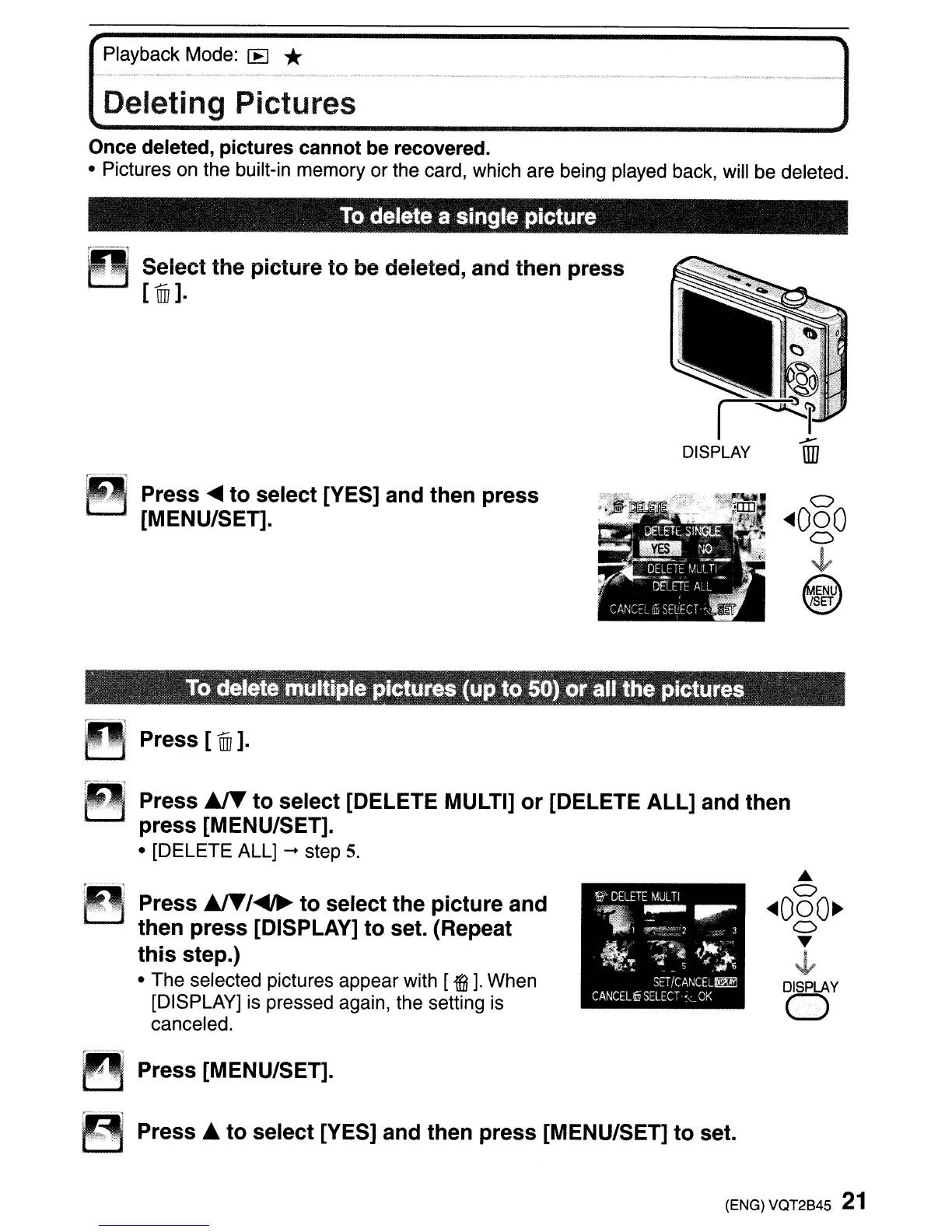
Deleting Pictures
Once deleted, pictures cannot be recovered.
• Pictures on the built-in memory or the card, which are being played back, will be deleted.
To
delete a single picture
~~
Seiect the picture
to
be deleted, and then press
[
ffij
].
Press
....
to
select [YES] and then press
[MENU/SET].
o
~OoO
o
~
~
\@)
.
To
delete multiple pictures (up
to
50)
or
all the pictures
~
..
~
Press [1ill].
Press
AI"
to
select [DELETE MULTI]
or
[DELETE ALL] and then
press [MENU/SET].
• [DELETE ALL]
-+
step
5.
~
Press
AI"/~
to
select the picture and
. then press [DISPLAY]
to
set. (Repeat
this
step.)
• The selected pictures appear with [
i].
When
[DISPLAY] is pressed again, the setting
is
canceled.
S'·
DELETE
MJL
Ti
~
....
~.
1
~!:;":~L
2 3
It!
:;:~~
~~
SETICA~CEL~
CANCEL~
SELECT·
<
OK
•
o
~OoO~
o
~
~
DISPLAY
o
Press [MENU/SET].
Press.
to
select [YES] and then press [MENU/SET]
to
set.
(ENG) VQT2B45
21



 To Next Page
 Loading...