7. Recording Motion Pictures
168
1
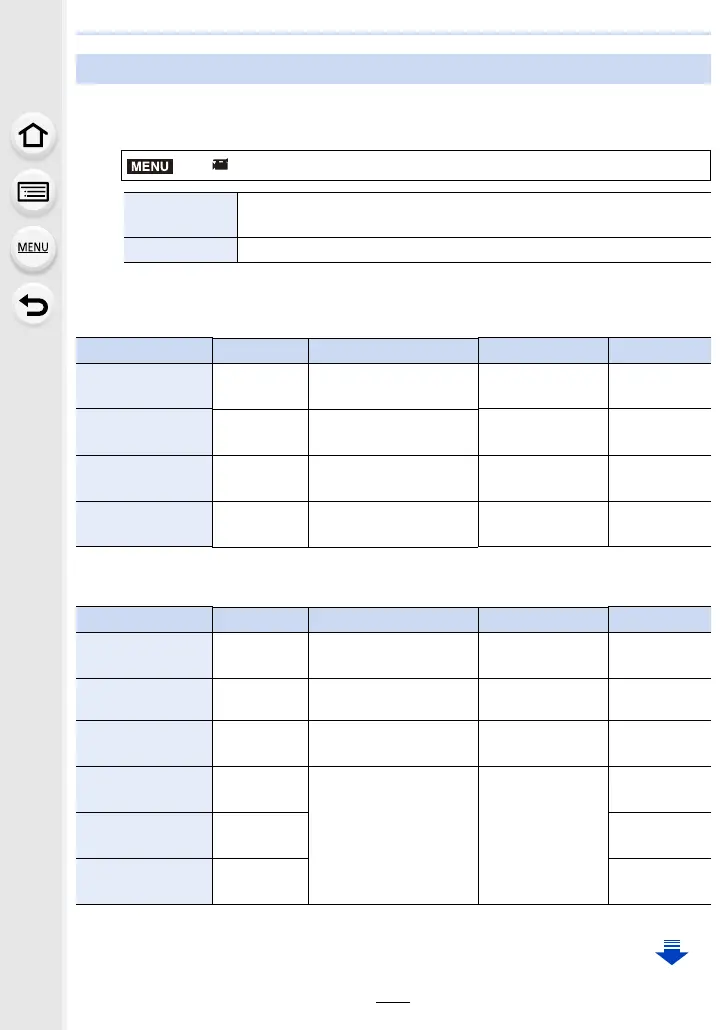
Select the menu. (P54)
2
Press 3/4 to select [Rec Quality] and then press [MENU/SET].
When [AVCHD] is selected
¢1 AVCHD Progressive
When [MP4] is selected
¢2 4K motion picture
Setting the format, size and recording frame rate
> [Motion Picture] > [Rec Format]
[AVCHD]
This data format is suitable for when playing back on a high-definition
TV, etc.
[MP4] This data format is suitable for when playing back on a PC, etc.
Item Size Recording frame rate Sensor output Bit rate
[FHD/28M/60p]
¢1
1920k1080
60p 60 frames/second
28 Mbps
[FHD/17M/60i]
1920k1080
60i 60 frames/second
17 Mbps
[FHD/24M/30p]
1920k1080
60i 30 frames/second
24 Mbps
[FHD/24M/24p]
1920k1080 24p 24 frames/second 24 Mbps
Item Size Recording frame rate Sensor output Bit rate
[4K/100M/30p]
¢2
3840k2160
30p 30 frames/second
100 Mbps
[4K/100M/24p]
¢2
3840k2160 24p 24 frames/second
100 Mbps
[FHD/28M/60p]
1920k1080
60p 60 frames/second
28 Mbps
[FHD/20M/30p]
1920k1080
30p 30 frames/second
20 Mbps
[HD/10M/30p]
1280k720 10 Mbps
[VGA/4M/30p]
640k480 4 Mbps
MENU


 To Next Page
 Loading...