EasyManua.ls Logo

Panasonic NV-HD100EA - Insert Editing

Panasonic NV-HD100EA
35 pages
Print Icon
To Next Page IconTo Next Page
To Previous Page IconTo Previous Page
Loading...
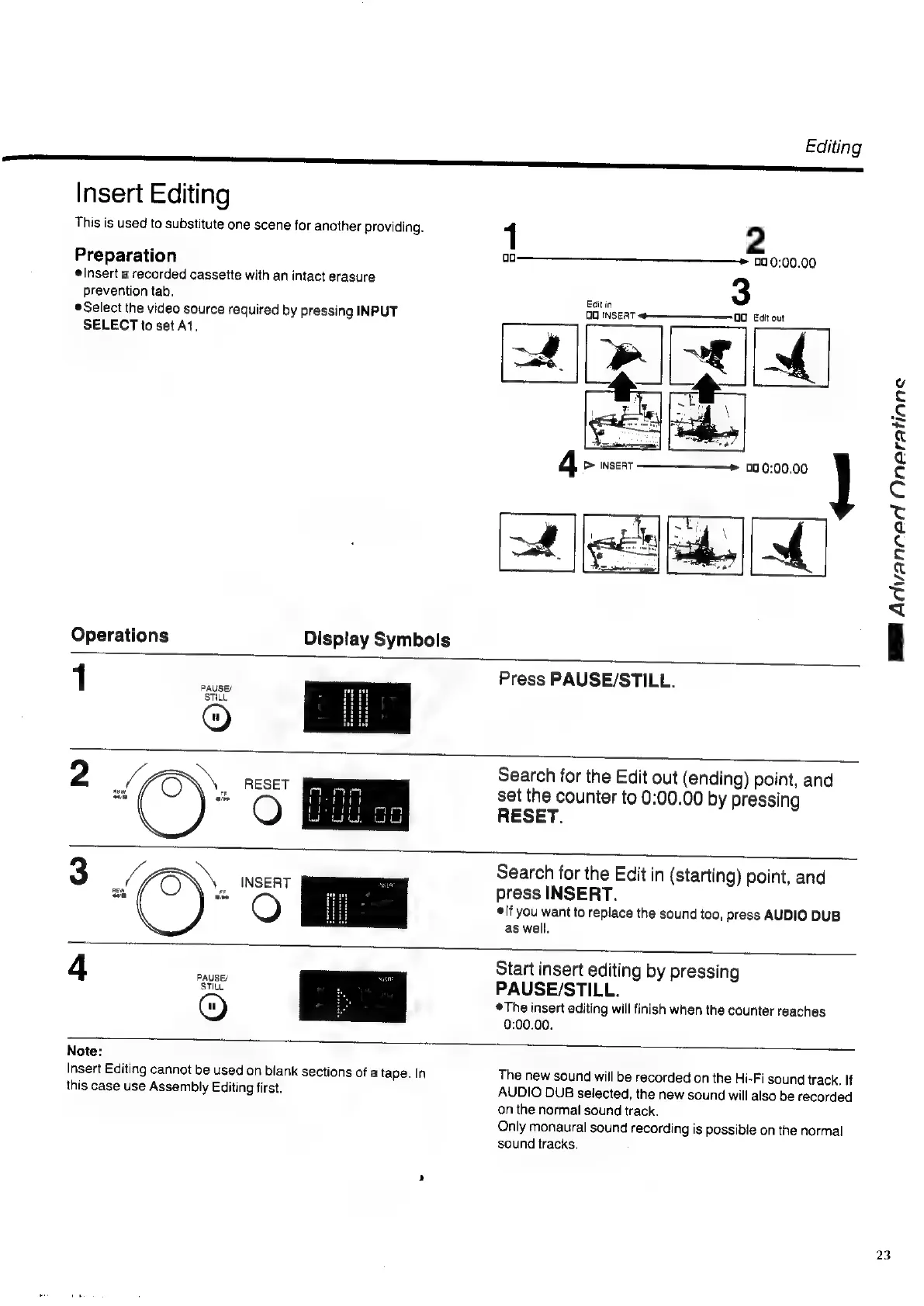
Insert
Editing
This
is
used
to
substitute
one
scene
for
another
providing.
Preparation
Insert
a
recorded
cassette
with
an
intact
erasure
prevention
tab.
Select
the
video
source
required
by
pressing
INPUT
SELECT
to
set
At.
Operations
1
Display
Symbols
Editing
1
2
00
0:00.00
Edit
in
3
OO
INSERT
4———_———___
99
Egit
out
4
>
INSERT
00
0:00.00
rl
Press
PAUSE/STILL.
2
Search
for
the
Edit
out
(ending)
point,
and
set
the
counter
to
0:00.00
by
pressing
RESET.
INSERT
Search
for
the
Edit
in
(starting)
point,
and
press
INSERT.
©
lf
you
want
to
replace
the
sound
too,
press
AUDIO
DUB
as
well.
4
PAUSE/
Start
insert
editing
by
pressing
PAUSE/STILL.
The
insert
editing
will
finish
when
the
counter
reaches
0:00.00.
Cn)
Lop
|
Note:
Insert
Editing
cannot
be
used
on
biank
sections
of
a
tape.
In
this
case
use
Assembly
Editing
first.
The
new
sound
will
be
recorded
on
the
Hi-Fi
sound
track,
If
AUDIO
DUB
selected,
the
new
sound
will
also
be
recorded
on
the
normal
sound
track.
Only
monaural
sound
recording
is
possible
on
the
normal
sound
tracks.
MB
Advanced
Oneratinne
23

Related product manuals